ArchiMate 3.2 Primer & Modelling Guide — Enterprise Architecture with Linked.Archi¶
ArchiMate models often end up as static diagrams you cannot query, validate against governance rules, or trace for cross-layer impact without manual effort. Linked.Archi treats ArchiMate 3.2 as a queryable knowledge graph, so "what breaks if we retire this node?" or "which capability has no realizing element?" become mechanical questions with concrete answers.
This guide walks through ArchiMate 3.2 as formalized in Linked.Archi: read the language, author a model, validate it, derive new facts from it, present it to different audiences, tailor it to your organization, and link it to other notations.
It is both breadth-complete and self-contained: every capability is demonstrated here with enough depth to be actionable, using a single worked example (NordFreight Logistics) and a single mental map (the metamodel manifest).
Orientation¶
What ArchiMate 3.2 is¶
ArchiMate is an open enterprise architecture modelling language published by The Open Group. Version 3.2 organizes the language along two orthogonal dimensions — aspect (what kind of thing it is) and layer (where it belongs):
- Seven layers. Strategy, Business, Application, Technology, Physical, and Implementation & Migration — plus the cross-cutting Motivation aspect.
- Per-layer behaviour. Each layer has its own element types:
BusinessProcess,ApplicationProcess,TechnologyProcess; likewise for Function, Service, Event, Interaction. - Physical layer. Equipment, Facility, Distribution Network, and Material model the physical estate.
- Implementation & Migration elements. Work Package, Deliverable, Implementation Event, Plateau, and Gap track architecture change.
- Junctions.
Junction_AndandJunction_Orconnectors combine relationships into logical groups.
Official specification: https://pubs.opengroup.org/architecture/archimate3-doc/
What Linked.Archi adds¶
In Linked.Archi, ArchiMate 3.2 is not a diagramming convention — it is a formally defined modelling language whose definition is a queryable knowledge graph. The language is published as a set of W3C-standard semantic assets, tied together by a single manifest. Each W3C standard plays one role, with no overlap:
- OWL defines what the concepts mean — the element and relationship vocabulary and its hierarchy.
- SHACL defines what a conforming model must satisfy — closed-world validation rules.
- SKOS defines how concepts are classified and navigated — the taxonomies behind palettes, filters, and views.
- SPARQL is how you query and traverse the model.
This is what turns "boxes and arrows" into something a machine can validate, reason over, and generate documents from.
Namespace: https://meta.linked.archi/archimate3/onto# (prefix: am)
Current version: 3.2
Status: Draft
Licence: CC BY 4.0
The manifest is your map¶
A Linked.Archi metamodel (arch:Metamodel) is a manifest — a single resource that aggregates all the assets making up the language. The ArchiMate 3.2 manifest lives at https://meta.linked.archi/archimate3/metamodel#ArchiMate3.2 and ties together the resources below. Keep this picture in mind; every section of this guide "lights up" one node of it.
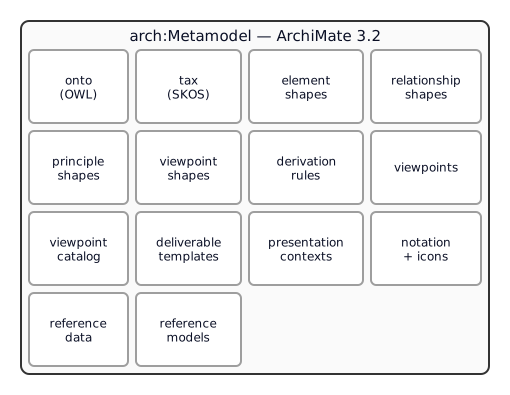 The manifest aggregates all semantic assets making up the language definition.
Browse the live manifest ▶
The manifest aggregates all semantic assets making up the language definition.
Browse the live manifest ▶
am3mm:ArchiMate3.2
    a                              arch:Metamodel ;
    arch:modelConcepts             <https://meta.linked.archi/archimate3/onto#> ;
    arch:formalRules               amsh:, amelsh:, ampsh: ;
    arch:derivationRules           amderiv: ;
    arch:architectureViewpoints    amvp: ;
    arch:conceptClassification     <https://meta.linked.archi/archimate3/tax#> ;
    arch:hasDeliverableTemplate    am3mm:ArchitectureDefinitionDocument ;
    arch:referenceData             am3mm:ArchiMateReferenceData ;
    arch:referenceModels           am3mm:ArchiMateReferenceModels ;
    arch:presentationContextScheme am3mm:ArchiMatePresentationContexts .
You can browse the live manifest at https://meta.linked.archi/archimate3/metamodel/.
File structure¶
The ArchiMate module is versioned by directory. The current version is 3.2.
| File | Purpose |
|---|---|
archimate3.2-onto.ttl |
Element classes, abstract hierarchy, and 11 relationship types (three-declaration pattern) |
archimate3.2-tax.ttl |
SKOS taxonomy classifying elements by layer and aspect |
archimate3.2-metamodel.ttl |
Metamodel manifest aggregating all constituent resources |
archimate3.2-relationship-shapes.ttl |
Generated SHACL shapes for valid source/target pairs (from relationship matrix) |
archimate3.2-relationship-tables.ttl |
The same tables as lookups: which relationships may go from which type to which, and which a modeller may draw directly; the potential derivation rules read them |
archimate3.2-element-shapes.ttl |
SHACL shapes for structural integrity, layer direction, cross-layer constraints |
archimate3.2-principle-shapes.ttl |
SHACL shapes for architecture governance principles |
archimate3.2-derivation-rules.ttl |
DR1–DR8 (valid) + PDR1–PDR12 (potential) derivation rules as SHACL Rules |
archimate3.2-viewpoints.ttl |
ArchiMate example viewpoints with allowed concepts and stakeholder targeting |
archimate3.2-viewpoint-shapes.ttl |
SHACL shapes validating viewpoint conformance |
archimate3.2-reference-data.ttl |
Reference data (access types, influence strengths, etc.) |
archimate3.2-reference-models.ttl |
Reference model definitions |
archimate3.2-presentation-contexts.ttl |
Presentation context schemes for stakeholder-specific views |
archimate3.2-deliverable-templates.ttl |
Deliverable template definitions |
Prerequisites¶
To author and validate a model, load the assets in this order (foundation first):
core/core-onto.ttl                                       # shared foundation (arch:*)
modelingLanguages/archimate/3.2/archimate3.2-onto.ttl    # elements + relationships
modelingLanguages/archimate/3.2/archimate3.2-tax.ttl     # SKOS taxonomy
modelingLanguages/archimate/3.2/archimate3.2-element-shapes.ttl
modelingLanguages/archimate/3.2/archimate3.2-relationship-shapes.ttl
modelingLanguages/archimate/3.2/archimate3.2-viewpoints.ttl
modelingLanguages/archimate/3.2/archimate3.2-metamodel.ttl  # the manifest (entry point)
Throughout, these prefixes are assumed:
@prefix owl:     <http://www.w3.org/2002/07/owl#> .
@prefix rdf:     <http://www.w3.org/1999/02/22-rdf-syntax-ns#> .
@prefix rdfs:    <http://www.w3.org/2000/01/rdf-schema#> .
@prefix xsd:     <http://www.w3.org/2001/XMLSchema#> .
@prefix skos:    <http://www.w3.org/2004/02/skos/core#> .
@prefix sh:      <http://www.w3.org/ns/shacl#> .
@prefix prov:    <http://www.w3.org/ns/prov#> .
@prefix dcterms: <http://purl.org/dc/terms/> .
@prefix arch:    <https://meta.linked.archi/core#> .
@prefix am:      <https://meta.linked.archi/archimate3/onto#> .
@prefix amtax:   <https://meta.linked.archi/archimate3/tax#> .
@prefix amvp:    <https://meta.linked.archi/archimate3/viewpoints#> .
@prefix amrd:    <https://meta.linked.archi/archimate3/reference-data#> .
Part 1 — The Language¶
ArchiMate 3.2 classifies every element along two orthogonal dimensions: by aspect (what kind of thing it is) and by layer (where it belongs). In Linked.Archi both dimensions are real, queryable structures — they are the tax SKOS concept scheme.
By aspect — what kind of thing¶
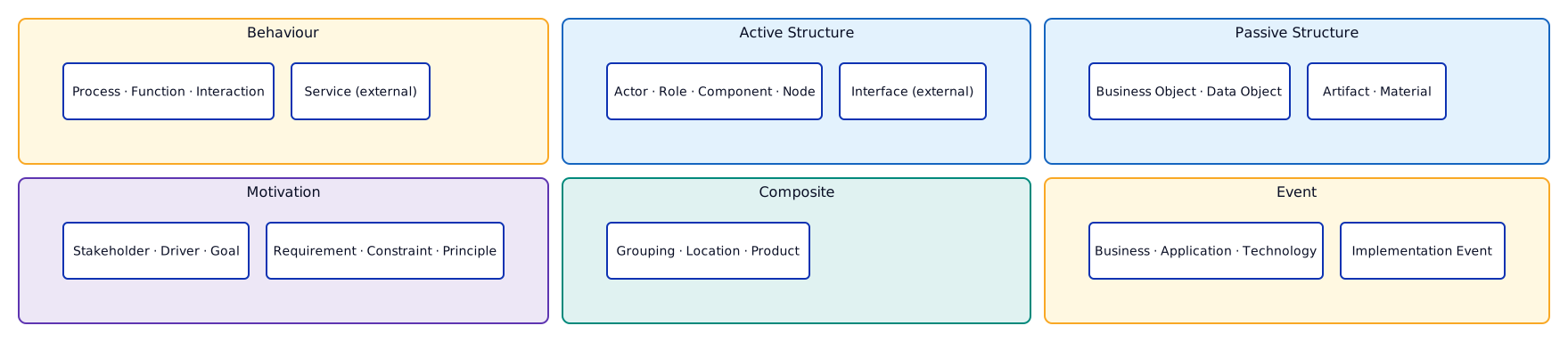 The six aspect dimensions of ArchiMate 3.2.
| Aspect | What it represents | Examples |
|---|---|---|
| Behaviour | Dynamic aspects — what happens | Process, Function, Interaction, Service (per layer) |
| Active Structure | Entities that perform behaviour | Actor, Role, Component, Node, Device |
| Passive Structure | Objects acted upon | Business Object, Data Object, Artifact, Material |
| Motivation | Why things happen | Stakeholder, Driver, Goal, Requirement, Constraint, Principle |
| Composite | Combinations of aspects | Grouping, Location, Product |
| Event | Things that happen at a moment | Business Event, Application Event, Technology Event |
By layer — where it belongs¶
| Layer | Scope | Key elements |
|---|---|---|
| Strategy | Strategic planning | Resource, Capability, Value Stream, Course of Action |
| Business | Business-specific | Business Actor, Role, Process, Function, Service, Event, Object, Contract, Representation, Product |
| Application | Software systems | Application Component, Function, Service, Interaction, Event, Data Object |
| Technology | Infrastructure | Node, Device, System Software, Communication Network, Path, Function, Process, Service, Artifact |
| Physical | Physical estate | Equipment, Facility, Distribution Network, Material |
| Motivation | Why architecture exists | Stakeholder, Driver, Assessment, Goal, Outcome, Principle, Requirement, Constraint, Meaning, Value |
| Implementation & Migration | Change management | Work Package, Deliverable, Implementation Event, Plateau, Gap |
The bridge — these dimensions are an asset. Both dimensions are published as one SKOS concept scheme (tax). Each element is classified twice — once under a layer, once under an aspect — so a single SPARQL query can ask "every Behaviour element" or "every Technology-layer element" without enumerating types by hand:
amtax:ArchiMate3ConceptScheme a skos:ConceptScheme ;
    skos:prefLabel "ArchiMate 3.2 Concept Scheme"@en ;
    skos:hasTopConcept amtax:StrategyLayer , amtax:BusinessLayer , amtax:ApplicationLayer ,
                       amtax:TechnologyLayer , amtax:PhysicalLayer ,
                       amtax:ImplementationMigrationLayer ,
                       amtax:BehaviorElement , amtax:ActiveStructureElement ,
                       amtax:PassiveStructureElement , amtax:MotivationElement ,
                       amtax:CompositeElement .

# "BusinessProcess" is classified on BOTH axes:
amtax:BusinessProcess a skos:Concept ;
    skos:prefLabel "Business Process"@en ;
    skos:broader amtax:BusinessLayer , amtax:InternalBehaviorElement ;
    rdfs:seeAlso am:BusinessProcess .       # links the SKOS concept to the OWL class (no punning)
Note the rdfs:seeAlso bridge: the SKOS concept and the OWL class are kept as separate resources (Linked.Archi never puns an IRI as both). The class carries logical semantics for reasoners and shapes; the concept carries navigation for palettes and filters.
Element coverage (~62 types)¶
| Category | Count | Examples |
|---|---|---|
| Motivation | 10 | Stakeholder, Driver, Assessment, Goal, Outcome, Principle, Requirement, Constraint, Meaning, Value |
| Strategy | 4 | Resource, Capability, ValueStream, CourseOfAction |
| Business | 13 | BusinessActor, BusinessRole, BusinessProcess, BusinessService, Product, ... |
| Application | 9 | ApplicationComponent, ApplicationFunction, ApplicationService, DataObject, ... |
| Technology | 13 | Node, Device, SystemSoftware, TechnologyService, Artifact, ... |
| Physical | 4 | Equipment, Facility, DistributionNetwork, Material |
| Implementation & Migration | 5 | WorkPackage, Deliverable, ImplementationEvent, Plateau, Gap |
| Composite | 2 | Grouping, Location |
| Connectors | 2 | Junction_And, Junction_Or |
Elements by layer — OWL declarations¶
Each concrete element has dual parentage: abstract classes from the aspect and layer classification, plus arch:Element from the core ontology. Below, one representative OWL declaration per layer shows the pattern.
Motivation¶
| Element | Notation |
|---|---|
| Stakeholder |  |
| Driver |  |
| Assessment | 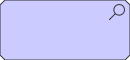 |
| Goal | 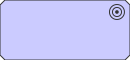 |
| Outcome |  |
| Principle |  |
| Requirement |  |
| Constraint |  |
| Meaning |  |
| Value |  |
am:Requirement a owl:Class ;
    rdfs:subClassOf am:MotivationElement , arch:Element ;
    skos:prefLabel "Requirement"@en ;
    skos:definition "A statement of need that must be realized by a system."@en ;
    dcterms:source <https://pubs.opengroup.org/architecture/archimate3-doc/chap06.html> ;
    arch:prefVisNotation "https://meta.linked.archi/archimate3/icons/requirement.svg" .
Strategy¶
| Element | Notation | Aspect |
|---|---|---|
| Resource |  |
Passive Structure |
| Capability |  |
Behaviour |
| Value Stream |  |
Behaviour |
| Course of Action |  |
Behaviour |
am:Capability a owl:Class ;
    rdfs:subClassOf am:StrategyLayerElement , am:InternalBehaviorElement , arch:Element ;
    skos:prefLabel "Capability"@en ;
    dcterms:source <https://pubs.opengroup.org/architecture/archimate3-doc/chap07.html> ;
    arch:prefVisNotation "https://meta.linked.archi/archimate3/icons/capability.svg" .
Business¶
| Element | Notation | Aspect |
|---|---|---|
| Business Actor |  |
Active Structure |
| Business Role |  |
Active Structure |
| Business Process |  |
Behaviour |
| Business Function |  |
Behaviour |
| Business Service |  |
Behaviour |
| Business Object |  |
Passive Structure |
| Product |  |
Composite |
am:BusinessProcess a owl:Class ;
    rdfs:subClassOf am:BusinessLayerElement , am:InternalBehaviorElement , arch:Element ;
    skos:prefLabel "BusinessProcess"@en ;
    dcterms:source <https://pubs.opengroup.org/architecture/archimate3-doc/chap08.html> ;
    arch:prefVisNotation "https://meta.linked.archi/archimate3/icons/business-process.svg" .
Application¶
| Element | Notation | Aspect |
|---|---|---|
| Application Component |  |
Active Structure |
| Application Function |  |
Behaviour |
| Application Service |  |
Behaviour |
| Data Object |  |
Passive Structure |
am:ApplicationComponent a owl:Class ;
    rdfs:subClassOf am:ApplicationLayerElement , am:InternalActiveStructureElement , arch:Element ;
    skos:prefLabel "ApplicationComponent"@en ;
    dcterms:source <https://pubs.opengroup.org/architecture/archimate3-doc/chap09.html> ;
    arch:prefVisNotation "https://meta.linked.archi/archimate3/icons/application-component.svg" .
Technology¶
| Element | Notation | Aspect |
|---|---|---|
| Node |  |
Active Structure |
| Device |  |
Active Structure |
| System Software |  |
Active Structure |
| Artifact |  |
Passive Structure |
am:Node a owl:Class ;
    rdfs:subClassOf am:TechnologyLayerElement , am:InternalActiveStructureElement , arch:Element ;
    skos:prefLabel "Node"@en ;
    dcterms:source <https://pubs.opengroup.org/architecture/archimate3-doc/chap10.html> ;
    arch:prefVisNotation "https://meta.linked.archi/archimate3/icons/node.svg" .
Physical¶
| Element | Notation | Aspect |
|---|---|---|
| Equipment |  |
Active Structure |
| Facility |  |
Active Structure |
| Distribution Network |  |
Active Structure |
| Material |  |
Passive Structure |
am:Facility a owl:Class ;
    rdfs:subClassOf am:PhysicalLayerElement , am:InternalActiveStructureElement , arch:Element ;
    skos:prefLabel "Facility"@en ;
    dcterms:source <https://pubs.opengroup.org/architecture/archimate3-doc/chap11.html> ;
    arch:prefVisNotation "https://meta.linked.archi/archimate3/icons/facility.svg" .
Implementation & Migration¶
| Element | Notation | Aspect |
|---|---|---|
| Work Package |  |
Behaviour |
| Deliverable | 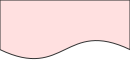 |
Passive Structure |
| Implementation Event | 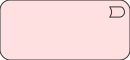 |
Event |
| Plateau | 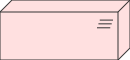 |
Composite |
| Gap | 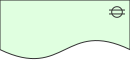 |
Composite |
am:WorkPackage a owl:Class ;
    rdfs:subClassOf am:ImplementationAndMigrationLayerElement , am:InternalBehaviorElement , arch:Element ;
    skos:prefLabel "WorkPackage"@en ;
    dcterms:source <https://pubs.opengroup.org/architecture/archimate3-doc/chap12.html> ;
    arch:prefVisNotation "https://meta.linked.archi/archimate3/icons/work-package.svg" .
Abstract vs concrete classes¶
The two hierarchies are anchored by abstract classes — never instantiated directly. They exist so that queries, shapes, and tool palettes can generalize. Because rdfs:subClassOf carries monotonic inference, anything typed as am:BusinessProcess is automatically an am:InternalBehaviorElement, an am:BusinessLayerElement, and an arch:Element — without you asserting it.
| Abstract (by aspect) | Abstract (by layer) | Concrete examples |
|---|---|---|
BehaviorElement |
StrategyLayerElement |
Capability, Value Stream, Course of Action |
InternalBehaviorElement |
BusinessLayerElement |
Business Process, Business Function |
ActiveStructureElement |
ApplicationLayerElement |
Application Component, Application Interface |
InternalActiveStructureElement |
TechnologyLayerElement |
Node, Device, System Software |
ExternalActiveStructureElement |
PhysicalLayerElement |
Equipment, Facility |
PassiveStructureElement |
ImplementationAndMigrationLayerElement |
Work Package, Deliverable |
MotivationElement |
Stakeholder, Driver, Goal, Constraint | |
CompositeElement |
Grouping, Location, Product | |
Event |
Business/Application/Technology/Implementation Event |
Relationships (11 types)¶
 Eleven relationship types organized by category.
| Category | Relationship | Meaning |
|---|---|---|
| Structural | Composition | Element consists of other elements |
| Structural | Aggregation | Element combines other elements |
| Structural | Assignment | Active structure performs behaviour |
| Structural | Realization | Element realizes another |
| Dependency | Serving | Element provides functionality to another |
| Dependency | Access | Behaviour accesses passive structure |
| Dependency | Influence | Element influences another (motivation) |
| Dependency | Association | Unspecified relationship |
| Dynamic | Triggering | Element triggers another |
| Dynamic | Flow | Transfer of content between elements |
| Other | Specialization | Element is a specialization of another |
The categories are those of the specification's Chapter 5; Association is the weakest dependency relationship
(§5.2.4), not an "other" one. The taxonomy publishes them as the
Relationship by Category scheme,
with the order of strength the derivation rules apply — weakest first, realization, assignment, aggregation,
composition for structural relationships, and association, influence, access, serving for dependency ones — as
amtax:StructuralStrength and
amtax:DependencyStrength.
The taxonomy also gives the order in which a modelling tool proposes relationships when you connect two elements,
amtax:ProposalOrder, the same as
ArchiMate 4.0's: realization, serving, access, influence, triggering, flow, aggregation, composition, assignment,
specialization, association. It decides between the relationships the metamodel draws for a pair — a business
process triggers another before it flows to it, a product aggregates a service before it is composed of it. A few
ordered collections put one relationship first for particular elements: aggregation from a grouping or a plateau,
composition between capabilities, from a facility to a node (a device among them) and from a device to system
software, assignment from a node to an artifact, and triggering from a work package to an implementation event.
Between two events no exception is needed: in a layer the figures draw triggering and flow, so triggering comes
first, and across layers they draw realization upwards — a technology event realizes an application event, an
application event a business event. This is Linked.Archi's modelling guidance, not the
specification's. What the metamodel draws is published with the relationship tables: the specification's metamodel
figures, edge by edge, as
amrt:drawsAssignment
and its siblings beside the permits… lookups, each relationship citing the figures that draw it. The generic
figures hold within a layer: across layers the tables give a business process accessing a data object, or an
application process triggering a business process, only as derived, and the figures of the cross-layer chapter draw
what holds between layers. Figure 113 draws a work package realizing and influencing a requirement, which the
tables give only as derived; it is kept as drawn. For an application component and a data object, see A component
and its data below.
The three-declaration relationship pattern¶
Every relationship type has three representations, because enterprise architecture needs both cheap graph traversal and rich relationship management. Using Serving as the example:
## 1. Direct predicate — for fast SPARQL traversal and analytics
am:serves a owl:ObjectProperty ;
    skos:prefLabel "Serves"@en ;
    arch:domainIncludes arch:Element ;          # tooling hint, not a constraint
    arch:rangeIncludes  arch:Element .

## 2. Qualified relationship class — a reified resource carrying metadata, lifecycle, provenance
am:Serving a owl:Class ;
    rdfs:subClassOf arch:QualifiedRelationship ;
    arch:unqualifiedForm am:serves ;
    skos:prefLabel "Serving"@en .

## 3. Qualified property — navigates from a source to its qualified resource
am:qualifiedServing a owl:ObjectProperty ;
    rdfs:range am:Serving ;
    arch:unqualifiedForm am:serves .
Why three? The direct predicate (am:serves) answers "what serves what?" in one cheap triple pattern. But suppose the same component serves the same process in two different ways, each with its own lifecycle state and owner — a bare predicate cannot tell those edges apart. The qualified am:Serving resource can, because it is a thing in its own right with arch:source, arch:target, and any metadata you attach.
Relationship properties use arch:domainIncludes/arch:rangeIncludes (annotation properties) rather than rdfs:domain/rdfs:range (inference axioms). This provides tooling guidance without triggering unintended type inference. See the Domain & Range Guide for the rationale.
Two relationships say more than their type on the qualified form:
- Access — the kind of access is the resource's class:
am:ReadAccess,am:WriteAccessoram:ReadWriteAccess, subclasses ofam:Access; anam:Accessthat is none of them is unspecified. Each kind is drawn with its own arrowheads. (am:accessTypeis deprecated in favour of these classes — DD-31.) am:influenceStrengthonam:Influence— values++,+,0,-,--
A directed association is likewise an am:DirectedAssociation, a subclass of am:Association, drawn with a half
arrowhead at the target. The kinds share their class's predicate (am:accesses, am:associatedWith), so the
direct triple stays the same.
Rule of thumb: write the direct predicate by default. Promote an edge to a qualified resource only when you need to say something about the relationship itself (provenance, lifecycle, multiple distinct edges, the kind of access, influence strength). The full rationale is in the Relationship Modelling Guide.
The 11 relationship types — full summary¶
| Unqualified predicate | Qualified class | Qualified predicate | Category |
|---|---|---|---|
am:composedOf |
am:Composition |
am:qualifiedComposition |
Structural |
am:aggregates |
am:Aggregation |
am:qualifiedAggregation |
Structural |
am:assignedTo |
am:Assignment |
am:qualifiedAssignment |
Structural |
am:realizes |
am:Realization |
am:qualifiedRealization |
Structural |
am:serves |
am:Serving |
am:qualifiedServing |
Dependency |
am:accesses |
am:Access |
am:qualifiedAccess |
Dependency |
am:influences |
am:Influence |
am:qualifiedInfluence |
Dependency |
am:associatedWith |
am:Association |
am:qualifiedAssociation |
Dependency |
am:triggers |
am:Triggering |
am:qualifiedTriggering |
Dynamic |
am:flowsTo |
am:Flow |
am:qualifiedFlow |
Dynamic |
am:specializes |
am:Specialization |
am:qualifiedSpecialization |
Other |
am:ReadAccess, am:WriteAccess and am:ReadWriteAccess are kinds of am:Access, and am:DirectedAssociation is a
kind of am:Association. Each shares its class's predicates.
Part 2 — Authoring a Model¶
Everything from here on uses one running example, NordFreight Logistics — a Scandinavian freight company modernising its shipment-tracking platform and integrating with EU customs systems for post-Brexit trade compliance.
Model header¶
A model is an arch:Model that declares which metamodel it conforms to:
@prefix : <https://model.nordfreight.example/> .

:NordFreightModel
    a                             arch:Model ;
    skos:prefLabel                "NordFreight Logistics — Architecture Model (3.2)"@en ;
    arch:modelConformsToMetamodel <https://meta.linked.archi/archimate3/metamodel#ArchiMate3.2> ;
    dcterms:created               "2025-06-27"^^xsd:date .
Element patterns¶
Each element needs only rdf:type and a language-tagged skos:prefLabel to be valid. Grouped by layer:
## Motivation
:EUCustomsCompliance a am:Requirement ; skos:prefLabel "EU Customs Compliance"@en .
:NoDataOutsideEU a am:Constraint ; skos:prefLabel "No personal data outside EU"@en .
:OperationalEfficiency a am:Goal ; skos:prefLabel "Operational Efficiency"@en .
:ShipperStakeholder a am:Stakeholder ; skos:prefLabel "Shipper"@en .

## Strategy
:ShipmentTracking a am:Capability ; skos:prefLabel "Shipment Tracking"@en .
:FreightBooking a am:Capability ; skos:prefLabel "Freight Booking"@en .
:CustomsClearance a am:Capability ; skos:prefLabel "Customs Clearance"@en .

## Business
:BookingProcess a am:BusinessProcess ; skos:prefLabel "Booking Process"@en .
:TrackingService a am:BusinessService ; skos:prefLabel "Shipment Tracking Service"@en .
:FreightOperations a am:BusinessRole ; skos:prefLabel "Freight Operations"@en .
:Shipment a am:BusinessObject ; skos:prefLabel "Shipment"@en .

## Application — Functions (behaviour performed by components)
:BookingFunction a am:ApplicationFunction ; skos:prefLabel "Booking Function"@en .
:TrackingFunction a am:ApplicationFunction ; skos:prefLabel "Tracking Function"@en .
:CustomsFunction a am:ApplicationFunction ; skos:prefLabel "Customs Processing"@en .

## Application — Services (exposed to consumers)
:BookingAppService a am:ApplicationService ; skos:prefLabel "Booking Service"@en .

## Application — Components (active structure)
:TMS a am:ApplicationComponent ; skos:prefLabel "Transport Management System"@en .
:TrackingPortal a am:ApplicationComponent ; skos:prefLabel "Tracking Portal"@en .
:CustomsGateway a am:ApplicationComponent ; skos:prefLabel "Customs Gateway"@en .
:ShipmentData a am:DataObject ; skos:prefLabel "Shipment Data"@en .

## Technology
:AzureCloud a am:Node ; skos:prefLabel "Azure North Europe"@en .
:K8sCluster a am:SystemSoftware ; skos:prefLabel "AKS Kubernetes Cluster"@en .
:IoTGateway a am:Device ; skos:prefLabel "IoT Tracking Gateway"@en .

## Physical
:NordicHub a am:Facility ; skos:prefLabel "Oslo Logistics Hub"@en .
:TruckFleet a am:Equipment ; skos:prefLabel "Truck Fleet"@en .
:RoadNetwork a am:DistributionNetwork ; skos:prefLabel "Nordic Road Network"@en .

## Implementation & Migration
:PlatformModernisation a am:WorkPackage ; skos:prefLabel "Platform Modernisation"@en .
:TargetState a am:Plateau ; skos:prefLabel "Target Architecture 2027"@en .
:GoLive a am:ImplementationEvent ; skos:prefLabel "Platform Go-Live"@en .
:TrackingGap a am:Gap ; skos:prefLabel "Real-time Tracking Gap"@en .
Relationship patterns¶
Direct predicates for the bulk of the model:
## Assignment — active structure performs behaviour
:FreightOperations am:assignedTo :BookingProcess .

## Application layer — the proper Component → Function → Service → Consumer pattern
:TMS               am:assignedTo :BookingFunction .      # component performs function
:BookingFunction   am:realizes   :BookingAppService .    # function provides service
:BookingAppService am:serves     :FreightOperations .    # service serves the role

:TrackingPortal    am:assignedTo :TrackingFunction .
:TrackingFunction  am:realizes   :TrackingService .
:TrackingService   am:serves     :FreightOperations .

:CustomsGateway    am:assignedTo :CustomsFunction .      # component performs function
:CustomsFunction   am:realizes   :CustomsClearance .     # function realizes capability directly

## Realization — process/service realizes capability
:BookingProcess    am:realizes :FreightBooking .
:TrackingService   am:realizes :ShipmentTracking .

## Serving — technology layer (valid: infra serves component)
:K8sCluster       am:serves :TMS .
:AzureCloud       am:serves :K8sCluster .

## Access
:BookingProcess am:accesses :Shipment .
:TMS            am:accesses :ShipmentData .   # the component uses the data (derived: component → function → data)

## Structural + dynamic
:AzureCloud           am:composedOf :K8sCluster .
:NordicHub            am:composedOf :TruckFleet .
:TMS                  am:flowsTo    :CustomsGateway .
:BookingProcess       am:triggers   :TrackingService .
:GoLive               am:triggers   :TargetState .
:CustomsGateway  am:realizes :EUCustomsCompliance .
:TMS      am:realizes :NoDataOutsideEU .
:PlatformModernisation am:aggregates :TargetState .
:TrackingGap          am:associatedWith :PlatformModernisation .
A component and its data. In 3.2 an application component relates to a data object by Access, which the relationship tables permit only as the conclusion of a derivation: the component is assigned to a function that accesses the data. There is no assignment from a component to a data object; 3.2 assigns passive structure only to deploy an artifact on a device or system software, or to store material with equipment. ArchiMate 4.0 adds one — the component as the system of record for the data — and draws it in its metamodel, so a tool following the 4.0 tables proposes Assignment there and Access only second. See Assignment to passive structure in the comparison.
Read one fragment three ways¶
Here is the Customs Gateway corner of the model — as a diagram, as direct predicates, and as a qualified resource:
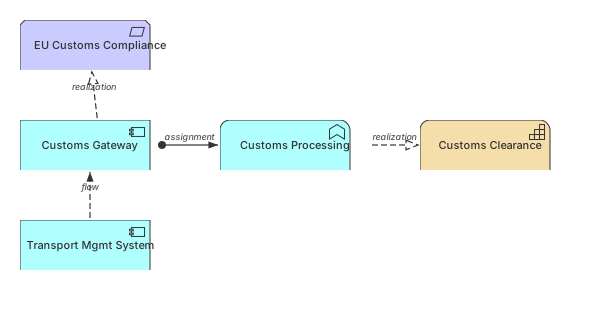 The Customs Gateway corner — component realizes requirement, component assigned to function, function realizes capability, flow from TMS.
View source model · Try it out ▶
The Customs Gateway corner — component realizes requirement, component assigned to function, function realizes capability, flow from TMS.
View source model · Try it out ▶
# Direct predicates (the diagram, literally)
:CustomsGateway am:realizes :EUCustomsCompliance .
:CustomsGateway      am:assignedTo :CustomsFunction .
:CustomsFunction     am:realizes   :CustomsClearance .
:TMS                 am:flowsTo    :CustomsGateway .

# The assignment promoted to a managed resource, because we want to record why and since when
:cg-assigned-customs-fn a am:Assignment ;
    arch:source :CustomsGateway ;
    arch:target :CustomsFunction ;
    arch:lifecycleState "planned" ;
    dcterms:created "2025-06-27"^^xsd:date ;
    rdf:reifies <<( :CustomsGateway am:assignedTo :CustomsFunction )>> .
A cross-layer view¶
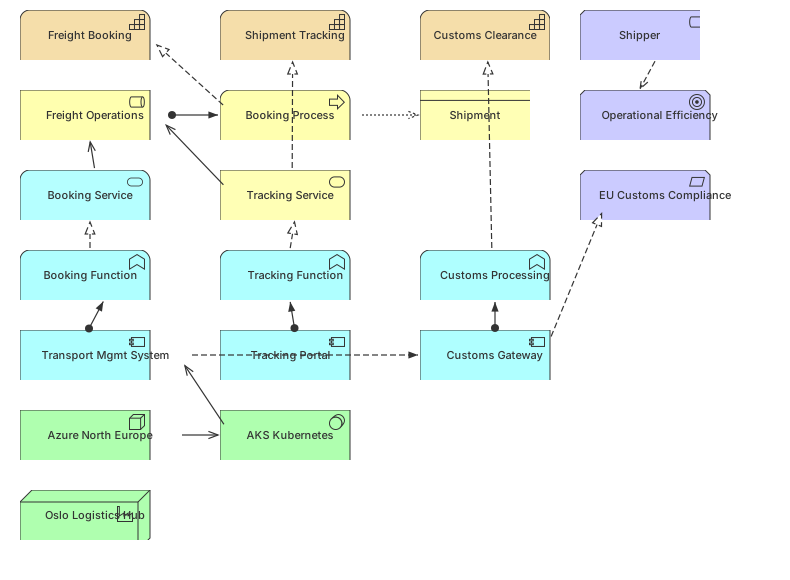 A cross-layer architecture view spanning motivation, strategy, business, application, and technology.
View source model · Try it out ▶
A cross-layer architecture view spanning motivation, strategy, business, application, and technology.
View source model · Try it out ▶
This view conforms to the Layered Viewpoint — we will make that conformance checkable in Part 5.
Part 3 — Validating the Model with SHACL¶
ArchiMate semantics that constrain a model live in SHACL, not OWL. This is deliberate: OWL works under the open-world assumption (a missing fact is merely unknown), whereas governance needs the closed-world opposite — "every Application Component must have an owner" should be a checkable rule whose violation is an error, not an invitation to infer a missing owner. The manifest publishes four shape families, each answering a different question.
3.1 Element validation (element-shapes)¶
Are the elements well-formed? 19 SPARQL-based shapes covering structural integrity (elements must have labels), layer direction constraints, cross-layer relationship rules, junction homogeneity, and metamodel pattern conformance. The simplest shape:
am:ElementShape a sh:NodeShape ;
    sh:targetClass arch:Element ;
    sh:property [
        sh:path skos:prefLabel ;
        sh:minCount 1 ;
        sh:datatype rdf:langString ;
        sh:message "Every element must have at least one language-tagged skos:prefLabel."@en ;
    ] .
Passing: :TMS a am:ApplicationComponent ; skos:prefLabel "Transport Management System"@en .
Failing, and the report it produces:
# Offending data
:Orphan a am:ApplicationComponent .     # no prefLabel

# sh:ValidationReport
[ a sh:ValidationResult ;
  sh:focusNode      :Orphan ;
  sh:resultPath     skos:prefLabel ;
  sh:sourceShape    am:ElementShape ;
  sh:resultSeverity sh:Violation ;
  sh:resultMessage  "Every element must have at least one language-tagged skos:prefLabel."@en ] .
3.2 Relationship-validity validation (relationship-shapes)¶
Is this edge legal? ArchiMate's relationship rules state which element types may connect via which relationship — the validity matrix in Appendix B of the specification. Linked.Archi generates SHACL from that matrix (via the Archi tool's relationship matrix), covering 10,484 valid pairs across the 11 relationship types. For example, Assignment runs from an active-structure element to a behaviour element:
am:AssignmentValidityShape a sh:NodeShape ;
    sh:targetSubjectsOf am:assignedTo ;
    sh:class am:ActiveStructureElement ;
    sh:property [
        sh:path am:assignedTo ;
        sh:class am:BehaviorElement ;
        sh:message "Assignment must run from an Active Structure element to a Behavior element."@en ;
    ] .
:FreightOperations am:assignedTo :BookingProcess passes (BusinessRole → BusinessProcess). The following fails, because a Data Object is passive structure, not behaviour:
:ShipmentData am:assignedTo :BookingProcess .   # ✗ source is passive structure
# → sh:ValidationResult: "Assignment must run from an Active Structure element to a Behavior element."
The same tables are published a second time, as lookups, in
archimate3.2-relationship-tables.ttl—am:Artifact amrt:permitsRealization am:DataObject , …— generated from the same matrix for another use: the shapes validate, and the tables answer may this relationship go from this type to that one? with one triple pattern. The tables also keep the specification's case: upper case permitted directly — a relationship a modeller may draw,amrt:permitsDirectRealization(an artifact may realize a data object) — lower case only as the conclusion of a derivation (a node may realize a business process, but only by derivation:amrt:permitsRealization, notamrt:permitsDirectRealization).
3.3 Principle validation (principle-shapes)¶
Does the model satisfy our governance rules? This is where SHACL becomes architecture compliance as code — rules you run in CI/CD on every commit, not in a quarterly review. 20 shapes encoding governance principles: redundancy avoidance, single source of truth, stewardship, separation of concerns, service orientation, completeness, and motivation alignment.
A completeness principle — every Capability must be realized by at least one core element:
am:CapabilityRealizationPrinciple a sh:NodeShape ;
    sh:targetClass am:Capability ;
    sh:sparql [
        sh:message "Every Capability must be realized by at least one Business Process or Application Service."@en ;
        sh:select """
            SELECT $this WHERE {
                FILTER NOT EXISTS { ?x am:realizes $this }
            }
        """ ;
    ] .
Against NordFreight as authored, :FreightBooking passes (:BookingProcess am:realizes :FreightBooking); a capability with no realizing element is flagged.
3.4 Viewpoint conformance (viewpoint-shapes)¶
Does this view show only what its viewpoint allows? A arch:View that declares conformance to a viewpoint can be checked against the element types that viewpoint permits — data-driven, reading the viewpoint definition from the graph. (See Part 5 for the viewpoint definitions this checks against.)
Running it¶
Validate NordFreight against all shape families in one pass, these as the shapes graph:
data:   nordfreight-3.2-model.ttl
shapes: core/core-shapes.ttl
        modelingLanguages/archimate/3.2/archimate3.2-element-shapes.ttl
        modelingLanguages/archimate/3.2/archimate3.2-relationship-shapes.ttl
        modelingLanguages/archimate/3.2/archimate3.2-principle-shapes.ttl
You now understand every file in it: element well-formedness, relationship legality, and governance principles, in one pass.
Part 4 — Deriving and Inferring New Facts with SPARQL Rules¶
A model states some relationships explicitly; many more are implied. ArchiMate's derivation rules say that a valid chain of relationships permits a derived relationship between its endpoints. In Linked.Archi these are sh:SPARQLRules, and every derived fact is annotated with provenance (PROV-O) and a certainty — valid (DR1–DR8: derived relationship is always valid) or potential (PDR1–PDR12: may be valid depending on context) — so inferred knowledge never silently masquerades as asserted knowledge.
Derivation rule inventory¶
| ID | Type | Chain pattern | Derived relationship |
|---|---|---|---|
| DR1–DR8 | Valid | Asserted chains guaranteed to produce valid edges | Realization, Serving, Assignment, etc. |
| PDR1–PDR12 | Potential | Chains that may produce valid edges depending on context | Various — require human review |
One derivation rule¶
If an Application Component is assigned to an Application Function, and that function realizes a service, then the component realizes the service. That is the specification's DR2: two structural relationships in line give the weaker of the two (realization is weaker than assignment). The published rule, with the restrictions of Appendix B.4 abridged:
@prefix amderiv: <https://meta.linked.archi/archimate3/derivation#> .

amderiv:DR2-DerivationBetweenStructuralRelationships a sh:NodeShape ;
    sh:targetClass arch:ModelConcept ;
    sh:rule amderiv:DR2 .

amderiv:DR2 a sh:SPARQLRule , prov:Activity ;
    skos:prefLabel "DR2: Derivation between structural relationships"@en ;
    sh:construct """
        CONSTRUCT {
            $this ?u ?c .
            ?_resource a ?_class ;
                arch:source $this ;
                arch:target ?c ;
                rdf:reifies <<( $this ?u ?c )>> ;
                :derivationCertainty :Valid ;
                prov:wasGeneratedBy :DR2 ;
                prov:wasDerivedFrom ?_premise1 , ?_premise2 .
        }
        WHERE {
            VALUES (?s ?sStrength) { (am:realizes 1) (am:assignedTo 2) (am:aggregates 3) (am:composedOf 4) }
            VALUES (?t ?tStrength) { (am:realizes 1) (am:assignedTo 2) (am:aggregates 3) (am:composedOf 4) }
            # The premises: relationships in the model, asserted or derived as valid — not one that is only potential.
            ?_premise1 arch:source $this ; arch:target ?b ; rdf:type/arch:unqualifiedForm ?s .
            FILTER NOT EXISTS { ?_premise1 :derivationCertainty :Potential }
            ?_premise2 arch:source ?b ; arch:target ?c ; rdf:type/arch:unqualifiedForm ?t .
            FILTER NOT EXISTS { ?_premise2 :derivationCertainty :Potential }
            BIND(IF(?sStrength <= ?tStrength, ?s, ?t) AS ?u)    # the weaker of the two
            FILTER($this != ?c)
            # Not there yet — or there only as potential, which a valid derivation makes valid.
            FILTER NOT EXISTS { ?_existing arch:source $this ; arch:target ?c ; rdf:type/arch:unqualifiedForm ?u . FILTER NOT EXISTS { ?_existing :derivationCertainty :Potential } }
            # Appendix B.4: the domains of the derived relationship's ends, whether they are
            # passive structure, and the element the two relationships join at
            …
            # The derivation's resource: the relationship's class, and an IRI in the model's namespace.
            …
        }
    """ .
The file implements all twenty rules of Appendix B — DR1–DR8, valid in any model, and PDR1–PDR12, potential, for the modeller to confirm — generated from the same definitions as the ArchiMate 4.0 rules, which explains them in detail: a derivation is a qualified relationship that reifies the derived triple and carries its certainty and provenance; a rule derives only from relationships that are asserted or derived as valid; a potential rule derives only what the relationship tables permit (archimate3.2-relationship-tables.ttl, loaded with the model); and the file also carries a validation shape, amderiv:DerivationRestrictions, for derivations from elsewhere.
3.2's Appendix B differs from 4.0's in two places, and the rules follow it: PDR12 also takes a grouping's composition ("with S being Aggregation or Composition"), and a grouping, location or plateau may have a derived composition to a relationship as well as an aggregation.
Before and after¶
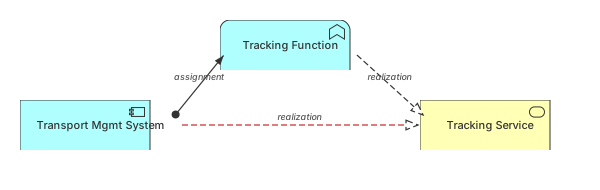 The red edge (TMS realizes Tracking Service) is derived from the chain: TMS assigned to Tracking Function, Tracking Function realizes Tracking Service.
View source model · Try it out ▶
The red edge (TMS realizes Tracking Service) is derived from the chain: TMS assigned to Tracking Function, Tracking Function realizes Tracking Service.
View source model · Try it out ▶
The derived edge is produced by the rule, carrying its lineage:
:TMS am:realizes :TrackingService .         # the derived triple

:derivation-4a9ebcb1e843f302a31202194304363babe34391 a am:Realization ;
    arch:source :TMS ;
    arch:target :TrackingService ;
    rdf:reifies <<( :TMS am:realizes :TrackingService )>> ;
    amderiv:derivationCertainty amderiv:Valid ;
    prov:wasGeneratedBy amderiv:DR2 ;
    prov:wasDerivedFrom :relationship-5bab2e58e67455b9587892268ee767139a4633c0 ,
                        :relationship-6d86959e8338ab766eb785b7c38176663761ac5a .

# The premises, stated as direct triples, qualified before the rules ran.
:relationship-5bab2e58e67455b9587892268ee767139a4633c0 a am:Assignment ;
    arch:source :TMS ;
    arch:target :TrackingFunction ;
    rdf:reifies <<( :TMS am:assignedTo :TrackingFunction )>> .

:relationship-6d86959e8338ab766eb785b7c38176663761ac5a a am:Realization ;
    arch:source :TrackingFunction ;
    arch:target :TrackingService ;
    rdf:reifies <<( :TrackingFunction am:realizes :TrackingService )>> .
SPARQL Queries for Impact Analysis¶
Run any of these queries against the loaded model — each is standalone and answers a common architecture question:
# 1. List every Application Component
PREFIX am:   <https://meta.linked.archi/archimate3/onto#>
PREFIX skos: <http://www.w3.org/2004/02/skos/core#>
SELECT ?c ?label WHERE {
    ?c a am:ApplicationComponent ; skos:prefLabel ?label .
}
# 2. Capabilities with no realizing element (a gap-finder)
SELECT ?cap WHERE {
    ?cap a am:Capability .
    FILTER NOT EXISTS { ?x am:realizes ?cap }
}
# 3. All Realization edges, labelled by how we know them (asserted vs derived)
SELECT ?source ?target ?certainty WHERE {
    ?r a am:Realization ; arch:source ?source ; arch:target ?target .
    OPTIONAL { ?r amderiv:derivationCertainty ?certainty }   # unbound ⇒ asserted
}
# 4. Impact analysis — which capabilities ride on a given technology node?
SELECT DISTINCT ?capability WHERE {
    :AzureCloud (am:serves|am:composedOf|am:realizes|am:assignedTo)+ ?capability .
    ?capability a am:Capability .
}
Query 4 makes "what breaks if we retire this node?" a property-path question rather than a week of manual tracing.
Part 5 — Viewpoints and Generating Presentations¶
A model is one source of truth; stakeholders need many tailored views of it. Linked.Archi separates viewpoints (the specification of a kind of view), presentation contexts (how a view is styled and filtered for an audience), and deliverable templates (SPARQL-driven documents) — all generated from the single model.
Viewpoints as first-class resources¶
A viewpoint is an arch:Viewpoint individual that names the element types it admits, the stakeholders it targets, the concerns it frames and its purposes, as the specification's table for it states (Appendix C). The 25 viewpoints are grouped twice, as SKOS — by the specification's categories and by the scope their tables state:
amvp:LayeredViewpoint a arch:Viewpoint ;
    skos:prefLabel "Layered Viewpoint"@en ;
    arch:includesConcept am:BusinessActor , am:BusinessRole , am:ApplicationComponent , am:Node , … ;
                         # every core element, and Grouping and the two junctions
    arch:targetsStakeholder amvp:EnterpriseArchitect , amvp:ProcessArchitect , amvp:ApplicationArchitect ,
                            amvp:InfrastructureArchitect , amvp:DomainArchitect ;
    arch:viewpointFramesConcern amvp:Consistency , amvp:ReductionOfComplexity , amvp:ImpactOfChange ,
                                amvp:Flexibility ;
    arch:viewpointHasPurpose amvp:Designing , amvp:Deciding , amvp:Informing ;
    skos:broader amvp:CompositionViewpoints , amvp:MultipleLayersMultipleAspects .
A arch:View declares conformance to one viewpoint — and that conformance is exactly what the viewpoint-shapes from Part 3.4 check:
:NordFreightLayeredView a arch:View ;
    skos:prefLabel "NordFreight Layered View"@en ;
    arch:viewConformsToViewpoint amvp:LayeredViewpoint .
Selected viewpoints (the full catalogue is the SKOS ViewpointCatalog):
| Viewpoint | Focus |
|---|---|
| Organization | Business actors, roles, collaborations |
| Application Cooperation | Application components and their interactions |
| Application Usage | How applications support business processes |
| Technology | Nodes, devices, system software, networks |
| Implementation & Deployment | Artifacts deployed on technology infrastructure |
| Information Structure | Business and data objects |
| Service Realization | How services are realized by processes and active structure |
| Goal Realization | How goals are realized through requirements and outcomes |
| Capability Map | Capabilities, the resources they need and the outcomes they produce |
| Migration | Baseline-to-target transition through plateaus and the gaps between them |
| Layered | Cross-layer traceability — the canonical end-to-end view |
Presentation contexts — one model, many renderings¶
A presentation context filters and styles a subgraph for a specific audience. The same NordFreight fragment renders very differently for an executive (capabilities and outcomes, no infrastructure) versus technology operations (nodes and deployment, no strategy).
Presentation contexts are modelled as SKOS concepts with a skos:definition that describes what the audience needs, plus an arch:usesNotationSet link to a visual notation set. Tooling reads the definition text to decide which viewpoints to apply and what level of abstraction is appropriate:
am3pc:ExecutiveContext
    a skos:Concept ; skos:topConceptOf am3pc:ArchiMatePresentationContexts ;
    skos:prefLabel "Executive / C-Level"@en ;
    skos:definition "High-level overview with minimal technical detail. Focus on business capabilities, strategic alignment, cost, and risk."@en ;
    arch:usesNotationSet am3not:ArchiMate32StandardNotation ;
    skos:inScheme am3pc:ArchiMatePresentationContexts .

am3pc:OperationsContext
    a skos:Concept ; skos:topConceptOf am3pc:ArchiMatePresentationContexts ;
    skos:prefLabel "Operations / Infrastructure"@en ;
    skos:definition "Focus on technology layer and deployment. Nodes, devices, networks, environments."@en ;
    arch:usesNotationSet am3not:ArchiMate32StandardNotation ;
    skos:inScheme am3pc:ArchiMatePresentationContexts .
Both use the standard notation set by default. Organizations that want a simplified visual treatment for executives can define their own notation set (e.g. flat boxes without ArchiMate icons) and reference it via arch:usesNotationSet. The skos:definition text on each context drives tooling decisions about which viewpoints to apply and what level of detail to include.
 Same NordFreight model, two audiences — executives see capabilities and goals, tech-ops sees nodes and deployment.
Deliverable templates — model to document¶
A deliverable template is a document structure whose sections are populated by SPARQL. The manifest ships templates for the Architecture Definition Document, Architecture Requirements Specification, and Architecture Principles Document:
am3mm:ArchitectureDefinitionDocument a arch:DeliverableTemplate ;
    skos:prefLabel "Architecture Definition Document"@en ;
    arch:hasSection [
        skos:prefLabel "Application Portfolio"@en ;
        arch:populatedBy """
            SELECT ?c ?label WHERE {
                ?c a am:ApplicationComponent ; skos:prefLabel ?label .
            } ORDER BY ?label
        """ ;
    ] .
Run the toolbox generator over NordFreight and the Application Portfolio section materializes as Markdown:
Part 6 — Tailoring and Extending the Language¶
The semantic assets are raw material, not a sealed package. Tailoring means adding resources the manifest already knows how to aggregate — never forking the language.
Add a custom element type¶
Suppose NordFreight wants to single out regulatory integration points. Define :RegulatoryGateway as a subclass of am:ApplicationComponent, register it for navigation, and constrain it — touching several assets coherently:
# onto — the class
:RegulatoryGateway a owl:Class ;
    rdfs:subClassOf am:ApplicationComponent ;
    skos:prefLabel "Regulatory Gateway"@en ;
    skos:definition "An application component that integrates with an external regulatory authority."@en .

# tax — so palettes and filters pick it up
:RegulatoryGatewayConcept a skos:Concept ;
    skos:prefLabel "Regulatory Gateway"@en ;
    skos:broader amtax:ApplicationLayer , amtax:InternalActiveStructureElement ;
    rdfs:seeAlso :RegulatoryGateway .

# shapes — a tailored governance rule
:RegulatoryGatewayShape a sh:NodeShape ;
    sh:targetClass :RegulatoryGateway ;
    sh:property [
        sh:path am:influences ;
        sh:minCount 1 ;
        sh:message "A Regulatory Gateway must be influenced by at least one Requirement."@en ;
    ] .
Now reclassify the Customs Gateway:
Because of rdfs:subClassOf, everything already written for am:ApplicationComponent still applies — the relationship-validity shapes from the matrix (Part 3.2), the derivation rules (Part 4), the queries (Part 4), and the viewpoints (Part 5) all continue to see :CustomsGateway, with no changes. That is the payoff of monotonic subsumption.
Specialization / profiles¶
ArchiMate supports user-defined specializations of element types. In Linked.Archi, this is handled directly via rdfs:subClassOf — the standard OWL/RDFS mechanism:
The subclass inherits all SHACL shapes, relationship validity rules, taxonomy membership, and visual notation from the parent. Organizations bundle their specializations into a custom metamodel that imports the ArchiMate one. See AM-DD-2 for the full rationale.
Compose with extensions¶
Cross-cutting extensions import arch:core, so they attach to ArchiMate elements with no integration code. Record why the Customs Gateway pattern was chosen, and how the legacy TMS scores in portfolio terms:
@prefix ad:     <https://meta.linked.archi/arch-decision#> .
@prefix timefw: <https://meta.linked.archi/time-framework/onto#> .

:UseDedicatedCustomsGateway a ad:Decision ;
    skos:prefLabel "Use a dedicated Customs Gateway"@en ;
    ad:addresses :EUCustomsCompliance ;
    ad:affects   :CustomsGateway ;
    ad:status    "accepted" .

:TMSFitAssessment a timefw:FitAssessment ;
    timefw:assesses :TMS ;
    timefw:functionalFit "low" ;
    timefw:technicalFit  "low" ;
    timefw:classifiedAs  timefw:Migrate .   # → flagged for migration
Part 7 — Linking with Other Notations and Frameworks¶
Because every Linked.Archi language imports arch:core, an ArchiMate ApplicationComponent, a C4 Container, and a Backstage Component are all arch:Element instances. They coexist in one graph, share SHACL shapes, and answer the same SPARQL queries.
 All languages import arch:core, enabling cross-notation linking in one graph.
A concrete link: ArchiMate ↔ Backstage¶
NordFreight's running estate is catalogued in Backstage, which knows ownership and lifecycle that the ArchiMate model does not. Link the two representations of the same system:
@prefix bs: <https://meta.linked.archi/backstage/onto#> .

# The Backstage catalog entry, with the owner ArchiMate lacked
bs:tracking-portal a bs:Component ;
    bs:name "tracking-portal" ;
    skos:prefLabel "tracking-portal"@en ;
    bs:lifecycleState bs:Production ;
    arch:owner "team-shipment-tracking" .

# Establish that these two nodes describe the same real-world system.
# skos:exactMatch, not owl:sameAs — the two models describe this system at
# different granularities, so the substitutability test fails. See DD-11.
:TrackingPortal skos:exactMatch bs:tracking-portal .
Now ask a question no single tool could answer:
# Which ArchiMate Application Components lack an owner, even after consulting Backstage?
PREFIX am:   <https://meta.linked.archi/archimate3/onto#>
PREFIX arch: <https://meta.linked.archi/core#>
PREFIX skos: <http://www.w3.org/2004/02/skos/core#>
SELECT ?c WHERE {
    ?c a am:ApplicationComponent .
    FILTER NOT EXISTS { ?c arch:owner ?own }
    FILTER NOT EXISTS {
        ?c (skos:exactMatch|^skos:exactMatch) ?corresponding .
        ?corresponding arch:owner ?ownerViaCorrespondence .
    }
}
:TrackingPortal no longer appears: it carries no arch:owner of its own, but the
correspondence reaches one, so the governance gap was closed by linking rather than by
re-modelling.
That second FILTER NOT EXISTS is the cost of correspondence over merge. skos:exactMatch
carries no OWL entailment, so nothing is inherited — the query crosses the link itself, one hop,
with no reasoner in the everyday path. owl:sameAs would let a reasoner pool both nodes'
properties and the shorter query would pass unchanged; it also asserts the two IRIs denote one
individual, which silently corrupts every downstream query if that turns out to be wrong. The
deciding test is substitutability: if a reasoner could safely replace one IRI with the other
everywhere, forever, the nodes are one entity → owl:sameAs; otherwise → skos:exactMatch.
See DD-11.
skos:exactMatch is symmetric by definition, but symmetry is an entailment — without a reasoner
only the direction actually written is in the data, which is why the query matches either.
The SKOS bridge for type-level alignment¶
The link above relates two instances. Types need relating too: when two notations describe the
same kind of thing at different granularities — an ArchiMate ApplicationComponent and a C4
Container — the correspondence is asserted between the classes with the SKOS mapping
properties: skos:closeMatch, skos:relatedMatch, skos:broadMatch, skos:narrowMatch, and
skos:exactMatch only where the two genuinely coincide in scope. skos:closeMatch is the usual
answer and skos:relatedMatch the common case across frameworks whose abstractions differ.
This lets tooling suggest alignments and generate cross-notation reports without asserting
owl:equivalentClass between element types that merely correspond. These assertions live in a
*-crossmappings.ttl document registered on the metamodel via arch:crossLanguageMappings, not
in the ontology itself and never in converter output — see
Authoring cross-language mappings.
Other pairings, in brief¶
- ArchiMate ↔ C4 — map an
am:ApplicationComponentto a C4Containerfor developer-facing zoom-in. See Application Layer vs C4 Containers. - ArchiMate ↔ BPMN — drill a single
am:BusinessProcessdown into an executable BPMN flow when order, gateways, and exceptions matter. - ArchiMate ↔ TOGAF — cross-map elements to the TOGAF content metamodel so a NordFreight element participates in an ADM deliverable. See the TOGAF Modelling Guide.
To summarise the mechanics of the two sections above: instance-level correspondence uses
skos:exactMatch, with owl:sameAs reserved for the documented subset where identity is
confirmed and a property merge is wanted (DD-11);
type-level correspondence uses the SKOS mapping properties in a *-crossmappings.ttl document.
Neither is emitted by a converter — mappings are editorial judgements, not derivations.
Cross-boundary SPARQL queries traverse the link explicitly, regardless of which notation
originated each element.
Strengths¶
- Rich element definitions — Full ArchiMate specification text as
skos:definitionandskos:scopeNote - Dual classification — OWL class hierarchy (abstract classes) and SKOS taxonomy provide complementary classification
- Visual notation links — Every element has
arch:prefVisNotationpointing to SVG icons. The full notation set provides structured rendering data (shape, colour, icon, dimensions) viaarch-vis:VisualNotationinstances for palette generation. - Spec traceability —
dcterms:sourcelinks to specific ArchiMate specification sections - Core ontology integration — All elements are
rdfs:subClassOf arch:Element, enabling cross-metamodel queries - Complete relationship modelling — 11 relationship types with three-declaration qualified pattern
- Generated SHACL shapes — Relationship shapes generated from the Archi matrix XML (10,484 valid pairs)
- Element/metamodel shapes — 19 SPARQL-based shapes covering structural integrity and cross-layer constraints
- Governance principle shapes — 20 shapes for architecture governance validation
- Derivation rules — DR1–DR8 + PDR1–PDR12 implemented as SHACL Rules with PROV-O provenance
- Viewpoints — Example viewpoints with allowed concepts, stakeholder targeting, and SHACL validation
- Metamodel manifest — Single entry point aggregating all resources
Where to Go Next¶
You have now exercised every capability of ArchiMate 3.2 in Linked.Archi: you read the language, authored a model, validated it three ways, derived new facts with provenance, rendered it for two audiences and a document, tailored it with a custom type and two extensions, and linked it to another notation. Re-reading the manifest map, every node is now lit.
You never have to write SPARQL by hand: the Linked.Archi MCP server exposes this whole graph to AI agents, so a natural-language question ("what breaks if we retire Azure North Europe?") is translated to the query in Part 4 and answered against your real model.
Further reading¶
- ArchiMate 3.2 Metamodel Manifest — the live index of every asset used here
- Relationship Modelling Guide — the three-declaration pattern in depth
- Domain & Range Guide — why
domainIncludes/rangeIncludes, notrdfs:domain/rdfs:range - Validation Guide — the SHACL validation pipeline
- ArchiMate Design Decisions — AM-DD-1 (dual classification), AM-DD-2 (specialization)
- ArchiMate 3.2 vs 4.0 — what changed between versions
- ArchiMate 3.2 Specification — the official spec by The Open Group
Disclaimer: This is a community semantic representation of ArchiMate for interoperability purposes. It is not produced by, endorsed by, or affiliated with The Open Group. "ArchiMate" is a registered trademark of The Open Group.