What is Linked.Archi?
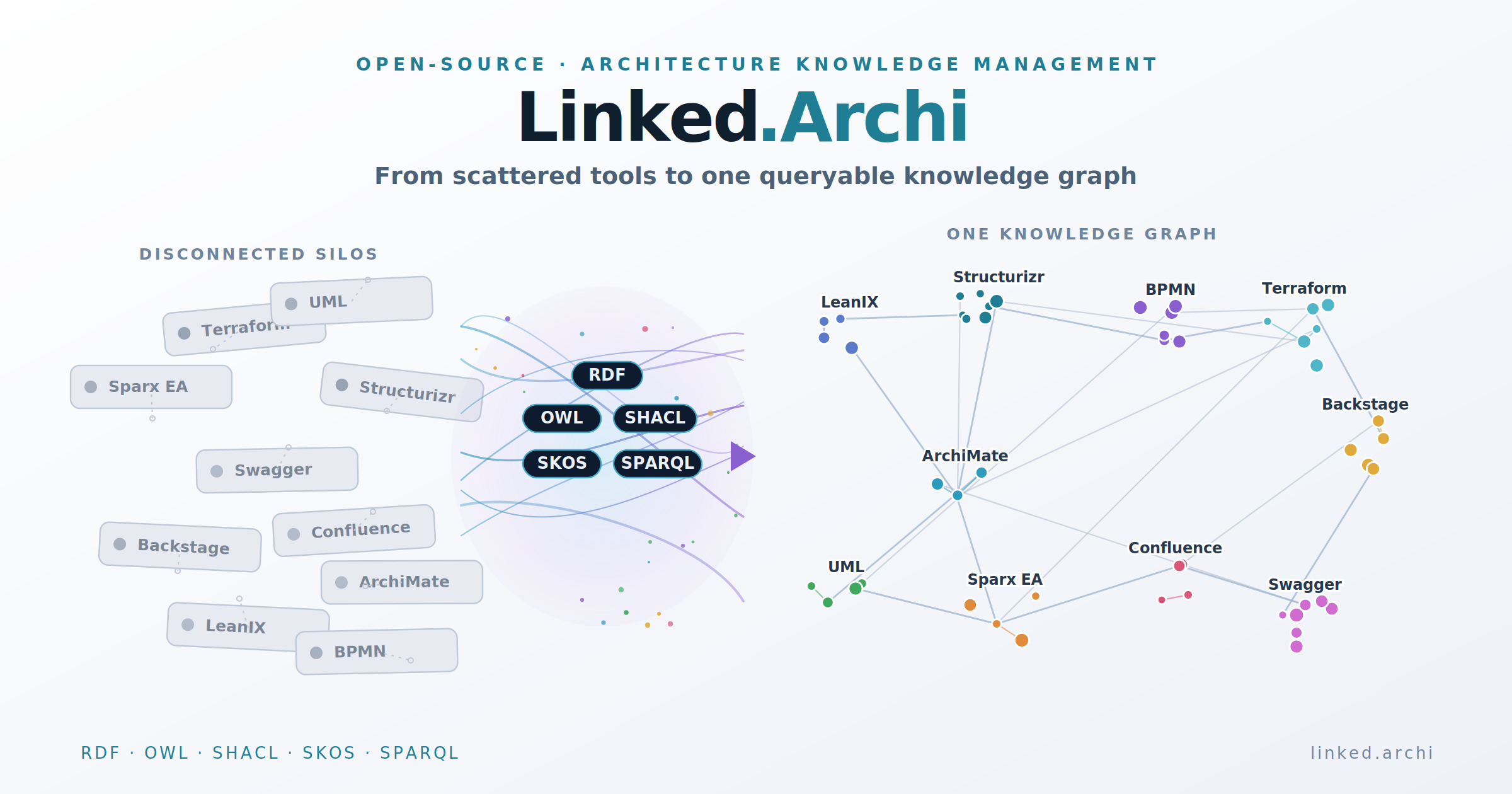
Your organization's architecture knowledge is scattered. Someone asks "which parts of the business break if we shut down this system?" — and answering takes a week of meetings because the strategy is in slide decks, the application landscape sits in one tool, the diagrams in another, the deployment details in code, and the reasoning behind key decisions exists only in someone's head.
Linked.Archi is an open-source platform for architecture knowledge management that solves this. This repository (meta.linked.archi) is its semantic asset layer — the shared ontologies, taxonomies, and validation shapes that turn scattered architecture models, decisions, and inventories into a single, queryable enterprise architecture knowledge graph connecting business strategy to technical implementation.
Think of it like a map: every place on the map is an architecture element (a system, a process, a decision) and every road between them is a labelled relationship. Once everything is on the same map, you can find a route between any two points — that's what a machine-readable architecture model gives you.
Your organization already has architecture information — application inventories, capability maps, technology standards, design decisions, service catalogues. The problem is that this information lives in separate tools (ArchiMate models in Archi or Sparx EA, UML diagrams in PlantUML or Enterprise Architect, sketches on Miro or Excalidraw, service catalogues in Backstage, decisions in Confluence, C4 diagrams in Structurizr or draw.io) and none of them talk to each other. Today, answering cross-cutting questions requires a human to manually piece together information from multiple sources.
Linked.Archi solves this by providing a shared semantic model for enterprise architecture. This repository defines the formal vocabulary — an enterprise architecture ontology — that all your architecture artifacts can be expressed in. Once they share a common language, they become queryable as one connected graph. AI agents can reason over them. Governance rules can be validated automatically. Impact analysis becomes a query, not a research project. This is what linked data enterprise architecture looks like in practice.
 What this repository provides and what it enables — from semantic assets to actionable architecture intelligence.
How it works (the short version)
The ecosystem has three parts:
-
Shared ontologies (this repository,
meta.linked.archi) — formal definitions of what architecture concepts mean and how they relate. Covers multiple modelling languages (ArchiMate, C4, BPMN, UML, EDGY, Backstage, LeanIX, BMC, BPMN-Lite), governance frameworks (TOGAF, DoDAF, Zachman, and more), and cross-cutting extensions (architecture decisions, quality attributes, AI governance, financial architecture, and others). -
A toolbox (separate repository,
linked.archi) — converters that transform existing models into the shared format (from Archi, Sparx EA, PlantUML, Structurizr, draw.io, and others), generators that produce documentation and visualizations, a graph navigator for exploration, and an MCP server that gives AI agents direct access to your architecture knowledge. -
Validation rules (SHACL shapes) — executable governance constraints that run in CI/CD. "Every application must have an owner." "Cross-domain integrations must use event-driven patterns." These aren't documents that nobody reads — they're automated checks that catch violations on every commit.
 From existing tools through RDF conversion to a unified knowledge graph with queryable, validated, AI-accessible outputs.
The technical foundation uses W3C semantic web standards: OWL for vocabulary semantics, SHACL for validation constraints, SKOS for classification taxonomies, SPARQL for queries, and RDF as the data model. If those acronyms are unfamiliar — they're the same standards that power Google's Knowledge Graph, Wikidata, and schema.org. Mature, well-tooled, and designed for exactly this kind of cross-domain knowledge integration.
The problem it addresses
Architecture knowledge is scattered across tools that don't talk to each other. The ArchiMate model lives in Archi or Sparx EA. UML and sequence diagrams live in PlantUML or Enterprise Architect. Architecture sketches and workshop outputs live on Miro, Excalidraw, or draw.io. Architecture decisions live in Confluence or Markdown ADRs. The service catalogue lives in Backstage. API specs live in Swagger. Deployment topology lives in Terraform. Quality requirements live in someone's head.
 Answering cross-cutting architecture questions today requires manual research across siloed tools — days of work, if the architect is available.
Each tool is good at what it does. The problem is the connections between them. Enterprise architecture is fundamentally about cross-cutting concerns — understanding how a business capability maps to applications, how those applications depend on infrastructure, how architecture decisions constrain technology choices, and how all of it aligns with strategy.
When someone asks "which business capabilities are at risk if we decommission this platform?" — answering that requires traversing from technology components through application services through business services to capabilities, cross-referencing with portfolio assessments and architecture decisions. No single tool holds all of that. Today, the answer lives in an architect's head — and leaves the organization when they do.
This is the architecture knowledge management problem: organizations have architecture data (inventories, models, catalogues) but lack architecture knowledge (the connected, interpreted understanding that supports decisions). See Architectural Data vs Architectural Knowledge for a deep dive on this distinction, and Architecture Knowledge Lifecycle for how knowledge is created, maintained, and evolved over time.
This repository provides the shared architecture semantic model that makes these connections explicit, machine-readable, and queryable — by humans, by governance automation, and by AI agents.
What's in this repository
Core ontology
core/core-onto.ttl — the shared foundation. Defines the concepts that all modelling languages share: Element, QualifiedRelationship, View, Viewpoint, Model, Metamodel, System, Architecture, Stakeholder, Concern, QualityAttribute. Aligned with ISO/IEC/IEEE 42010.
Modelling languages
Linked.Archi formalizes multiple modelling notations as OWL ontologies. These notations span the full spectrum of architecture work — from enterprise-wide strategy and governance down to code-level software design. Each serves a different community of practitioners and operates at a different level of abstraction and expressiveness:
-
ArchiMate 3.2 (
https://meta.linked.archi/archimate3/onto#· Guide) is the reference implementation and the most expressive notation for enterprise architecture. It covers seven layers (Strategy, Business, Application, Technology, Physical, Motivation, Implementation & Migration) with 62 element types and 11 formally typed relationships. It's the only notation here that traces from business capability through application service to deployment node in a single model. Its strength is cross-layer governance; its weakness is adoption outside the EA team. -
ArchiMate 4.0 (
https://meta.linked.archi/archimate4/onto#· Guide) is the latest version of the standard, introducing simplified relationship rules, merged element types, and a flatter metamodel. See 3.2 vs 4.0 for a detailed comparison of what changed. -
BPMN (
https://meta.linked.archi/bpmn/onto#· Guide) is the standard for behavioural modelling — how work actually flows. Where ArchiMate abstracts a process to a single element, BPMN decomposes it into activities, gateways, events, lanes, and message flows with precise execution semantics. Process analysts and business architects use it when "what happens in what order, with what exceptions" matters. -
UML (
https://meta.linked.archi/uml/onto#· Guide) (1997) is the oldest and broadest notation here — 14 diagram types covering structure (class, component, deployment, package), behaviour (activity, state machine, sequence, use case), and interaction. It's the lingua franca of software engineering education and the formal foundation that C4 simplified away from. Most teams use a subset (class + sequence + component), but the full language can express anything from domain models to protocol state machines. -
C4 (
https://meta.linked.archi/c4/onto#) is a deliberate reaction to UML's complexity. Four zoom levels, five element types, one relationship type (labelled arrow). Its power is adoption: developers learn it in hours, maintain it in Git as DSL files, and review it in pull requests. Its limitation is semantic thinness — no typed relationships, no cross-layer traceability, no formal validation. -
Backstage (
https://meta.linked.archi/backstage/onto#· Guide) isn't a modelling notation in the traditional sense — it's a service catalogue schema (Component, System, API, Resource, Group). But it captures what no EA tool does: who owns what, what's the lifecycle state, what APIs does it expose. For platform engineering teams, it's the source of truth for the running estate. -
LeanIX (
https://meta.linked.archi/leanix/onto#) is a portfolio management tool's data model — applications, IT components, business capabilities, and their relationships. It serves enterprise architects and portfolio managers who need to rationalize application landscapes, track technology lifecycle, and connect business capabilities to IT. -
BMC (
https://meta.linked.archi/bmc/onto#) (Business Model Canvas) is a lightweight strategy vocabulary — nine building blocks for describing how an organization creates and delivers value. It operates at a level above architecture proper, but connects to it when you need to trace from value proposition to capability to system. -
EDGY (
https://meta.linked.archi/edgy/onto#· Guide) is the Intersection Group's Enterprise Design language. Four base elements (People, Outcome, Activity, Object), twelve facet and intersection elements, three relationship types (Link, Flow, Tree), and two label types (Tagging, Metrics). EDGY bridges the gap between business design and enterprise architecture — it's accessible to non-technical stakeholders while remaining formally structured enough for graph-based reasoning. -
BPMN-Lite (
https://meta.linked.archi/bpmn-lite/onto#) is a simplified BPMN profile for enterprise architecture use cases. Covers only the BPMN constructs that carry semantic value at the EA level — processes, tasks, events, gateways, participants, data objects, and message flows — omitting execution-level detail. Use this when you need process semantics without the full BPMN 2.0.2 complexity.
Each language is formalized as an OWL ontology importing arch:core. This means elements from different notations can coexist in the same graph, participate in the same SPARQL queries, and be validated by the same SHACL shapes. An ArchiMate Application Component and a Backstage Component representing the same system can be linked. A BPMN Process and an ArchiMate Business Process modelling the same workflow can be connected.
Note: Not all ontology implementations are at the same level of completeness. ArchiMate 3.2 is the reference implementation that exercises every metamodel pattern; ArchiMate 4.0 is also available. Others vary. See the individual README files in each
modelingLanguages/subdirectory for current status.
Frameworks
Governance and assessment frameworks that provide structure for how architecture work is organized, evaluated, and classified:
-
TOGAF (
https://meta.linked.archi/togaf/onto#· Guide) — the most widely adopted EA framework. Enterprise Metamodel available in both TOGAF 10 (36 entity types incl. Business Capability, Value Stream) and TOGAF 9.2 (36 entity types). ADM phase taxonomy, 60 viewpoints organized by phase, 8 stakeholder roles, and 5 deliverable templates with SPARQL queries. -
DoDAF (
https://meta.linked.archi/dodaf/onto#) — U.S. Department of Defense Architecture Framework. Data-centric approach with 8 viewpoints containing 52 models. 22 entity classes, 10 relationship types. Mandated for defence architecture descriptions. -
UAF (
https://meta.linked.archi/uaf/onto#· Guide) — Unified Architecture Framework. OMG standard that unifies DoDAF, MODAF, and NAF concepts into a single framework for defence and systems engineering. -
ADMIT (
https://meta.linked.archi/admit/onto#) — 20 design forces organized as a systematic checklist for architecture decision-making. Forces cover business, operations, security, cost, integration, simplicity, and more. Modelled asowl:Class rdfs:subClassOf ad:Forcefor direct use with the decisions extension. -
TIME (
https://meta.linked.archi/time-framework/onto#· Guide) — Gartner's application portfolio rationalization model. Classifies applications into Tolerate/Invest/Migrate/Eliminate based on functional and technical fit. Includes OWL equivalent classes for automatic quadrant classification, SHACL validation, and evidence tracking. -
Zachman (
https://meta.linked.archi/zachman/onto#· Guide) — 6×6 classification schema for architecture artifacts. Six interrogatives (What, How, Where, Who, When, Why) × six perspectives (Planner through Worker). Useful as a completeness check — "which cells have no artifacts?" -
EA on a Page (
https://meta.linked.archi/eaonapage/onto#· Guide) — evidence-based framework from Kotusev's research across 27+ organizations. CSVLOD artifact taxonomy (Considerations, Standards, Visions, Landscapes, Outlines, Designs), three EA processes, governance model, and maturity stages. -
ATAM (
https://meta.linked.archi/atam/onto#) — Architecture Tradeoff Analysis Method from SEI/CMU. Utility trees, sensitivity points, tradeoff points, risks, and non-risks. For formal architecture evaluation with stakeholder-driven quality attribute prioritization. -
Platform Design (
https://meta.linked.archi/platform-design#) — vocabulary for platform business design. Stakeholder roles (consumer, producer, enabler, keystone), value exchange, channels, and touchpoints. -
4+1 View Model (
https://meta.linked.archi/4plus1#) — Philippe Kruchten's architectural view model (IEEE Software, 1995). Five viewpoint categories (Logical, Process, Development, Physical, Scenarios) that are language-agnostic — they describe what concerns each view addresses, not which notation to use. Useful as a viewpoint framework on top of any custom metamodel. Includes SKOS taxonomy, viewpoints, and deliverable templates.
Extensions
Cross-cutting concerns that compose with any modelling language. Each extension imports arch:core and defines classes that subclass arch:Element, making them usable in architecture views alongside elements from any notation:
-
Architecture Decisions (
https://meta.linked.archi/arch-decision#) — decisions, issues, forces (requirements, constraints, trends, principles), options with trade-offs, quality attribute scenarios (full QAS structure). The most-used extension — connects "why" to "what." -
Architecture Processes (
https://meta.linked.archi/arch-processes#) — governance workflows that act upon architecture elements. Processes, activities, tasks, roles, milestones, inputs/outputs. Aligned with ISO 42020/12207/15288. Process concepts relate to architecture elements via linking properties (ap:governs,ap:input,ap:output) rather than by subclassingarch:Element. -
Reference Architecture (
https://meta.linked.archi/ref-arch#) — patterns, tactics, building blocks (ABB/SBB), reference models. Patterns contain tactics; tactics address quality attributes. Connects to decisions when an architect selects a pattern as part of an option. -
Quality Attributes (
https://meta.linked.archi/quality-attributes#) — ISO 25010-aligned quality attribute individuals (Availability, Performance, Security, Maintainability, etc.). Used by decisions, tactics, and ATAM evaluations. -
Tactics (
https://meta.linked.archi/tactics#) — architectural tactics organized by quality attribute. Each tactic specifies which quality attributes it addresses and which it impacts as a side effect. -
AI Governance (
https://meta.linked.archi/ai-governance/onto#) — EU AI Act risk classification, conformity assessments, bias assessments, explainability reports, human oversight plans. Wraps ML system components with governance metadata. -
Financial Architecture (
https://meta.linked.archi/financial-architecture/onto#) — TCO models, cost-benefit analyses, investment cases, technical debt costs, cloud cost allocation. Attaches financial data to architecture elements so recommendations come with business cases. -
EA-as-a-Service (
https://meta.linked.archi/ea-service/onto#) — models the EA practice itself as a service catalogue. Named services with SLEs, engagement tracking, stakeholder satisfaction, capability portfolios, maturity assessments. -
ML-Enabled Systems (
https://meta.linked.archi/ml-systems/onto#) — ML models, datasets, training pipelines, serving infrastructure, feature stores, monitoring. The technical layer that AI Governance wraps with regulatory metadata.
Standards
Reference vocabularies for ISO standards — not model elements, but formal definitions you can reference via rdfs:seeAlso or align your ontologies against:
-
ISO/IEC/IEEE 42010 (
https://meta.linked.archi/iso42010#) — Architecture description. Defines the conceptual model for architecture frameworks: Architecture, Stakeholder, Concern, Viewpoint, View, Model Kind. The foundation thatarch:corealigns with. -
ISO/IEC/IEEE 42020 (
https://meta.linked.archi/iso42020#) — Architecture processes. Defines governance, management, and engineering processes for architecture work. Referenced by the Architecture Processes extension. -
ISO/IEC 12207 (
https://meta.linked.archi/iso12207#) — Software lifecycle processes. Defines process groups (agreement, organizational, technical, supporting) and lifecycle stages (Concept, Development, Production, Utilization, Support, Retirement) for software engineering. Lifecycle stages are typed asap:LifecycleStageand referenced by the TIME framework. -
ISO/IEC 15288 (
https://meta.linked.archi/iso15288#) — System lifecycle processes. The systems engineering counterpart to 12207 — covers the full system lifecycle from concept through retirement. -
ISO/IEC 25010 (
https://meta.linked.archi/iso25010#) — Product quality model. Defines quality characteristics (Functional Suitability, Performance Efficiency, Compatibility, Usability, Reliability, Security, Maintainability, Portability). Referenced by the Quality Attributes extension and ATAM evaluations. -
ISO/IEC 25011 (
https://meta.linked.archi/iso25011#) — IT service quality model. Extends 25010 for service contexts. -
ISO/IEC 25012 (
https://meta.linked.archi/iso25012#) — Data quality model. Defines data quality characteristics (Accuracy, Completeness, Consistency, Timeliness, etc.). Relevant for data architecture governance.
How the pieces connect
All ontologies import arch:core. This means an ArchiMate Application Component, a Backstage Component, a C4 Container, and an EDGY Object are all arch:Element instances. They can participate in the same views, be governed by the same SHACL shapes, and be traversed in the same SPARQL queries.
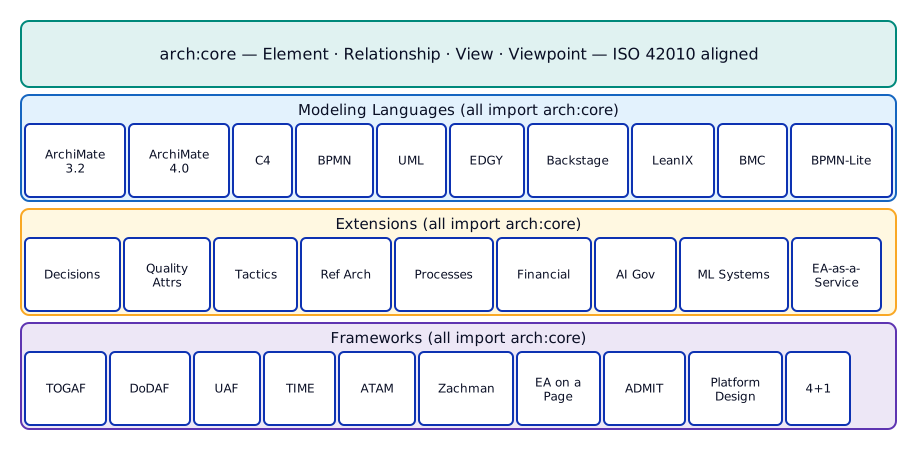 All modelling languages, extensions, and frameworks import arch:core — enabling cross-domain queries and shared validation.
Extensions compose freely with modelling languages. You can attach ad:Decision instances to ArchiMate elements, link timefw:FitAssessment to applications, or connect aigov:AISystem governance wrappers to mlsys:MLModel instances. The shared arch:core foundation makes this work without custom integration code.
Cross-language mappings (*-crossmappings.ttl files) provide formal equivalence axioms between frameworks — for example, mapping TOGAF content metamodel entities to ArchiMate elements, or UAF concepts to DoDAF equivalents.
What you can do with it
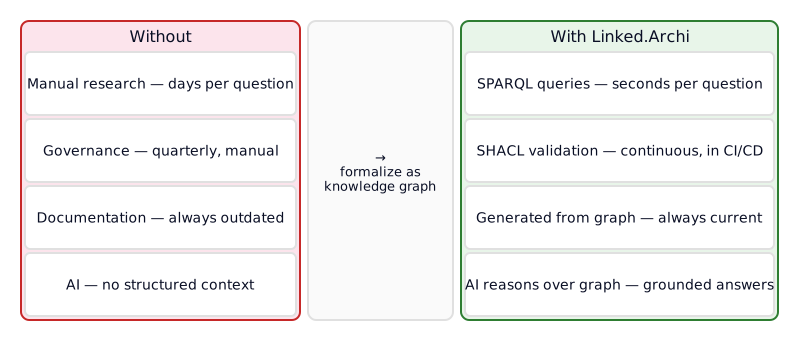 The shift from manual, periodic architecture practices to automated, continuous ones — enabled by formalizing architecture as a knowledge graph.
Ask questions that span multiple tools. "Which applications support capability X, are classified as Migrate in our portfolio assessment, and have no architecture decision documenting why?" — one SPARQL query, four concerns, answers in seconds instead of days of manual research. This is the core value of an enterprise architecture knowledge graph: cross-domain queryability.
Automate architecture governance. SHACL shapes encode governance rules as executable constraints. Run them in CI/CD like code linting. Catch missing owners, invalid relationships, incomplete decisions, and governance gaps automatically — not in quarterly review boards, but on every commit. This is architecture compliance as code.
Generate stakeholder-specific documentation. Deliverable templates define SPARQL-driven document structures. The toolbox generators produce Markdown, HTML, and interactive visualizations from the graph. Model once, generate views for executives, developers, auditors, and operations teams.
Give AI agents access to your architecture. The MCP server exposes the graph to Claude, Amazon Q, or any MCP-compatible AI agent. Architects ask natural language questions; the agent translates to SPARQL and returns grounded answers — not hallucinated from training data, but derived from your actual architecture model. This is AI for enterprise architecture in practice — what Forrester calls the "context graph" that AI agents need to reason about an enterprise.
Build custom metamodels. Extend the core ontology with organization-specific elements, relationships, and validation rules. Define your own architecture modelling language or customize an existing one. The ArchiMate implementation (13 files, 17,000+ lines) serves as a reference for what a complete ArchiMate ontology looks like.
Connect architecture to code. Backstage catalog-info.yaml, Structurizr DSL files, PlantUML sources, Terraform modules, draw.io XML exports — these are architecture artifacts that live in Git alongside code. Convert them to RDF and they join the same knowledge graph as your enterprise ArchiMate models from Archi or Sparx EA. Architecture as code meets semantic architecture modelling — producing a machine-readable architecture model that bridges the gap between development and governance.
Design principles
These are the non-obvious architectural choices that shape the ontologies — the decisions that make this a practical semantic architecture framework rather than an academic exercise. Each has a rationale documented in Design Decisions.
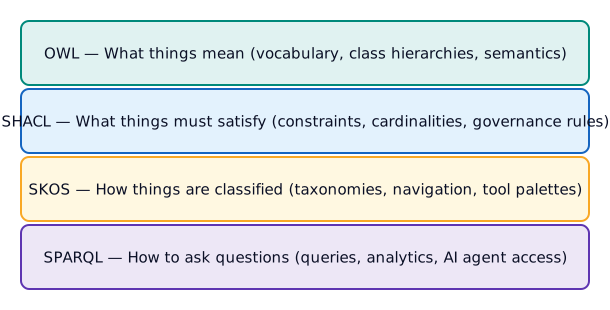 Each W3C standard has a distinct role — OWL for meaning, SHACL for validation, SKOS for classification, SPARQL for queries. No overlap.
-
OWL for meaning, SHACL for validation, SKOS for navigation. OWL defines vocabulary semantics. SHACL enforces closed-world constraints. SKOS provides classification hierarchies for tool palettes and navigation. They don't overlap.
-
Minimal OWL profile. Only class declarations, simple hierarchies, property typing, imports, and documentation metadata. No complex restrictions (except TIME, where OWL equivalent classes enable automatic quadrant classification). Everything else goes in SHACL.
-
No punning. The same IRI is never used as both an OWL class and a SKOS concept. Taxonomies reference OWL classes via
skos:narrowerorrdfs:seeAlso, but don't declare them as concepts. -
domainIncludes/rangeIncludesinstead ofrdfs:domain/rdfs:range. Domain and range in RDFS are inference axioms, not constraints. Using them causes unintended type inference. Annotation properties provide tooling hints without polluting the type graph. See the Domain & Range Guide for the full explanation. -
Qualified relationships. Every relationship has three representations: a direct predicate for graph traversal (
am:serves), a qualified relationship resource for metadata and provenance (am:Servinginstance), and anrdf:reifiesbridge (RDF 1.2). This supports both simple SPARQL queries and rich architecture management. -
Standards are reference vocabularies, extensions are model elements. ISO standard concepts don't subclass
arch:Element— they're definitions you reference. Extension concepts do subclassarch:Element— they appear in models and views.
Getting started
| If you want to... | Start here |
|---|---|
| Understand the architecture approach | Architecture & Approach |
| Build a metamodel from scratch | Quick Start Guide |
| See what modelling languages are available | Modelling Languages Guide |
| Add decision tracking, processes, or other extensions | Extensions Guide |
| Integrate TOGAF, DoDAF, or other frameworks | Frameworks Guide |
| Write SHACL validation rules | Validation Guide |
| Understand the design rationale | Design Decisions |
| Use EDGY for enterprise design | EDGY Primer & Modelling Guide |
| See working examples | examples/ directory |
Scope
-
This repository is the semantic layer. It provides the ontologies, taxonomies, and validation shapes — the formal vocabulary that gives architecture data meaning. The toolbox (separate repository) provides converters, generators, a graph navigator, and the MCP server for AI agents. Together they form the full platform.
-
Semantic assets define the vocabulary, not the data. This repository provides the formal schema — what types of elements exist, how they can relate, and what constraints apply. Your organization's actual architecture (applications, capabilities, decisions) is instance data that you populate into the graph using the toolbox converters or by authoring RDF directly.
-
Not a replacement for your existing tools. The Linked.Archi ecosystem doesn't replace Archi, Sparx EA, PlantUML, Miro, draw.io, Excalidraw, Backstage, or Structurizr. It connects them. You keep modelling in whatever tool fits your workflow — the knowledge graph is the integration layer that makes the whole greater than the sum of its parts.
-
Semantic web foundations. The assets use W3C standards (RDF, OWL, SHACL, SPARQL, SKOS). The MCP server and AI agents can reduce the barrier to entry — they write SPARQL for you — but familiarity with these standards helps when extending or customizing the ontologies.
-
Maturity varies across modules. ArchiMate (3.2 and 4.0) is the reference implementation with full metamodel coverage. EDGY, BPMN, and C4 are well-developed. Others vary. See individual module READMEs for current status.
-
Use as-is or as a reference. The semantic assets here support two adoption paths: use them directly (all or a subset relevant to your stack) to get a ready-made architecture knowledge graph, or study them as a worked example for designing your own domain-specific ontologies, taxonomies, and validation shapes, grounded in well-established notations and frameworks (ArchiMate, TOGAF, BPMN, UML, ISO standards).
Frequently asked questions
Is Linked.Archi a tool or a standard? Neither — it's a set of open-source semantic assets (ontologies, taxonomies, validation shapes) built on W3C standards. You use them with whatever tools fit your workflow. The separate toolbox repository provides converters, generators, and an MCP server, but the semantic assets themselves are tool-agnostic.
Do I need to know RDF or SPARQL to use it? Not to get started. The MCP server lets AI agents write SPARQL for you — ask questions in plain language and get grounded answers from your architecture graph. Familiarity with RDF and SPARQL helps when you want to extend the ontologies or write custom queries, but it's not a prerequisite for day-to-day use.
How does it work with ArchiMate?
The ArchiMate ontology formalizes ArchiMate 3.2 and 4.0 as OWL — every element type, relationship type, and constraint from the specification is represented as a machine-readable semantic model. You keep modelling in Archi or Sparx EA; the toolbox converts your .archimate files into RDF that joins the knowledge graph alongside other architecture artifacts.
Can I use just the parts I need?
Yes. Each ontology module is self-contained (importing only arch:core). Use the ArchiMate ontology alone, or combine it with architecture decisions, TOGAF viewpoints, and whatever else fits your practice. The modular design means you adopt incrementally.
How is this different from just putting everything in one EA tool? EA tools are excellent for their intended scope, but they create walled gardens. Linked.Archi doesn't replace them — it connects them. The knowledge graph is the integration layer where ArchiMate models from Archi, UML diagrams from PlantUML, architecture sketches from Miro or draw.io, service catalogues from Backstage, decisions, and governance rules coexist and cross-reference each other. No single tool covers all of that.