Semantic Building Blocks
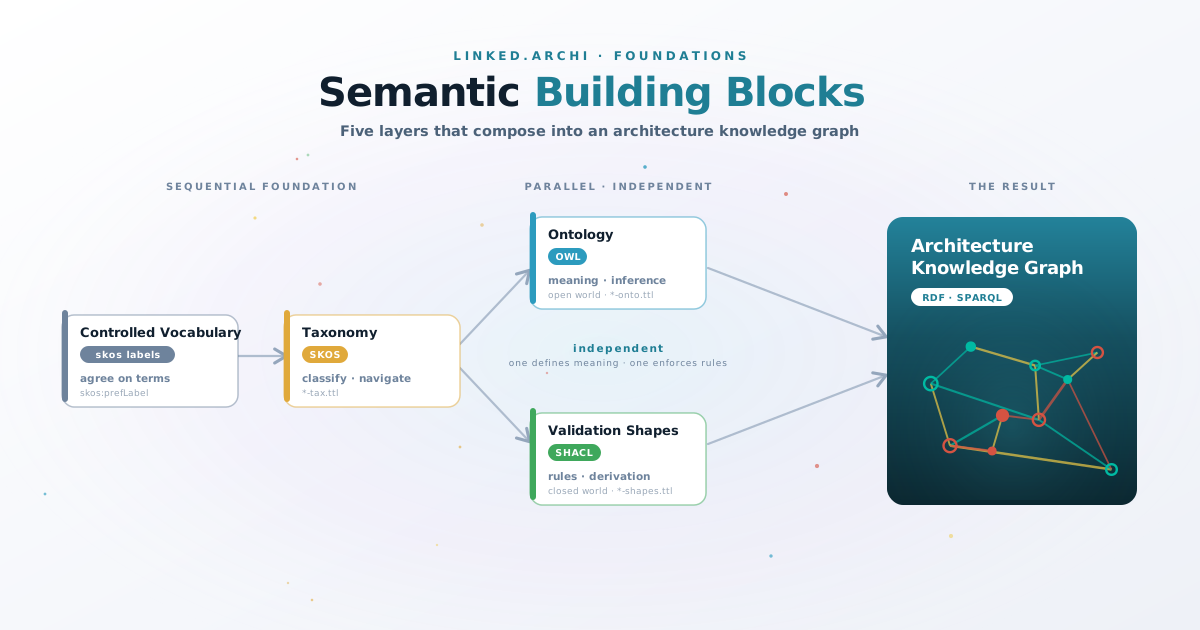
Building a knowledge graph is not a single step. It is a progression — each layer solves a specific problem and prepares the ground for the next. This article explains the five semantic layers that Linked.Archi uses, what each one does, and how they compose into a queryable architecture knowledge graph.
If you already know what SKOS and OWL are, you may prefer Architectural Data vs Architectural Knowledge which maps these layers to the DIKW progression with worked examples.
The progression
The layers compose into a knowledge graph, but not all are strictly sequential. Vocabulary and taxonomy are prerequisites — you need agreed terms before you can formalize or validate them. But OWL and SHACL are parallel concerns that solve different problems independently:
 The semantic layers that compose into an architecture knowledge graph. OWL and SHACL are independent — one defines meaning, the other enforces rules.
- Controlled Vocabulary — agree on terms
- Taxonomy — organize terms into hierarchies
- Ontology (OWL) — define meaning and relationships formally
- Validation Shapes (SHACL) — enforce rules on data
- Knowledge Graph — query and reason over connected data
OWL and SHACL do not depend on each other. You can validate data with SHACL without any OWL ontology, and you can reason over an OWL ontology without any SHACL shapes. Linked.Archi uses both because they address complementary needs: OWL for inference under the Open World Assumption, SHACL for governance under the Closed World Assumption (see DD-2).
Skipping the foundational layers creates problems. An ontology built on inconsistent terminology is brittle. A knowledge graph without validation fills with garbage. But OWL and SHACL can be adopted independently and in any order — they complement each other without requiring each other.
Controlled Vocabulary
What it is: A curated list of terms with agreed definitions. No hierarchy, no relationships — just "these are the words we use, and this is what each one means."
What problem it solves: Ambiguity. Without a controlled vocabulary, the same concept gets different names across teams and tools. One group says "service," another says "application," a third says "component" — all meaning the same thing. Or worse, the same word means different things in different contexts.
In Linked.Archi: Every ontology file (*-onto.ttl) uses skos:prefLabel for the canonical term and skos:altLabel for known synonyms. The skos:definition property provides the agreed meaning. This is the controlled vocabulary layer — embedded directly in the ontology rather than maintained as a separate artefact.
am:ApplicationComponent
    a               owl:Class ;
    skos:prefLabel  "Application Component"@en ;
    skos:altLabel   "App"@en, "Application"@en ;
    skos:definition "An encapsulation of application functionality aligned to
                     implementation structure, which is modular and replaceable."@en .
The labels and definitions ensure that when someone encounters am:ApplicationComponent in a graph, there is no ambiguity about what it means — regardless of what their source tool called it.
Taxonomy
What it is: A hierarchical classification of terms — broader/narrower relationships that organize concepts into navigable trees. Taxonomies answer "what kind of thing is this?" and "what category does it belong to?"
What problem it solves: Without classification, a flat list of 62 element types (as in ArchiMate 3.2) is overwhelming. Taxonomies group them into meaningful clusters — by layer (Business, Application, Technology), by aspect (Active Structure, Behaviour, Passive Structure), or by any other facet relevant to the domain.
The standard: SKOS (Simple Knowledge Organization System) — a W3C standard for representing classification schemes, thesauri, and controlled vocabularies in RDF.
In Linked.Archi: Every modelling language has a *-tax.ttl file that provides a SKOS ConceptScheme classifying its elements. These taxonomies serve two purposes:
- Tool navigation — modelling tools read the taxonomy to populate palettes, tree views, and filter menus
- Faceted classification — elements are classified along independent dimensions (ArchiMate elements are classified by both layer and aspect simultaneously)
:BusinessLayer
    a              skos:Concept ;
    skos:prefLabel "Business Layer"@en ;
    skos:inScheme  <https://meta.linked.archi/archimate3/tax#> ;
    rdfs:seeAlso   am:BusinessLayerElement ;
    skos:narrower  am:BusinessActor, am:BusinessRole, am:BusinessProcess,
                   am:BusinessFunction, am:BusinessService . . . .
The taxonomy groups am:BusinessActor, am:BusinessRole, etc. under "Business Layer" — a navigational concept that helps humans and tools find what they need. The rdfs:seeAlso links the SKOS grouping concept to its corresponding OWL class without conflating the two (see DD-6).
Key distinction: A taxonomy classifies; it does not define meaning. It tells you that am:BusinessProcess belongs to the Business Layer, but it does not tell you what a Business Process is, what properties it has, or what relationships it can participate in. That is the ontology's job.
Ontology
What it is: A formal, machine-readable model of a domain — classes, properties, relationships, and constraints that define what things exist, how they relate, and what rules govern their behaviour. An ontology makes meaning explicit enough for machines to reason over it.
What problem it solves: Taxonomies classify, but they cannot express "an Application Component realizes an Application Service" or "a Serving relationship connects an active structure element to a behaviour element." Ontologies define the vocabulary of relationships, their domains and ranges, and the logical rules that allow inference.
The standard: OWL (Web Ontology Language) — a W3C standard for defining ontologies in RDF. OWL adds formal semantics on top of RDF Schema, enabling reasoning and inference.
In Linked.Archi: The *-onto.ttl files define the formal semantics of each modelling language. They declare:
- Classes — the types of things that exist (
am:ApplicationComponent,am:Serving,am:BusinessProcess) - Properties — the relationships between things (
am:serves,am:realizes,am:composedOf) - Class hierarchies — inheritance (
am:BusinessProcess rdfs:subClassOf am:InternalBehaviorElement) - Property characteristics — domain/range hints, inverse properties, transitivity
am:ApplicationComponent
    a               owl:Class ;
    rdfs:subClassOf am:InternalActiveStructureElement ;
    skos:prefLabel  "Application Component"@en ;
    skos:definition "An encapsulation of application functionality aligned to
                     implementation structure."@en .

am:serves
    a               owl:ObjectProperty ;
    skos:prefLabel  "serves"@en ;
    skos:definition "Indicates that an element provides its functionality to
                     another element."@en .
What reasoning enables: With formal semantics, a machine can derive facts that were never explicitly stated. If am:ApplicationComponent rdfs:subClassOf am:InternalActiveStructureElement, and a SPARQL query asks for all internal active structure elements, it will find application components — without anyone having to list them explicitly.
Key distinction from taxonomy: The taxonomy says "Application Component is in the Application Layer." The ontology says "Application Component is a kind of Internal Active Structure Element, and it can serve Application Services." The taxonomy navigates; the ontology reasons.
Validation Shapes and Derivation Rules
What it is: SHACL serves two roles in Linked.Archi. First, it defines executable constraints that check whether data in the graph conforms to the rules of the domain — required properties, allowed relationship types, cardinality constraints. Second, it defines derivation rules (sh:rule) that infer new facts from existing graph patterns.
What problem it solves: An ontology defines what can exist. Shapes define what must exist and what must not exist. And derivation rules produce facts that are logically implied but not explicitly stated — like derived relationships in ArchiMate.
The standard: SHACL (Shapes Constraint Language) and SHACL Advanced Features (for rules) — W3C standards for validating and enriching RDF graphs.
In Linked.Archi: The *-shapes.ttl files encode governance rules as executable constraints. The *-derivation-rules.ttl files use SHACL rules to infer new relationships. Both run in CI/CD — validation catches errors, derivation enriches the graph.
Validation example:
amsh:ApplicationComponentShape
    a              sh:NodeShape ;
    sh:targetClass am:ApplicationComponent ;
    sh:property [
        sh:path     skos:prefLabel ;
        sh:minCount 1 ;
        sh:message  "Every Application Component must have a label." ;
    ] ;
    sh:property [
        sh:path     am:serves ;
        sh:class    am:ApplicationService ;
        sh:message  "An Application Component can only serve Application Services." ;
    ] .
Derivation example:
amderiv:DerivedRealizationRule
    a              sh:NodeShape ;
    sh:targetClass am:Element ;
    sh:rule [
        a       sh:TripleRule ;
        sh:subject   sh:this ;
        sh:predicate am:indirectlyRealizes ;
        sh:object    [sh:path (am:realizes am:realizes)] ;
    ] .
This rule infers that if element A realizes B, and B realizes C, then A indirectly realizes C — without anyone having to state that explicitly.
Two roles of SHACL in Linked.Archi:
- Validation — enforce structural and governance rules (Closed World Assumption: missing data is a violation)
- Derivation — infer new relationships from graph patterns (like OWL inference, but driven by explicit pattern matching rather than logical axioms)
How this relates to OWL inference: Both OWL and SHACL can derive new facts. OWL inference is declarative — a reasoner applies logical axioms (transitivity, class hierarchies, equivalent classes). SHACL rules are procedural — they match explicit graph patterns and produce new triples. Linked.Archi uses both: OWL for type-level inference (subclass reasoning, property inheritance), SHACL rules for instance-level derivation (relationship chains, conditional patterns).
Key distinction from ontology: OWL operates under the Open World Assumption — if something is not stated, it might still be true. SHACL validation operates under the Closed World Assumption — if something is not stated, it is a violation. SHACL derivation bridges the two: it produces new facts (like OWL) but based on closed-world pattern matching (like SHACL validation). This is why both are needed (see DD-2).
Knowledge Graph
What it is: The result of combining all the previous layers — controlled vocabulary, taxonomy, ontology, and validation — with actual instance data. A knowledge graph is a validated, semantically typed, queryable graph of interconnected facts about a domain.
What problem it solves: Individual tools hold fragments of architecture knowledge. The knowledge graph connects them into a single queryable whole — traversable by SPARQL queries, accessible to AI agents, and governed by automated validation.
The standard: RDF (Resource Description Framework) as the data model, SPARQL as the query language.
In Linked.Archi: When you convert an ArchiMate model from Archi, a service catalogue from Backstage, and architecture decisions from Markdown ADRs into RDF using the shared ontologies — and validate the result against SHACL shapes — you have an architecture knowledge graph. The elements from different sources share a common vocabulary (arch:core), are classified by shared taxonomies, and are connected by formally defined relationships.
# "What capabilities are at risk if we decommission the CRM?"
SELECT ?capability ?service WHERE {
    ex:crm-system am:realizes ?service .
    ?service am:realizes ?capability .
    ?capability a am:Capability .
}
This query works because:
- The controlled vocabulary ensured "CRM" was consistently named
- The taxonomy classified it as an Application Component
- The ontology defined what am:realizes means and that it is transitive through service layers
- The shapes validated that the realization chain is well-formed
- The knowledge graph holds the connected instance data
How the layers relate
| Layer | Standard | Linked.Archi files | Role |
|---|---|---|---|
| Controlled Vocabulary | — | skos:prefLabel / skos:definition in *-onto.ttl |
Agree on terms |
| Taxonomy | SKOS | *-tax.ttl |
Classify and navigate |
| Ontology | OWL | *-onto.ttl |
Define meaning and enable reasoning |
| Validation & Derivation | SHACL | *-shapes.ttl, *-derivation-rules.ttl |
Enforce rules and derive new facts |
| Knowledge Graph | RDF + SPARQL | Instance data (your models) | Query and reason |
Each layer is maintained as a separate file because they serve different consumers and change at different rates (see DD-13). The metamodel manifest ties them together into a discoverable whole.
Common misconceptions
"A taxonomy is just a simple ontology." No. A taxonomy classifies; an ontology defines meaning. You can have a taxonomy without an ontology (a library classification scheme), and an ontology without a taxonomy (a formal domain model with no navigational structure). Linked.Archi uses both because they serve different purposes — the taxonomy populates tool palettes, the ontology enables reasoning.
"OWL can do validation." Technically, OWL restrictions can express some constraints. But OWL operates under the Open World Assumption — a missing property is not a violation, it is simply unknown. For architecture governance, you need the Closed World Assumption: "if there is no owner stated, that is a problem." SHACL provides this.
"A knowledge graph is just a database with links." A knowledge graph carries formal semantics. The links are not arbitrary — they are typed relationships with defined meaning. This is what enables inference (deriving facts not explicitly stated) and validation (checking that stated facts are consistent with the domain model).
"You need all layers from day one." You do not. Start with the ontology (the minimum for Linked.Archi is a *-onto.ttl file typed as arch:Metamodel). Add a taxonomy when you need tool navigation. Add shapes when you need governance. The layers accrue as the language matures — see Quick Start for the incremental path.
Further reading
- Architectural Data vs Architectural Knowledge — maps these layers to the DIKW progression with worked examples
- Architecture & Approach — how the layers compose in the Linked.Archi module system
- DD-2: SHACL for Closed-World Validation — why both OWL and SHACL are needed
- DD-6: No Punning — why OWL classes and SKOS concepts stay separate
- DD-7: SKOS for Taxonomies — why SKOS over OWL class hierarchies for classification
- Quick Start Guide — build a metamodel from scratch, layer by layer