TIME Framework Primer & Modelling Guide — Application Portfolio Rationalization with Linked.Archi
Application portfolios accumulate hundreds of systems with no consistent basis for deciding which to fund, modernize, tolerate, or retire. The Gartner TIME model turns that into a repeatable decision; formalizing it as semantic assets lets you compute dispositions, validate them against fit ratings, and query the whole portfolio for rationalization candidates.
This guide introduces the Gartner TIME framework as formalized in Linked.Archi, explains how its concepts map to semantic assets, and demonstrates practical application portfolio assessment through worked examples.
Phase 1 — Understanding the TIME Framework
What is the TIME Framework?
TIME stands for Tolerate, Invest, Migrate, Eliminate — four dispositions that classify applications in an enterprise portfolio based on their fitness along two primary axes:
- Functional fit (business value) — how well the application supports business needs and capabilities
- Technical fit (technical health) — how well the application performs from a technical quality, maintainability, and operability perspective
The model was developed by Gartner for application portfolio rationalization and is widely adopted across the industry. SAP LeanIX, Ardoq, and other EA tools implement it natively.
References: - SAP LeanIX TIME Documentation - LeanIX Wiki — Gartner TIME Model - Gartner — Enterprise Applications - Ardoq — Application Rationalization - Enterprise Architecture.org — Bridging Application Disposition Frameworks
The TIME Quadrant
The TIME model forms a 2x2 matrix:
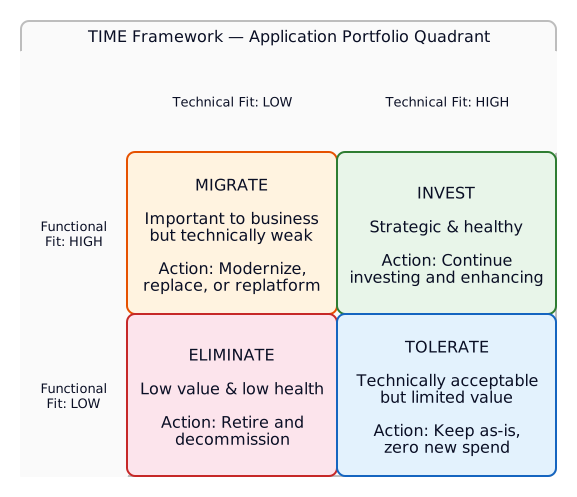 The four TIME dispositions mapped by Functional Fit (y-axis) and Technical Fit (x-axis). Each quadrant mandates a specific budget posture and action.
The Four Dispositions
| Disposition | Functional Fit | Technical Fit | Action |
|---|---|---|---|
| Invest | High | High | Strategic and healthy — continue investing and enhancing |
| Migrate | High | Low | Important to business but technically weak — modernize, replace, or replatform |
| Tolerate | Low | High | Technically acceptable but limited strategic value — keep as-is, avoid further investment |
| Eliminate | Low | Low | Low value and low health — retire and decommission |
Disposition Is a Decision, Not a Label
A TIME disposition is not a descriptive tag on an application — it is a strategic decision that mandates an action and a budget posture. Classification and action are the same act: once you place an application in a quadrant, you have committed to what happens to it.
Each disposition maps to a concrete funding posture:
- Invest — actively fund and extend. Put new project money and roadmap capacity here.
- Tolerate — deliberately do nothing. Ring-fence at zero new spend; maintain only to keep running. This is an active budget decision, not neglect.
- Migrate — redirect investment toward replacement. The business need persists but the technology must change.
- Eliminate — decommission and reclaim the budget. Plan retirement, migrate data, free the spend.
The disposition is what you take into project/portfolio governance: proposed initiatives get checked against it. You don't approve a feature project for an application dispositioned Eliminate.
Disposition vs Lifecycle State
A common source of confusion: disposition and lifecycle state are separate axes.
| Concept | Question it answers | Example |
|---|---|---|
timefw:timeDisposition |
What should happen? (strategic decision) | Eliminate |
timefw:lifecycleState |
Where is it operationally? (current state) | Run |
An application can be dispositioned Eliminate while still in lifecycle state Run for 18 months — the disposition drives the transition toward Retire, but the operational state hasn't changed yet. Similarly, a Migrate disposition doesn't mean the application is in Build — it means a replacement initiative should be planned.
The lifecycle states (Plan, Build, Run, Retire) are grounded in the arch-processes extension (ap:LifecycleStage) and aligned to ISO/IEC/IEEE 12207 software lifecycle stages via skos:closeMatch:
| TIME State | ISO 12207 Stage | LeanIX Equivalent |
|---|---|---|
| Plan | Concept | Plan |
| Build | Development | Phase In |
| Run | Utilization | Active |
| Retire | Retirement | Phase Out / End of Life |
Model both:
ex:OldHRPortal a timefw:Application ;
    timefw:lifecycleState timefw:Run ;           # Currently running in production
    timefw:hasFitAssessment [
        timefw:timeDisposition timefw:Eliminate ; # Strategic decision: retire it
    ] .
Portfolio Health — Reading the Distribution
When applied across the estate, the distribution of dispositions is the signal:
| Pattern | Interpretation |
|---|---|
| High proportion of Tolerate | Portfolio stagnation — too many apps in "do nothing" limbo |
| Healthy Invest share | Portfolio is funding its future |
| Large Eliminate backlog | Rationalisation debt — retirement decisions made but not executed |
| Many Migrate without progress | Modernisation intent without delivery capacity |
See the Portfolio Distribution Summary SPARQL query in Phase 4 for how to compute this from the graph.
Beyond Two Dimensions
While the classic TIME model uses two axes, many organizations extend it with a third dimension:
- Cost fitness — relative cost of maintaining the application (licensing, operations, support)
The Linked.Archi TIME ontology supports all three dimensions: functional fit, technical fit, and cost fitness. The cost dimension does not alter the quadrant classification (which remains based on functional + technical) but provides additional decision context.
Assessment Workflow
A typical TIME assessment follows this workflow:
- Identify — select applications for assessment (typically a portfolio or business domain)
- Score — evaluate each application on functional fit and technical fit (typically 1-5 scale)
- Rate — derive HIGH/LOW ratings from scores using a threshold (e.g., >= 4 is HIGH)
- Classify — assign TIME disposition based on the rating combination
- Evidence — attach supporting evidence (architecture reviews, security assessments, vendor roadmaps)
- Approve — governance review and status assignment (Draft -> Approved)
- Act — execute the disposition (invest, modernize, tolerate, retire)
Roles in the Assessment Process
TIME assessments are collaborative — no single role can judge both business value and technical health accurately. The ontology captures the participants via timefw:assessor, timefw:businessOwner, and timefw:itOwner.
| Role | Responsibility | Ontology property |
|---|---|---|
| Business owner | Provides functional fit judgement — they understand the application's business value, capability coverage, and strategic relevance. Answers: "How well does this serve our needs?" | timefw:businessOwner |
| IT owner / Platform lead | Provides technical fit judgement — they understand the application's technical health, maintainability, security posture, and integration quality. Answers: "How healthy is this technically?" | timefw:itOwner |
| Enterprise architect | Facilitates the assessment, ensures consistency across the portfolio, owns the assessment model (scoring scale, thresholds), and resolves disagreements. Records the assessment. | timefw:assessor |
| Architecture governance board | Reviews and approves dispositions. Transitions assessments from Draft to Approved. Ensures dispositions are actionable and budgeted. | (represented by timefw:assessmentStatus transitions) |
Why this matters: Functional fit scored by IT alone tends to undervalue business-critical applications that happen to be ugly. Technical fit scored by business alone tends to overlook serious operability and security risks. The assessment is reliable only when both perspectives contribute.
A common anti-pattern is the "architect scores everything alone" approach — this produces assessments that neither business nor IT feel ownership over, making the disposition unenforceable in governance.
@prefix timefw: <https://meta.linked.archi/time-framework/onto#> .
@prefix skos:   <http://www.w3.org/2004/02/skos/core#> .
@prefix ex:     <https://model.example.com/portfolio#> .

# Roles captured on the application
ex:LegacyCRM a timefw:Application ;
    skos:prefLabel "Legacy CRM System"@en ;
    timefw:businessOwner ex:SalesDirector ;   # Judges functional fit
    timefw:itOwner ex:PlatformLead .          # Judges technical fit

# Assessor recorded on the assessment
ex:CRM-Assess-2026 a timefw:FitAssessment ;
    timefw:assessedApplication ex:LegacyCRM ;
    timefw:assessor ex:EnterpriseArchitect ;  # Facilitates and records
    timefw:assessmentStatus timefw:Approved . # Board approved
Phase 2 — The Linked.Archi Semantic Model
Namespace and Assets
| File | Namespace | Layer | Purpose |
|---|---|---|---|
time-onto.ttl |
https://meta.linked.archi/time-framework/onto# |
OWL (reasoning) | Classes, properties, OWL enumeration types, automatic quadrant classification |
time-tax.ttl |
https://meta.linked.archi/time-framework/tax# |
SKOS (navigation) | 7 ConceptSchemes for controlled vocabularies |
time-shapes.ttl |
https://meta.linked.archi/time-framework/shapes# |
SHACL (validation) | Required fields, value ranges, cardinality constraints, disposition–rating consistency guard |
time-derivation.ttl |
https://meta.linked.archi/time-framework/derivation# |
SHACL Rules (derivation) | Disposition movement derivation with PROV-O provenance |
time-crossmappings.ttl |
https://meta.linked.archi/time-framework/crossmappings# |
SKOS mappings | Editorial correspondences to ArchiMate, Backstage, TOGAF |
time-metamodel.ttl |
https://meta.linked.archi/time-framework/metamodel# |
Manifest | Entry point tying all layers together |
examples/time-framework-example-data.jsonld |
— | Example | 8 sample applications with fit assessments |
examples/time-framework-d3-demo.html |
— | Demo | Interactive D3 visualization |
Three-Layer Architecture
The TIME framework uses three complementary semantic layers. Each answers a different question:
| Layer | Question it answers | Example |
|---|---|---|
| OWL (ontology) | "What is this?" | High/High ratings -> the assessment is an InvestAssessment (inference) |
| SHACL (shapes) | "Is this valid?" | Missing timeDisposition -> validation error (constraint) |
| SKOS (taxonomy) | "What are the choices?" | Valid dispositions: Tolerate, Invest, Migrate, Eliminate (navigation) |
This follows the Linked.Archi design principles — see DD-2: Minimal OWL Profile with SHACL Constraints and DD-7: SKOS for Taxonomies and Classification.
The dispositions, ratings and lifecycle states follow the repository's closed enumeration pattern: an owl:Class closed with owl:oneOf, values declared as named individuals that are also skos:Concept, and skos:narrower navigation from the taxonomy. The same pattern carries the tech radar rings and quadrants and the UML enumerations.
TIME is the only framework in Linked.Archi that uses OWL restrictions beyond the minimal profile, because automatic quadrant classification is the core value proposition of the model.
Core Classes
| Class | Description |
|---|---|
timefw:Application |
An application in the portfolio being assessed |
timefw:FitAssessment |
A point-in-time assessment with functional and technical fit scores |
timefw:FitCriterion |
A criterion used to evaluate fit (e.g., capability coverage, maintainability) |
timefw:FitCriterionScore |
A scored evaluation of one criterion within an assessment |
timefw:Evidence |
Supporting evidence (security reports, vendor roadmaps, operations metrics) |
timefw:TimeAssessmentModel |
The scoring model (scale, thresholds for HIGH/LOW derivation) |
timefw:BusinessCapability |
A business capability supported by applications |
timefw:TechnologyComponent |
A technology dependency used by applications |
timefw:Person |
Assessors, business owners, IT owners |
Classified Assessment Types (OWL)
The ontology defines four OWL equivalent classes that enable automatic quadrant classification by a DL reasoner:
| Class | Condition | Disposition |
|---|---|---|
timefw:InvestAssessment |
functionalFitRating = High AND technicalFitRating = High | Invest |
timefw:MigrateAssessment |
functionalFitRating = High AND technicalFitRating = Low | Migrate |
timefw:TolerateAssessment |
functionalFitRating = Low AND technicalFitRating = High | Tolerate |
timefw:EliminateAssessment |
functionalFitRating = Low AND technicalFitRating = Low | Eliminate |
Controlled Vocabularies
Six enumeration types, each defined as owl:oneOf in the ontology and organized as skos:ConceptScheme in the taxonomy:
| Vocabulary | Values |
|---|---|
timefw:TimeDisposition |
Tolerate, Invest, Migrate, Eliminate |
timefw:FitRating |
High, Low |
timefw:FitDimension |
Functional, Technical, Cost |
timefw:AssessmentStatus |
Draft, Approved, Superseded, Rejected |
timefw:EvidenceType |
ArchitectureReview, SecurityAssessment, OperationsMetrics, CostAnalysis, BusinessStakeholderInput, VendorRoadmap, TechnicalDebtRegister, OtherEvidence |
timefw:LifecycleState |
Plan, Build, Run, Retire |
timefw:DispositionMovement |
Improved, Degraded, Unchanged, NewAssessment |
Key Properties
Object properties:
| Property | Domain | Range | Description |
|---|---|---|---|
timefw:hasFitAssessment |
Application | FitAssessment | Links app to assessments over time |
timefw:assessedApplication |
FitAssessment | Application | Inverse — which app was assessed |
timefw:timeDisposition |
FitAssessment | TimeDisposition | The TIME classification outcome |
timefw:functionalFitRating |
FitAssessment | FitRating | HIGH/LOW functional fit |
timefw:technicalFitRating |
FitAssessment | FitRating | HIGH/LOW technical fit |
timefw:supportsCapability |
Application | BusinessCapability | Business capabilities served |
timefw:usesTechnologyComponent |
Application | TechnologyComponent | Technology dependencies |
timefw:businessOwner |
Application | Person | Accountable business owner |
timefw:itOwner |
Application | Person | Accountable IT owner |
timefw:hasEvidence |
FitAssessment | Evidence | Supporting evidence items |
timefw:usesAssessmentModel |
FitAssessment | TimeAssessmentModel | Scoring model used |
timefw:dispositionMovement |
FitAssessment | DispositionMovement | Direction of change vs previous assessment (manual or derived) |
timefw:previousDisposition |
FitAssessment | TimeDisposition | Disposition from the prior assessment (manual or derived) |
Datatype properties:
| Property | Domain | Range | Description |
|---|---|---|---|
timefw:assessmentDate |
FitAssessment | xsd:date | When the assessment was performed |
timefw:functionalFitScore |
FitAssessment | xsd:integer | Numeric score (typically 1-5) |
timefw:technicalFitScore |
FitAssessment | xsd:integer | Numeric score (typically 1-5) |
timefw:costFitScore |
FitAssessment | xsd:integer | Numeric score (typically 1-5) |
timefw:rationale |
FitAssessment | xsd:string | Justification narrative |
timefw:scaleMin |
TimeAssessmentModel | xsd:integer | Minimum on the scale (e.g., 1) |
timefw:scaleMax |
TimeAssessmentModel | xsd:integer | Maximum on the scale (e.g., 5) |
timefw:highThreshold |
TimeAssessmentModel | xsd:integer | Score at or above = HIGH (e.g., 4) |
Validate Assessments with SHACL
The shapes layer enforces data quality:
| Shape | Target | Key Constraints |
|---|---|---|
ApplicationShape |
timefw:Application |
Required: skos:prefLabel. Warning: should have assessment. Owner must be Person. |
FitAssessmentShape |
timefw:FitAssessment |
Required: application, date, disposition. Scores: integer 1-5. Ratings: High/Low. |
EvidenceShape |
timefw:Evidence |
Required: label, evidence type (from 8 valid values). |
FitCriterionScoreShape |
timefw:FitCriterionScore |
Required: criterion reference, score 1-5. |
FitCriterionShape |
timefw:FitCriterion |
Required: label, dimension (Functional/Technical/Cost). |
Run validation:
Disposition–Rating Consistency Guard
Beyond basic field validation, the shapes file includes a SPARQL-based constraint that checks logical consistency: when both functionalFitRating and technicalFitRating are present on an assessment, the timeDisposition must match the implied quadrant.
| Ratings | Required Disposition |
|---|---|
| Low + High | Tolerate |
| High + High | Invest |
| High + Low | Migrate |
| Low + Low | Eliminate |
This fires only when both ratings are asserted — assessments that state a disposition without ratings (e.g., from manual governance judgement) pass without error.
# This will FAIL validation:
ex:BadAssessment a timefw:FitAssessment ;
    timefw:functionalFitRating timefw:High ;
    timefw:technicalFitRating timefw:High ;
    timefw:timeDisposition timefw:Eliminate .  # Should be Invest!
    # → sh:Violation: "timeDisposition is inconsistent with fit ratings"
This is complementary to the OWL automatic classification (Phase 5). OWL catches the inconsistency at the reasoning layer; this SHACL constraint catches it at the validation layer — where most CI/CD pipelines operate without a full DL reasoner.
Cross-Language Mappings
The time-crossmappings.ttl file documents editorial correspondences between TIME concepts and other modelling languages in Linked.Archi. These are skos:closeMatch / skos:relatedMatch assertions — not owl:equivalentClass — because the concepts share semantic proximity but differ in scope and context.
| TIME Concept | ArchiMate 3.2 | ArchiMate 4.0 | Backstage | TOGAF |
|---|---|---|---|---|
timefw:Application |
am:ApplicationComponent |
am4:ApplicationComponent |
bs:Component |
togaf:LogicalApplicationComponent |
timefw:BusinessCapability |
am:Capability |
am4:Capability |
— | togaf:Capability |
timefw:TechnologyComponent |
am:TechnologyObject |
am4:TechnologyObject |
— | — |
timefw:Person |
am:BusinessActor |
am4:BusinessActor |
— | — |
In practice, you use these mappings by multi-typing the same IRI:
@prefix timefw: <https://meta.linked.archi/time-framework/onto#> .
@prefix am:     <https://meta.linked.archi/archimate3/onto#> .
@prefix skos:   <http://www.w3.org/2004/02/skos/core#> .
@prefix ex:     <https://model.example.com/portfolio#> .

# Same node, two types — queryable from both frameworks
ex:LegacyCRM a timefw:Application, am:ApplicationComponent ;
    skos:prefLabel "Legacy CRM System"@en ;
    timefw:hasFitAssessment ex:CRM-Assess-2026 ;
    am:serves ex:SalesService .
No import of the crossmappings file is required for this to work — RDF multi-typing is native. The crossmappings file documents the semantic relationship for tooling and documentation generators.
Axis Terminology — Gartner vs SAP LeanIX
The TIME framework has two co-existing naming conventions for its axes:
| Linked.Archi | Gartner (original) | SAP LeanIX |
|---|---|---|
timefw:Functional (prefLabel) |
Business fitness / Business value | Functional fit |
timefw:Technical (prefLabel) |
Technical fitness / IT quality | Technical fit |
The ontology uses SAP LeanIX's "Functional/Technical" as skos:prefLabel (this is what we implemented) and provides the Gartner terminology as skos:altLabel:
timefw:Functional→ altLabels: "Business value", "Business fitness"timefw:Technical→ altLabels: "IT quality", "Technical fitness"
The quadrant mapping is identical in both framings — only the axis labels differ. The skos:historyNote on the ontology header documents the full provenance chain: Gartner (Duggan et al., ~2009) as origin, SAP LeanIX as the source of the axis vocabulary implemented here.
Phase 3 — Practical Modelling
Example 1: Basic Application Assessment
The minimal pattern — one application with one fit assessment:
@prefix timefw: <https://meta.linked.archi/time-framework/onto#> .
@prefix skos:   <http://www.w3.org/2004/02/skos/core#> .
@prefix xsd:    <http://www.w3.org/2001/XMLSchema#> .
@prefix ex:     <https://model.example.com/portfolio#> .

# The application
ex:LegacyCRM a timefw:Application ;
    skos:prefLabel "Legacy CRM System"@en ;
    timefw:businessOwner ex:SalesDirector ;
    timefw:itOwner ex:PlatformLead ;
    timefw:lifecycleState timefw:Run ;
    timefw:supportsCapability ex:Cap_CRM ;
    timefw:usesTechnologyComponent ex:Tech_OracleDB ;
    timefw:hasFitAssessment ex:CRM-Assessment-2026-Q1 .

# The assessment
ex:CRM-Assessment-2026-Q1 a timefw:FitAssessment ;
    timefw:assessedApplication ex:LegacyCRM ;
    timefw:assessmentDate "2026-03-15"^^xsd:date ;
    timefw:assessor ex:SalesDirector ;
    timefw:usesAssessmentModel ex:StandardModel ;
    timefw:functionalFitScore 4 ;
    timefw:technicalFitScore 2 ;
    timefw:costFitScore 3 ;
    timefw:functionalFitRating timefw:High ;
    timefw:technicalFitRating timefw:Low ;
    timefw:timeDisposition timefw:Migrate ;
    timefw:assessmentStatus timefw:Approved ;
    timefw:rationale "Strong business fit but aging technology stack (Java 8, on-prem only). Vendor has announced end-of-support."@en .
Example 2: Scoring Model Definition
Define how scores translate to HIGH/LOW ratings:
@prefix timefw: <https://meta.linked.archi/time-framework/onto#> .
@prefix rdfs:   <http://www.w3.org/2000/01/rdf-schema#> .
@prefix ex:     <https://model.example.com/portfolio#> .

ex:StandardModel a timefw:TimeAssessmentModel ;
    rdfs:label "Standard TIME scoring model (1..5, HIGH >= 4)" ;
    timefw:scaleMin 1 ;
    timefw:scaleMax 5 ;
    timefw:highThreshold 4 .
With this model, scores of 4 or 5 are rated HIGH; scores of 1, 2, or 3 are rated LOW.
Example 3: Evidence-Backed Assessment
Attach evidence to justify the assessment:
@prefix timefw: <https://meta.linked.archi/time-framework/onto#> .
@prefix skos:   <http://www.w3.org/2004/02/skos/core#> .
@prefix xsd:    <http://www.w3.org/2001/XMLSchema#> .
@prefix ex:     <https://model.example.com/portfolio#> .

ex:HR-Assessment-2026 a timefw:FitAssessment ;
    timefw:assessedApplication ex:OldHRPortal ;
    timefw:assessmentDate "2026-01-20"^^xsd:date ;
    timefw:functionalFitScore 2 ;
    timefw:technicalFitScore 2 ;
    timefw:functionalFitRating timefw:Low ;
    timefw:technicalFitRating timefw:Low ;
    timefw:timeDisposition timefw:Eliminate ;
    timefw:rationale "Low adoption (12% active users) and poor technical posture. Plan retirement after data migration to SuccessFactors."@en ;
    timefw:hasEvidence ex:Ev_HR_UsageMetrics, ex:Ev_HR_SecurityAudit .

ex:Ev_HR_UsageMetrics a timefw:Evidence ;
    skos:prefLabel "Usage metrics dashboard"@en ;
    timefw:evidenceType timefw:OperationsMetrics ;
    timefw:referenceURI "https://observability.example.com/hr-portal/usage"^^xsd:anyURI ;
    timefw:sourceSystem "Observability Platform" .

ex:Ev_HR_SecurityAudit a timefw:Evidence ;
    skos:prefLabel "Q4 2025 security audit findings"@en ;
    timefw:evidenceType timefw:SecurityAssessment ;
    timefw:referenceURI "https://jira.example.com/SEC-2025-Q4-HR"^^xsd:anyURI ;
    timefw:sourceSystem "Jira" .
Example 4: Criterion-Level Scoring
For detailed assessments, break down the evaluation into individual criteria:
@prefix timefw: <https://meta.linked.archi/time-framework/onto#> .
@prefix skos:   <http://www.w3.org/2004/02/skos/core#> .
@prefix xsd:    <http://www.w3.org/2001/XMLSchema#> .
@prefix ex:     <https://model.example.com/portfolio#> .

# Define criteria
ex:Crit_CapabilityCoverage a timefw:FitCriterion ;
    skos:prefLabel "Capability coverage"@en ;
    timefw:dimension timefw:Functional ;
    timefw:criterionWeight 0.4 .

ex:Crit_Maintainability a timefw:FitCriterion ;
    skos:prefLabel "Maintainability"@en ;
    timefw:dimension timefw:Technical ;
    timefw:criterionWeight 0.3 .

ex:Crit_SecurityPosture a timefw:FitCriterion ;
    skos:prefLabel "Security posture"@en ;
    timefw:dimension timefw:Technical ;
    timefw:criterionWeight 0.3 .

# Score each criterion within an assessment
ex:CRM-Assessment-2026-Q1
    timefw:hasCriterionScore ex:Score_CRM_Coverage,
                             ex:Score_CRM_Maintain,
                             ex:Score_CRM_Security .

ex:Score_CRM_Coverage a timefw:FitCriterionScore ;
    timefw:criterion ex:Crit_CapabilityCoverage ;
    timefw:criterionScoreValue 4 ;
    timefw:criterionJustification "Covers 85% of sales team requirements."@en .

ex:Score_CRM_Maintain a timefw:FitCriterionScore ;
    timefw:criterion ex:Crit_Maintainability ;
    timefw:criterionScoreValue 2 ;
    timefw:criterionJustification "Java 8 on-prem, no CI/CD, manual deployment."@en .

ex:Score_CRM_Security a timefw:FitCriterionScore ;
    timefw:criterion ex:Crit_SecurityPosture ;
    timefw:criterionScoreValue 2 ;
    timefw:criterionJustification "Unpatched CVEs, no WAF, basic authentication only."@en .
Example 5: Full Portfolio in JSON-LD
For bulk data exchange (e.g., importing from a CMDB or EA tool), use JSON-LD:
{
  "@context": {
    "timefw": "https://meta.linked.archi/time-framework/onto#",
    "skos": "http://www.w3.org/2004/02/skos/core#",
    "xsd": "http://www.w3.org/2001/XMLSchema#",
    "ex": "https://model.example.com/portfolio#"
  },
  "@graph": [
    {
      "@id": "ex:FinanceERP",
      "@type": "timefw:Application",
      "skos:prefLabel": "Finance ERP (SAP S/4HANA)",
      "timefw:lifecycleState": { "@id": "timefw:Run" },
      "timefw:hasFitAssessment": { "@id": "ex:Assess_FinanceERP_2026" }
    },
    {
      "@id": "ex:Assess_FinanceERP_2026",
      "@type": "timefw:FitAssessment",
      "timefw:assessedApplication": { "@id": "ex:FinanceERP" },
      "timefw:assessmentDate": { "@value": "2026-02-15", "@type": "xsd:date" },
      "timefw:functionalFitScore": 5,
      "timefw:technicalFitScore": 5,
      "timefw:functionalFitRating": { "@id": "timefw:High" },
      "timefw:technicalFitRating": { "@id": "timefw:High" },
      "timefw:timeDisposition": { "@id": "timefw:Invest" },
      "timefw:rationale": "Strategic core system with strong vendor support and stable operations."
    }
  ]
}
Phase 4 — Querying the Portfolio
Find All Migration Candidates
Run this query to list approved Migrate candidates, weakest technical fit first:
PREFIX timefw: <https://meta.linked.archi/time-framework/onto#>
PREFIX skos:   <http://www.w3.org/2004/02/skos/core#>

SELECT ?app ?label ?funcScore ?techScore ?rationale WHERE {
    ?app a timefw:Application ;
         skos:prefLabel ?label ;
         timefw:hasFitAssessment ?assess .
    ?assess timefw:timeDisposition timefw:Migrate ;
            timefw:functionalFitScore ?funcScore ;
            timefw:technicalFitScore ?techScore ;
            timefw:assessmentStatus timefw:Approved .
    OPTIONAL { ?assess timefw:rationale ?rationale }
}
ORDER BY ?techScore
Portfolio Distribution Summary
Run this query to count applications per disposition and read the portfolio's health:
PREFIX timefw: <https://meta.linked.archi/time-framework/onto#>

SELECT ?disposition (COUNT(?app) AS ?count) WHERE {
    ?app a timefw:Application ;
         timefw:hasFitAssessment ?assess .
    ?assess timefw:timeDisposition ?disposition ;
            timefw:assessmentStatus timefw:Approved .
}
GROUP BY ?disposition
ORDER BY DESC(?count)
Technology Risk — Apps on End-of-Life Platforms
Run this query to find apps with Low technical fit and the technology components they depend on:
PREFIX timefw: <https://meta.linked.archi/time-framework/onto#>
PREFIX skos:   <http://www.w3.org/2004/02/skos/core#>

SELECT ?app ?appLabel ?tech ?techLabel ?disposition WHERE {
    ?app a timefw:Application ;
         skos:prefLabel ?appLabel ;
         timefw:usesTechnologyComponent ?tech ;
         timefw:hasFitAssessment ?assess .
    ?tech skos:prefLabel ?techLabel .
    ?assess timefw:timeDisposition ?disposition ;
            timefw:technicalFitRating timefw:Low .
}
ORDER BY ?techLabel
Capability Coverage — Which Capabilities Depend on Migrate/Eliminate Apps?
Run this query to see which business capabilities rest on applications marked for change:
PREFIX timefw: <https://meta.linked.archi/time-framework/onto#>
PREFIX skos:   <http://www.w3.org/2004/02/skos/core#>

SELECT ?capability ?capLabel ?app ?appLabel ?disposition WHERE {
    ?app a timefw:Application ;
         skos:prefLabel ?appLabel ;
         timefw:supportsCapability ?capability ;
         timefw:hasFitAssessment ?assess .
    ?capability skos:prefLabel ?capLabel .
    ?assess timefw:timeDisposition ?disposition ;
            timefw:assessmentStatus timefw:Approved .
    FILTER (?disposition IN (timefw:Migrate, timefw:Eliminate))
}
ORDER BY ?capLabel
Assessment Freshness — Stale Assessments
Run this query to surface approved assessments that are overdue for review:
PREFIX timefw: <https://meta.linked.archi/time-framework/onto#>
PREFIX skos:   <http://www.w3.org/2004/02/skos/core#>
PREFIX xsd:    <http://www.w3.org/2001/XMLSchema#>

SELECT ?app ?label ?lastDate WHERE {
    ?app a timefw:Application ;
         skos:prefLabel ?label ;
         timefw:hasFitAssessment ?assess .
    ?assess timefw:assessmentDate ?lastDate ;
            timefw:assessmentStatus timefw:Approved .
    FILTER (?lastDate < "2025-01-01"^^xsd:date)
}
ORDER BY ?lastDate
Phase 5 — OWL Automatic Classification
How It Works
The TIME ontology uses owl:equivalentClass definitions to enable DL reasoners to automatically infer the TIME quadrant:
timefw:InvestAssessment
    owl:equivalentClass [
        owl:intersectionOf (
            timefw:FitAssessment
            [ owl:onProperty timefw:functionalFitRating ; owl:hasValue timefw:High ]
            [ owl:onProperty timefw:technicalFitRating ; owl:hasValue timefw:High ]
        )
    ] .
If an assessment has timefw:functionalFitRating timefw:High and timefw:technicalFitRating timefw:High, a reasoner will automatically classify it as a timefw:InvestAssessment — without the modeller explicitly stating timefw:timeDisposition timefw:Invest.
When to Use Reasoning
OWL classification is useful when:
- Importing data from external systems that provide scores but not dispositions
- Validating consistency — if someone asserts timefw:Migrate but the ratings are High/High, the reasoner flags a conflict
- Querying by inferred type — ?x a timefw:MigrateAssessment finds all migrate candidates regardless of how they were classified
When Manual Disposition Is Enough
For most practical use, explicitly stating timefw:timeDisposition is sufficient. OWL classification adds value for:
- Automated pipelines ingesting raw scores
- Governance validation (checking that asserted dispositions match the rating logic)
- Organizations using a reasoner as part of their architecture toolchain
Phase 6 — Cross-Framework Composition
TIME + Financial Architecture
Combine TIME dispositions with cost data for prioritized rationalization:
@prefix timefw: <https://meta.linked.archi/time-framework/onto#> .
@prefix fina:   <https://meta.linked.archi/financial-architecture/onto#> .
@prefix finard: <https://meta.linked.archi/financial-architecture/reference-data#> .
@prefix skos:   <http://www.w3.org/2004/02/skos/core#> .
@prefix ex:     <https://model.example.com/portfolio#> .

ex:LegacyCRM a timefw:Application ;
    skos:prefLabel "Legacy CRM System"@en ;
    timefw:hasFitAssessment ex:CRM-Assessment-2026-Q1 ;
    fina:hasCostModel ex:CRM-CostModel .

ex:CRM-CostModel a fina:CostModel ;
    fina:currency "EUR" ;
    fina:tcoHorizonYears 3 ;
    fina:totalTCO 1250000.00 ;
    fina:hasCostItem [
        a fina:MigrationCost ;
        fina:costCategory finard:InfrastructureCost ;
        fina:oneTimeAmount 400000.00 ;
        skos:note "Estimated migration to Salesforce"@en ;
    ] .
Query — migration candidates ordered by TCO:
PREFIX timefw: <https://meta.linked.archi/time-framework/onto#>
PREFIX fina:   <https://meta.linked.archi/financial-architecture/onto#>
PREFIX skos:   <http://www.w3.org/2004/02/skos/core#>

SELECT ?app ?label ?tco ?techScore WHERE {
    ?app a timefw:Application ;
         skos:prefLabel ?label ;
         timefw:hasFitAssessment ?assess .
    ?assess timefw:timeDisposition timefw:Migrate ;
            timefw:technicalFitScore ?techScore ;
            timefw:assessmentStatus timefw:Approved .
    ?app fina:hasCostModel ?cost .
    ?cost fina:totalTCO ?tco .
}
ORDER BY DESC(?tco)
TIME + ArchiMate
Link TIME applications to ArchiMate application components for detailed architecture tracing:
@prefix timefw: <https://meta.linked.archi/time-framework/onto#> .
@prefix am:     <https://meta.linked.archi/archimate3/onto#> .
@prefix arch:   <https://meta.linked.archi/core#> .
@prefix skos:   <http://www.w3.org/2004/02/skos/core#> .
@prefix ex:     <https://model.example.com/portfolio#> .

# TIME application linked to ArchiMate element
ex:LegacyCRM a timefw:Application ;
    skos:prefLabel "Legacy CRM System"@en ;
    arch:relatedConcept ex:CRM_AppComponent .

ex:CRM_AppComponent a am:ApplicationComponent ;
    skos:prefLabel "CRM Application Component"@en ;
    am:serves ex:SalesService .
TIME + Architecture Decisions
Connect TIME dispositions to the architecture decisions they drive:
@prefix timefw: <https://meta.linked.archi/time-framework/onto#> .
@prefix ad:     <https://meta.linked.archi/arch-decision#> .
@prefix skos:   <http://www.w3.org/2004/02/skos/core#> .
@prefix ex:     <https://model.example.com/portfolio#> .

ex:ADR-015 a ad:Decision ;
    skos:prefLabel "ADR-015: Migrate Legacy CRM to Salesforce"@en ;
    ad:hasStatus ad:Accepted ;
    ad:relatedConcept ex:LegacyCRM ;
    ad:justification "TIME assessment classified as Migrate (High functional / Low technical). Vendor EOL in 18 months."@en .
Phase 7 — Governance and Lifecycle
Assessment Lifecycle
Assessments progress through governance statuses:
- Draft — initial assessment, not yet reviewed
- Approved — reviewed and accepted by governance
- Superseded — replaced by a newer assessment (keep for audit trail)
- Rejected — reviewed and not accepted (rationale insufficient, scores contested)
Reassessment Pattern
Applications should be reassessed periodically (typically annually). Model this as multiple assessments over time:
ex:LegacyCRM
    timefw:hasFitAssessment ex:CRM-Assess-2024, ex:CRM-Assess-2025, ex:CRM-Assess-2026 .

ex:CRM-Assess-2024 a timefw:FitAssessment ;
    timefw:assessmentDate "2024-03-10"^^xsd:date ;
    timefw:timeDisposition timefw:Tolerate ;
    timefw:assessmentStatus timefw:Superseded .

ex:CRM-Assess-2025 a timefw:FitAssessment ;
    timefw:assessmentDate "2025-03-12"^^xsd:date ;
    timefw:timeDisposition timefw:Migrate ;
    timefw:assessmentStatus timefw:Superseded .

ex:CRM-Assess-2026 a timefw:FitAssessment ;
    timefw:assessmentDate "2026-03-15"^^xsd:date ;
    timefw:timeDisposition timefw:Migrate ;
    timefw:assessmentStatus timefw:Approved .
This creates an audit trail showing how the disposition evolved (Tolerate -> Migrate as technical fitness degraded).
Query — Disposition Drift
Run this query to trace how an application's disposition changed across successive assessments:
PREFIX timefw: <https://meta.linked.archi/time-framework/onto#>
PREFIX skos:   <http://www.w3.org/2004/02/skos/core#>

SELECT ?app ?label ?date ?disposition WHERE {
    ?app a timefw:Application ;
         skos:prefLabel ?label ;
         timefw:hasFitAssessment ?assess .
    ?assess timefw:assessmentDate ?date ;
            timefw:timeDisposition ?disposition .
}
ORDER BY ?app ?date
Disposition Movement Tracking
Each assessment can carry a timefw:dispositionMovement indicating how the disposition changed relative to the previous assessment:
| Movement | Meaning |
|---|---|
timefw:Improved |
Moved toward a more favourable quadrant (e.g., Eliminate -> Tolerate, Migrate -> Invest) |
timefw:Degraded |
Moved toward a less favourable quadrant (e.g., Invest -> Migrate, Tolerate -> Eliminate) |
timefw:Unchanged |
Same disposition as the previous assessment |
timefw:NewAssessment |
First assessment for this application — no prior to compare against |
Favourability ranking: Eliminate(1) < Tolerate(2) < Migrate(3) < Invest(4). Migrate ranks above Tolerate because functional fit (business value) is preserved.
Manual Assertion
Assessors can explicitly state the movement they observed:
ex:CRM-Assess-2026 a timefw:FitAssessment ;
    timefw:assessedApplication ex:LegacyCRM ;
    timefw:assessmentDate "2026-03-15"^^xsd:date ;
    timefw:timeDisposition timefw:Migrate ;
    timefw:previousDisposition timefw:Tolerate ;
    timefw:dispositionMovement timefw:Degraded ;
    timefw:rationale "Technical debt increased; now classified as Migrate."@en .
Automatic Derivation
The derivation rules file (time-derivation.ttl) computes previousDisposition and dispositionMovement automatically from the assessment history using SHACL Rules (sh:SPARQLRule). Derived triples are annotated with PROV-O provenance so you can always distinguish derived facts from manual assertions:
# After running derivation rules, the graph contains:
ex:CRM-Assess-2026 timefw:previousDisposition timefw:Tolerate .
ex:CRM-Assess-2026 timefw:dispositionMovement timefw:Degraded .

# With PROV-O provenance (via RDF 1.2 reification):
<<ex:CRM-Assess-2026 timefw:previousDisposition timefw:Tolerate>>
    prov:wasGeneratedBy timederiv:DeriveDispositionMovement ;
    prov:wasDerivedFrom ex:CRM-Assess-2025 .
The derivation rules:
- Fire only when previousDisposition / dispositionMovement are NOT already manually asserted (manual takes precedence)
- Find the most recent prior assessment of the same application by assessmentDate
- Do not fire when there is no prior assessment (unless computing NewAssessment movement)
Query — Applications with Degrading Disposition
PREFIX timefw: <https://meta.linked.archi/time-framework/onto#>
PREFIX skos:   <http://www.w3.org/2004/02/skos/core#>

SELECT ?app ?label ?currentDisp ?prevDisp ?date WHERE {
    ?app a timefw:Application ;
         skos:prefLabel ?label ;
         timefw:hasFitAssessment ?assess .
    ?assess timefw:timeDisposition ?currentDisp ;
            timefw:previousDisposition ?prevDisp ;
            timefw:dispositionMovement timefw:Degraded ;
            timefw:assessmentDate ?date ;
            timefw:assessmentStatus timefw:Approved .
}
ORDER BY ?date
Worked Example — Full Assessment History with Movement
@prefix timefw: <https://meta.linked.archi/time-framework/onto#> .
@prefix skos:   <http://www.w3.org/2004/02/skos/core#> .
@prefix xsd:    <http://www.w3.org/2001/XMLSchema#> .
@prefix ex:     <https://model.example.com/portfolio#> .

ex:LegacyCRM a timefw:Application ;
    skos:prefLabel "Legacy CRM System"@en ;
    timefw:hasFitAssessment
        ex:CRM-Assess-2024,
        ex:CRM-Assess-2025,
        ex:CRM-Assess-2026 .

# 2024: First assessment — New
ex:CRM-Assess-2024 a timefw:FitAssessment ;
    timefw:assessedApplication ex:LegacyCRM ;
    timefw:assessmentDate "2024-03-10"^^xsd:date ;
    timefw:timeDisposition timefw:Tolerate ;
    timefw:dispositionMovement timefw:NewAssessment ;
    timefw:assessmentStatus timefw:Superseded .

# 2025: Tolerate -> Migrate — Degraded
ex:CRM-Assess-2025 a timefw:FitAssessment ;
    timefw:assessedApplication ex:LegacyCRM ;
    timefw:assessmentDate "2025-03-12"^^xsd:date ;
    timefw:timeDisposition timefw:Migrate ;
    timefw:previousDisposition timefw:Tolerate ;
    timefw:dispositionMovement timefw:Degraded ;
    timefw:assessmentStatus timefw:Superseded .

# 2026: Migrate -> Migrate — Unchanged
ex:CRM-Assess-2026 a timefw:FitAssessment ;
    timefw:assessedApplication ex:LegacyCRM ;
    timefw:assessmentDate "2026-03-15"^^xsd:date ;
    timefw:timeDisposition timefw:Migrate ;
    timefw:previousDisposition timefw:Migrate ;
    timefw:dispositionMovement timefw:Unchanged ;
    timefw:assessmentStatus timefw:Approved .
Appendix A — Common Misconceptions
| Misconception | Reality |
|---|---|
| "TIME is a methodology" | TIME is a classification model. It does not prescribe how to migrate or retire applications. |
| "A disposition is just a label" | A disposition is a strategic decision that mandates action and budget posture. It gates investment decisions. |
| "Tolerate means ignore" | Tolerate means acknowledge the application exists, accept its current state, but avoid further investment. It still needs basic maintenance. "Tolerate" is an active budget decision (zero new spend), not neglect. |
| "Eliminate means delete immediately" | Eliminate means plan for decommissioning. It implies a retirement roadmap, not immediate shutdown. An app can be dispositioned Eliminate while still in lifecycle state Run for months. |
| "Disposition is the same as lifecycle state" | Disposition = what should happen (strategic). Lifecycle state = where is it (operational). They are separate axes that evolve independently. |
| "The quadrant is purely mechanical" | While the 2x2 derives from scores, governance review can override — an application might score High/High but still be marked Migrate if the vendor is being acquired. |
| "Cost should change the quadrant" | Cost is a supporting dimension. The quadrant is always functional x technical. Cost informs prioritization within a quadrant. |
| "One assessment per application" | Applications should be reassessed periodically. The model supports multiple assessments over time with supersession tracking. Dispositions are expected to change as fitness evolves. |
Appendix B — Mapping from EA Tools
From SAP LeanIX
| LeanIX Field | TIME Property |
|---|---|
| Application name | skos:prefLabel |
| IT Owner | timefw:itOwner |
| Business Owner | timefw:businessOwner |
| Functional Fit | timefw:functionalFitRating (map Excellent/Adequate -> High, Insufficient/Unreasonable -> Low) |
| Technical Fit | timefw:technicalFitRating |
| TIME classification | timefw:timeDisposition |
| Lifecycle (Plan/Phase In/Active/Phase Out/End of Life) | timefw:lifecycleState (map to Plan/Build/Run/Retire) |
From Spreadsheets
For organizations tracking TIME in spreadsheets, the JSON-LD format (Example 5) provides a natural import path. Map columns as:
| Spreadsheet Column | JSON-LD Property |
|---|---|
| App Name | skos:prefLabel |
| Functional Score (1-5) | timefw:functionalFitScore |
| Technical Score (1-5) | timefw:technicalFitScore |
| Disposition | timefw:timeDisposition (prefix with timefw:) |
| Assessment Date | timefw:assessmentDate |
| Rationale | timefw:rationale |
Appendix C — Comparison with Other Disposition Models
The TIME model is one of several application disposition frameworks. Linked.Archi currently formalizes TIME; others may be added in future.
| Framework | Axes | Quadrants/Categories | Key Difference |
|---|---|---|---|
| Gartner TIME | Functional fit x Technical fit | 4 (T/I/M/E) | Simple, widely adopted, focus on IT fitness |
| Pace Layering | Rate of change | 3 (Systems of Record / Differentiation / Innovation) | Classifies by change velocity, not fitness |
| APM (Gartner) | Business value x Technical condition | Varies | Broader than TIME, includes cost as primary axis |
| CAST HIGHLIGHT | Business impact x Technical health (automated) | 4 quadrants | Automated code analysis drives technical scores |
Appendix D — Future Consideration: Actionable Dispositions
The current model captures the disposition classification and its evidence. A natural extension is to attach execution metadata to the disposition — making it a full governance commitment rather than just a classification:
# Hypothetical future pattern (not yet implemented):
ex:CRM-Assess-2026 a timefw:FitAssessment ;
    timefw:timeDisposition timefw:Migrate ;
    timefw:dispositionOwner ex:PlatformLead ;        # Who owns executing this?
    timefw:dispositionTargetDate "2027-09-30"^^xsd:date ;  # By when?
    timefw:mandatedAction "Replatform to Salesforce; migrate data by Q3 2027."@en .
This would close the gap between "we classified it" and "we committed to doing something about it." For now, this intent is typically captured in architecture decisions (ad:Decision) linked to the application — see Phase 6, "TIME + Architecture Decisions." A dedicated action-on-disposition pattern may be formalized in a future version if demand warrants it.
References
- SAP LeanIX TIME Documentation
- LeanIX Wiki — Gartner TIME Model
- Gartner — Enterprise Applications
- Gartner — Government Modernization
- Ardoq — Application Rationalization Metamodel
- Enterprise Architecture.org — Bridging Application Disposition Frameworks
- Xebia — How to Assess and Improve Application Portfolio Quality
- Linked.Archi TIME Ontology
- Linked.Archi TIME Taxonomy
- Linked.Archi TIME Shapes
- Linked.Archi Frameworks Guide
- Linked.Archi Design Decisions
- Financial Architecture Practice Guide
Disclaimer: This is a community semantic representation of the Gartner TIME model for interoperability purposes. It is not produced by, endorsed by, or affiliated with Gartner, Inc. References to Gartner are for attribution only.