Classifying Business and Application Architecture with CSVLOD
Capability maps, functional and application decompositions, and application landscapes are notation-independent. You can express them in ArchiMate (as views), in the TOGAF content metamodel (as catalogs, matrices, and diagrams), or as a plain capability map on a slide. EA on a Page's CSVLOD taxonomy classifies the artifacts an EA practice produces by the role they play, regardless of how they are drawn or what a given framework calls them. So the question this article answers is not tied to any one notation: when you produce business or application architecture content — a decomposition, a realization, a solution artifact — which CSVLOD type does it belong to?
The answer follows two axes, and once they are explicit the placement is mechanical. The worked examples use ArchiMate because it makes the element-level content concrete, but the reasoning is the same for TOGAF catalogs, BizBOK capability maps, or any other form.
See also: EA on a Page Primer & Modelling Guide for a standalone introduction to CSVLOD and its Linked.Archi semantic model.
See also: ArchiMate 4.0 Primer & Modelling Guide for the ArchiMate element and relationship model used in the examples below.
See also: Zachman vs EA on a Page for the artifact-versus-deliverable distinction reused here.
Elements Are Not Artifacts
A single model element — an ArchiMate am4:Function or am4:ApplicationComponent, a TOGAF business function, a capability box — is model content, not a CSVLOD artifact. CSVLOD classifies the work product that depicts the content: the business capability map, the application landscape, the solution design document. Different frameworks name these work products differently — TOGAF distinguishes catalogs (lists of building blocks), matrices, and diagrams; ArchiMate calls them views — but CSVLOD classifies them by the role they play in the practice, not by their form. This is the same level distinction the Zachman article draws between a cell (which classifies views) and a deliverable (which aggregates them).
So throughout this article the thing being classified is the artifact, typed with its CSVLOD OWL class (eaop:Vision, eaop:Landscape, eaop:Outline, eaop:Design) and refined via eaop:classifiedByType — never the individual model elements it depicts. The model elements shown alongside each artifact are the content that artifact describes.
The Two Axes That Decide Everything
CSVLOD classifies every artifact along two orthogonal dimensions. For placing any decomposition or landscape, these are the only two questions that matter.
Nature — what does the artifact describe?
| Nature | Describes | CSVLOD types |
|---|---|---|
| Rules | General global rules for how the organization works | Considerations, Standards |
| Structures | High-level standing structures of the organization | Visions, Landscapes |
| Changes | Specific proposed incremental changes | Outlines, Designs |
Focus — who is the primary audience?
| Focus | Language | CSVLOD types |
|---|---|---|
| Business-focused | Technology-neutral, plain business language | Considerations, Visions, Outlines |
| IT-focused | Technical, IT-specific language | Standards, Landscapes, Designs |
A decomposition is a Structure by nature — it says what we have or want to have, not how we work (Rules) or what we are changing right now (Changes). That fixes the column. The Focus axis then picks the row: business-focused structures are Visions; IT-focused structures are Landscapes.
| Structures | Changes | |
|---|---|---|
| Business-focused | Visions — business/application-independent decomposition | Outlines — initiative-scoped solution overview |
| IT-focused | Landscapes — IT landscape decomposition | Designs — project-scoped solution design |
The whole article is a walk through this quadrant.
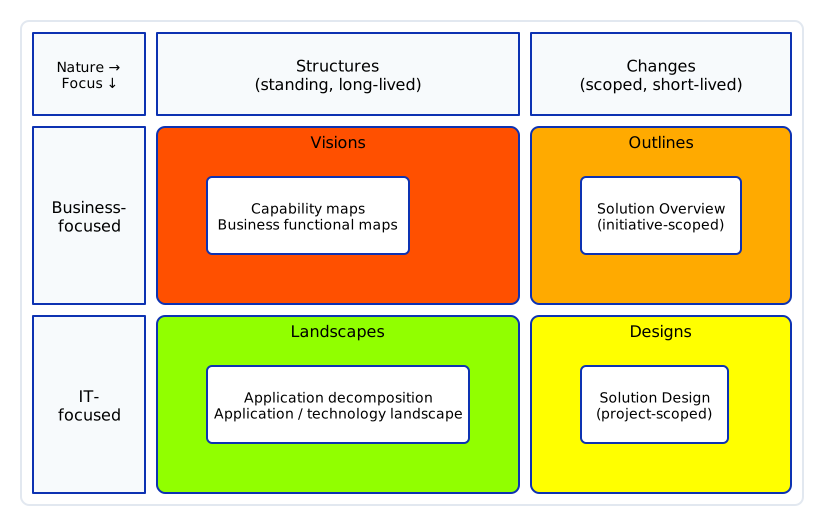 Nature (standing structures vs scoped changes) picks the column; Focus (business vs IT) picks the row — the same axis orientation as the CSVLOD taxonomy matrix. Business and application architecture content falls into one of these four cells.
Business Layer — Functional and Capability Decomposition → Visions
A business capability map is the flagship Vision artifact: eaoptax:BusinessCapabilityModel, defined as "structured graphical representations of all organizational business capabilities, their relationship and hierarchy."
A business function decomposition — a hierarchy of am4:Function elements in the business layer, composed via am4:composedOf, sitting one level below the capability map — shares every defining facet with the capability model:
- Nature = Structures — it is a standing description of what the organization does, not a rule and not a change.
- Focus = Business-focused — it is expressed in technology-neutral business language for business leaders and architects.
- Scope = Organization-wide, Lifecycle = Long-lived.
So a business functional map classifies as a Vision. It is either an instance of eaoptax:BusinessCapabilityModel (treating it as a companion view of the capability model) or a sibling artifact under eaoptax:Visions carrying the same facets.
Business function realization — a business function realizing a capability via am4:realizes — stays inside the Vision. It is a structural correspondence within the standing business model, not a separate artifact type.
Application Layer — Application Functional Decomposition and Realization → Landscapes
Flip the Focus axis and the same reasoning lands one column to the right.
An application functional decomposition — application functions and am4:ApplicationComponent elements, how they compose, and how they realize application services — describes the standing IT landscape. It is:
- Nature = Structures — still a standing structure, not a rule or a change.
- Focus = IT-focused — expressed in technical language, developed by and for architects, largely invisible to business.
- Scope = Organization-wide, Lifecycle = Long-lived.
Structures + IT-focused = Landscapes. The taxonomy defines Landscapes as "high-level technical descriptions of the organizational IT landscape," with examples including landscape diagrams and application inventories — exactly what an application functional decomposition is. The nearest specific artifact is eaoptax:LandscapeDiagram.
Application function realization — an application component assigned to a function that realizes an application service or capability (am4:assignedTo → am4:realizes) — is a structural relationship inside the Landscape, the IT-side mirror of business function realization inside the Vision.
The contrast is clean, and the only thing that moved was Focus:
- Business function decomposition and realization → business-focused structure → Visions
- Application function decomposition and realization → IT-focused structure → Landscapes
The technology layer behaves the same way: a standing decomposition of nodes, system software, and infrastructure services is an IT-focused structure, so it also lands in Landscapes (technology reference models are the Rules counterpart and belong in Standards — see the caveat section).
Moving Right on the Nature Axis — Structures Become Changes
Keep the Focus fixed and move right from Structures to Changes. Scope narrows (organization-wide → initiative/project) and lifecycle shortens (long-lived → short-lived). The decomposition does not disappear — it reappears as a scoped projection tied to a specific proposed change.
Business row: Visions → Outlines. A eaoptax:SolutionOverview is "a high-level description of a specific proposed IT solution understandable to business leaders," initiative-scoped and short-lived. In ArchiMate terms it is a slice of the business functional and capability decomposition projected onto one initiative: which capabilities and business functions the initiative touches, the business impact, and rough cost and benefit. It consumes the Vision-level decomposition; it does not maintain it.
IT row: Landscapes → Designs. A eaoptax:SolutionDesign is a "detailed technical and functional specification of an approved IT solution actionable for project teams," project-scoped and short-lived. In ArchiMate terms it is a projection of the application functional decomposition onto one project: how that project creates or changes specific application functions and components, and how the affected application services get realized. It consumes and extends the Landscape-level decomposition.
So yes — the Solution Overview and Solution Design are directly related to the functional and application decompositions. They are the same structural content seen through the Changes lens, scoped to a single initiative or project.
 Standing structures on the left project into scoped, disposable change artifacts on the right. Focus stays fixed per row; only the Nature axis moves. Dashed edges show Landscapes supplying environment context to both change types.
What the change artifacts look like
The two change artifacts differ sharply in altitude and audience. Both examples below are for the same Checkout Revamp initiative used in the worked example later in this article. CSVLOD itself says nothing about notation — the schematics below are deliberately notation-agnostic, capturing the shape and content of each artifact type. Further down, the same two artifacts are rendered in ArchiMate 4 notation from RDF, showing one concrete way to express them.
A Solution Overview stays in business language: the proposed change, which capabilities and applications are in scope, and a rough business case. It is understandable to business leaders and carries no implementation detail — just enough to approve and fund the initiative.
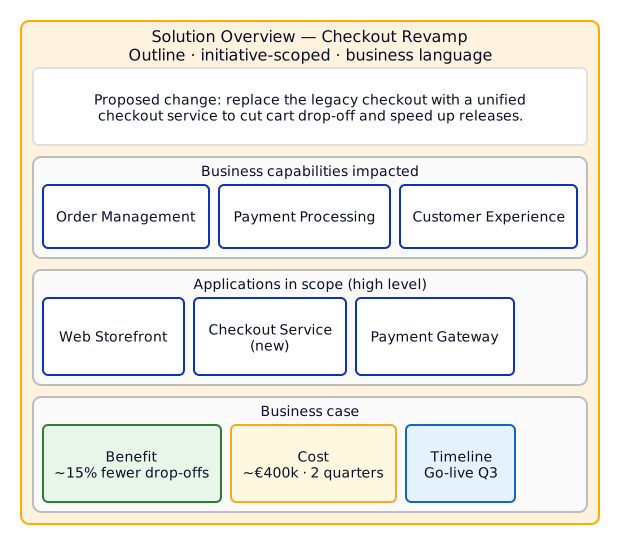 Illustrative Solution Overview (Outline) — coarse, business-facing, one page. The boxes name capabilities and applications, not components or interfaces.
A Solution Design drops into technical detail actionable for a project team: application components, the services they realize, data objects they access, external systems, and the deployment node. This is the IT-focused projection of the application landscape onto the approved project.
 Illustrative Solution Design (Design) — fine-grained and technical. Components realize services, access data objects, call each other, and deploy onto a node. Dashed edges are data access.
The same artifacts in ArchiMate 4 notation
The schematics above are notation-agnostic — a Solution Overview could equally be a slide, a one-page brief, or a TOGAF catalog. To show one concrete expression, here are the same two artifacts modelled as the ArchiMate content of the eaop:Outline and eaop:Design work products, rendered directly from RDF by the Linked.Archi model renderer — the same pipeline used across the ArchiMate guide.
In ArchiMate, the Solution Overview reads as a work package realizing a target-state plateau that aggregates the impacted capabilities and the new application — strategy and business language, no implementation detail.
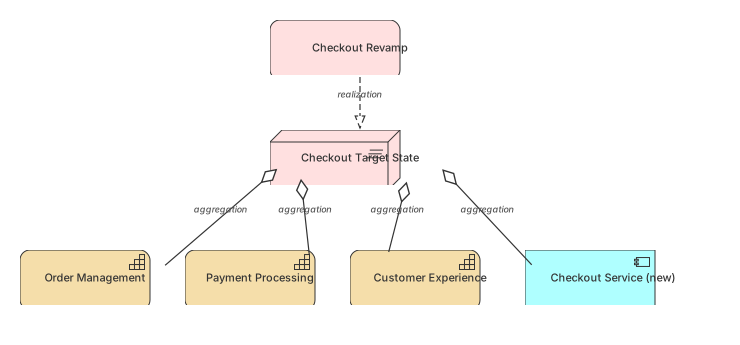 Solution Overview (Outline) in ArchiMate 4 notation, rendered from RDF.
View source model · Try it out ▶
Solution Overview (Outline) in ArchiMate 4 notation, rendered from RDF.
View source model · Try it out ▶
The Solution Design becomes an application-and-technology fragment: the Checkout Service component is assigned to a function that realizes the Checkout API, accesses the Order data object, flows to the Payment Adapter, and is served by the AKS node.
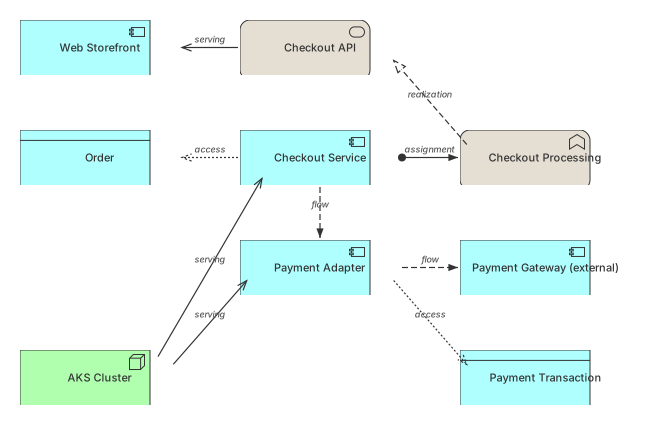 Solution Design (Design) in ArchiMate 4 notation, rendered from RDF.
View source model · Try it out ▶
Solution Design (Design) in ArchiMate 4 notation, rendered from RDF.
View source model · Try it out ▶
The Realization Thread
Realization runs through all four cells, and it is worth reading vertically:
- Business function realization lives in Visions (standing) and is applied per-initiative in Outlines ("how this initiative realizes the affected capabilities").
- Application function realization lives in Landscapes (standing) and is applied per-project in Designs ("how this project realizes the affected application services").
The standing artifacts (Visions, Landscapes) hold the reference realization structure; the change artifacts (Outlines, Designs) describe the delta against it.
Worked Example — Classification with the Content It Describes
Each artifact is typed with its CSVLOD OWL class and refined with eaop:classifiedByType — the same two-layer pattern used throughout the EA on a Page guide. The ArchiMate elements are shown separately as the model content each artifact describes; they are not the classified artifacts themselves.
@prefix eaop:    <https://meta.linked.archi/eaonapage/onto#> .
@prefix eaoptax: <https://meta.linked.archi/eaonapage/tax#> .
@prefix am4:     <https://meta.linked.archi/archimate4/onto#> .
@prefix skos:    <http://www.w3.org/2004/02/skos/core#> .
@prefix ex:      <https://model.example.com/myea#> .

## ── Structures (standing decompositions) ──────────────────────────────

# Business functional decomposition — a Vision (business-focused structure)
ex:BusinessFunctionMap a eaop:Vision ;
    skos:prefLabel "Business Functional Decomposition"@en ;
    eaop:classifiedByType eaoptax:BusinessCapabilityModel ;
    eaop:usedInProcess eaop:StrategicPlanning .

# Application functional decomposition — a Landscape (IT-focused structure)
ex:AppFunctionMap a eaop:Landscape ;
    skos:prefLabel "Application Functional Decomposition"@en ;
    eaop:classifiedByType eaoptax:LandscapeDiagram ;
    eaop:usedInProcess eaop:TechnologyOptimization .

## ── Changes (scoped projections of the above) ────────────────────────

# Initiative-scoped business projection — an Outline
ex:CheckoutSolutionOverview a eaop:Outline ;
    skos:prefLabel "Checkout Revamp Solution Overview"@en ;
    eaop:classifiedByType eaoptax:SolutionOverview ;
    eaop:usedInProcess eaop:InitiativeDelivery .

# Project-scoped IT projection — a Design
ex:CheckoutSolutionDesign a eaop:Design ;
    skos:prefLabel "Checkout Service Detailed Design"@en ;
    eaop:classifiedByType eaoptax:SolutionDesign ;
    eaop:usedInProcess eaop:InitiativeDelivery .

## ── Inter-type relationships (the CSVLOD influence graph) ─────────────
ex:BusinessFunctionMap eaop:initiateNew ex:CheckoutSolutionOverview .
ex:AppFunctionMap      eaop:provideEnvironmentForOutline ex:CheckoutSolutionOverview .
ex:CheckoutSolutionOverview eaop:provideBasis ex:CheckoutSolutionDesign .

## ── The model content the artifacts describe (ArchiMate here) ─────────
# These elements are model content, not CSVLOD artifacts.
ex:OrderManagement a am4:Function ;
    skos:prefLabel "Order Management"@en ;
    am4:realizes ex:OrderFulfilmentCapability .    # business function realisation

ex:OrderService a am4:ApplicationComponent ;
    skos:prefLabel "Order Service"@en ;
    am4:assignedTo ex:PricingFunction .
ex:PricingFunction a am4:Function ;
    skos:prefLabel "Pricing Function"@en ;
    am4:realizes ex:PricingAppService .            # application function realisation
The same classification would apply if the decomposition were captured in the TOGAF content metamodel, a BizBOK capability map, or any other notation — only the model-content vocabulary in the last block changes.
ArchiMate Viewpoints → CSVLOD Types
The mapping generalizes from decompositions to whole viewpoint families. Nature and Focus still decide placement.
Note: This is a Linked.Archi interpretation, not an official ArchiMate or Kotusev mapping. A viewpoint can produce artifacts of more than one CSVLOD type depending on whether the artifact is maintained as a standing reference or produced to shape a single change.
| ArchiMate viewpoint (family) | Typical artifact | Nature | Focus | CSVLOD type |
|---|---|---|---|---|
| Capability Map, Strategy | Business capability model | Structures | Business | Visions |
| Business Function / business decomposition | Business functional map | Structures | Business | Visions |
| Business Process Cooperation (standing) | Operating model overview | Structures | Business | Visions |
| Application Cooperation, Application Structure | Application functional decomposition | Structures | IT | Landscapes |
| Application Usage, Information Structure (standing) | Application/data landscape | Structures | IT | Landscapes |
| Technology / Implementation and Deployment (standing) | Technology landscape | Structures | IT | Landscapes |
| Motivation (principles, drivers) | Architecture principles | Rules | Business | Considerations |
| Technology reference / standards | Technology reference model | Rules | IT | Standards |
| Any of the above, scoped to one initiative | Solution overview | Changes | Business | Outlines |
| Any of the above, scoped to one project | Solution design | Changes | IT | Designs |
The Standing-Reference vs Disposable Caveat
The Nature axis is decided by how the artifact is used, not by the diagram notation. The same ArchiMate application decomposition can be either a Landscape or a Design:
- Maintained as the organization-wide reference for the application estate → Landscape (standing structure, long-lived).
- Drawn up to specify one approved project and discarded afterwards → Design (change, short-lived, project-scoped).
Likewise a business function view produced only to frame a proposed initiative is an Outline, not a Vision. What makes something a Change rather than a Structure is that it is tied to a specific proposed change and is disposable once delivered. If in doubt, ask whether the artifact outlives the initiative that produced it.
One more boundary: a technology reference model looks structural but is a Rule (it prescribes approved technologies), so it belongs in Standards, not Landscapes. A technology landscape (what is actually deployed) is the Structures counterpart and belongs in Landscapes.
Summary
| Decision | Rule |
|---|---|
| It is a standing decomposition | Nature = Structures |
| Business language, business audience | Focus = Business → Visions |
| Technical language, architect audience | Focus = IT → Landscapes |
| Scoped to one initiative, business-facing | Nature = Changes, Business → Outlines |
| Scoped to one project, technical | Nature = Changes, IT → Designs |
| Prescribes approved technologies | Nature = Rules, IT → Standards |
| Global business rules and principles | Nature = Rules, Business → Considerations |
Business functional decomposition and realization are Visions. Application functional decomposition and realization are Landscapes. Move right on the Nature axis and the same content becomes a Solution Overview (Outline) or a Solution Design (Design), scoped to a change. Focus decides the business-versus-IT column; Nature decides the standing-versus-change row. Everything else follows.
References
- Kotusev, S. (2021). The Practice of Enterprise Architecture: A Modern Approach to Business and IT Alignment. 2nd ed. SK Publishing. ISBN 978-0-6450825-2-4.
- Kotusev, S. (2016). The CSVLOD Model of Enterprise Architecture. BCS.
- Kotusev, S. (2019). Yet Another Taxonomy for Enterprise Architecture Artifacts. Journal of Enterprise Architecture.
- EA on a Page
- ArchiMate 3.2 Specification — The Open Group.
- ISO/IEC/IEEE 42010:2022 — Architecture description.
Further Reading
- EA on a Page Primer & Modelling Guide — CSVLOD introduction and modelling examples
- ArchiMate 4.0 Primer & Modelling Guide — ArchiMate element and relationship model
- Zachman vs EA on a Page — Two artifact classification lenses, and the artifact-vs-deliverable distinction
- EA Frameworks Compared — Broader comparison across TOGAF, Zachman, EA on a Page, and others