EA on a Page Primer & Modelling Guide — Evidence-Based EA Practice with Linked.Archi
Enterprise architects juggle dozens of artifact types — principles, capability models, landscape diagrams, solution designs — with no shared vocabulary for what each one is or how they relate. EA on a Page supplies that vocabulary, and formalizing it as semantic assets makes artifact classification, process coverage, and governance gaps queryable rather than tacit.
This guide introduces the EA on a Page framework as formalized in Linked.Archi, explains how its concepts map to semantic assets, and demonstrates practical modelling through worked examples.
Phase 1 — Understanding EA on a Page
What is EA on a Page?
EA on a Page is an evidence-based enterprise architecture framework created by Svyatoslav Kotusev, based on empirical research across 27+ organizations. Unlike prescriptive frameworks (TOGAF, Zachman), EA on a Page describes how EA practices actually work rather than prescribing how they should work.
The framework classifies: - 24 EA artifacts into 6 types (the CSVLOD taxonomy) - 3 core EA processes that revolve around those artifacts - 4 maturity stages describing how EA practices evolve - Governance arrangements including architecture tiers and governance bodies
"Enterprise architecture is not a single methodology or framework. It is a collection of specific planning practices that organizations use to align their IT assets with business needs." — Svyatoslav Kotusev, The Practice of Enterprise Architecture (2021)
References: - Kotusev, S. (2021). The Practice of Enterprise Architecture: A Modern Approach to Business and IT Alignment. 2nd ed. SK Publishing. - Kotusev, S. (2024). Enterprise Architects: The Agents of Digital Transformation. SK Publishing. - Kotusev, S. (2016). The CSVLOD Model of Enterprise Architecture. BCS. - EA on a Page
The CSVLOD Taxonomy — Six Artifact Types
EA on a Page classifies all EA artifacts into six general types, forming the acronym CSVLOD:
| Type | Nature | Focus | Scope | Lifecycle | What it provides |
|---|---|---|---|---|---|
| Considerations | Rules | Business | Organization-wide | Permanent | Governance rules — principles, policies, guidelines |
| Standards | Rules | IT | Organization-wide | Permanent | Proven solutions — technology reference models, patterns |
| Visions | Structures | Business | Organization-wide | Long-lived | Future state — capability models, target architectures, roadmaps |
| Landscapes | Structures | IT | Organization-wide | Long-lived | Current state — landscape diagrams, inventories, portfolios |
| Outlines | Changes | Business | Initiative-scoped | Short-lived | Initiative architecture — solution overviews, options assessments |
| Designs | Changes | IT | Project-scoped | Short-lived | Detailed specs — solution designs, preliminary solution designs |
The CSVLOD taxonomy has two orthogonal dimensions for classifying EA artifacts:
Dimension 1 — Nature (what do artifacts describe?):
| Nature | Describes | Question answered | Lifecycle | Purpose |
|---|---|---|---|---|
| Rules | General global rules defining an organization | How do we work or want to work? | Permanent, periodically updated | Consistency and homogeneity of planning decisions |
| Structures | High-level structures of an organization | What approximately do we have or want to have? | Permanent, continuously updated | Understand what changes are desirable |
| Changes | Specific proposed incremental changes | What exactly are we going to change right now? | Temporary, then discarded | Plan separate changes in detail |
Dimension 2 — Focus (how do artifacts describe objects?):
| Focus | Language | Stakeholders | Role |
|---|---|---|---|
| Business-Focused | Technology-neutral, plain business language | Business leaders and architects | Communication interfaces between business and IT |
| IT-Focused | Technical, IT-specific language | Architects and IT specialists | Internal IT tools invisible to business |
Business-focused artifacts are always dual — they convey one meaning to business executives and another to architects. IT-focused artifacts are developed by architects alone and are largely invisible to business.
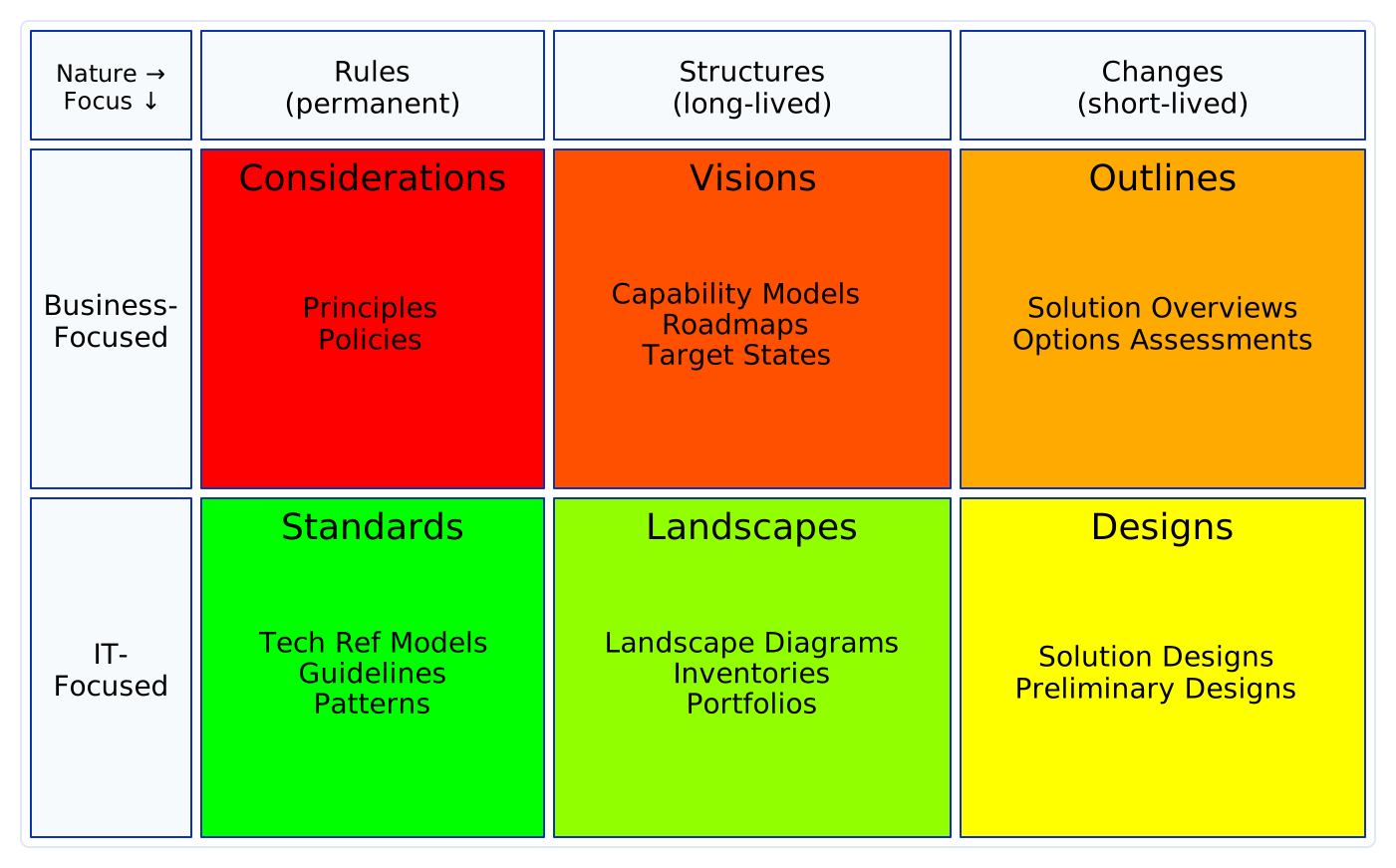 The six CSVLOD artifact types as a Nature × Focus matrix — the same orientation as the ACME Corp catalogue. Colours are Kotusev's original red→green hue sweep, running along the fold from Considerations (red) to Standards (green).
Reading the colour gradient. The matrix reproduces Kotusev's original CSVLOD colouring: a single continuous red→green hue sweep that follows the fold path through all six types — Considerations (red) → Visions → Outlines → Designs → Landscapes → Standards (green). It folds at the concrete-solution level: along the business-focused row from generic to specific (Considerations
#FF0000→ Visions → Outlines#FFAA00), down at the most concrete point (the Changes column), then back along the IT-focused row from specific to generic (Designs#FFFF00→ Landscapes → Standards#00FF00). Two things fall out of this. The Rules column shows the widest split — red (Considerations) against green (Standards) — because those are the extremes of the business↔IT language/audience spectrum: Considerations speak pure business language to executives, Standards speak pure IT language to architects. The Changes column nearly meets — amber (Outlines) against yellow (Designs) — because business and IT converge at the concrete solution, describing the same change from two sides. The split is a difference in language and audience, not in purpose: Considerations and Standards are directly linked (an architecture or technology strategy drives the selection of technology reference models and roadmaps — theeaop:influenceSelectionrelationship). The gradient is a communication spectrum, not a quality or relatedness scale.The horizontal axis (the column headers Rules/Structures/Changes) is the other CSVLOD dimension — Nature — which is the distinction most relevant to the modelling that follows. The process, typing, and governance diagrams later in this guide keep flat categorical colours, since a business↔IT gradient does not apply to them.
Accessibility note: these are Kotusev's original saturated primaries, and a red→green sweep is the hardest case for readers with red-green colour vision deficiency. The colours stay parseable here because every cell is also labelled and positioned, but where the palette is reused interactively — for example the ACME Corp catalogue — a colourblind-safe orange→blue variant is available as an alternative.
Accessibility note: a literal red→green gradient is the hardest case for readers with red-green colour vision deficiency. The colours here stay legible because every box is also labelled and positioned, but where the palette is reused interactively — for example the ACME Corp catalogue — a colourblind-safe orange→blue variant is available as an alternative.
The 24 Artifacts
The 24 specific artifacts are distributed across the six CSVLOD types, classified by usage frequency:
| Type | Essential | Common | Uncommon |
|---|---|---|---|
| Considerations | Principles | Policies | Conceptual Data Models, Analytical Reports, Direction Statements |
| Standards | Technology Reference Models, Guidelines | Patterns, IT Principles | Logical Data Models |
| Visions | Business Capability Models, Roadmaps | Target States | Value Chains, Context Diagrams |
| Landscapes | Landscape Diagrams | Inventories, Enterprise System Portfolios, IT Roadmaps | — |
| Outlines | Solution Overviews | Options Assessments | Initiative Proposals |
| Designs | Solution Designs | — | Preliminary Solution Designs |
Usage frequency is based on empirical observation: Essential artifacts are used by the majority of organizations, Common by 25-50%, and Uncommon by 10-25%.
The Three Core Processes
EA practices revolve around three distinct but interrelated processes:
 Strategic Planning guides both Technology Optimization and Initiative Delivery; Technology Optimization constrains Initiative Delivery.
| Process | Input Artifacts | Output Artifacts | Participants | Key Questions |
|---|---|---|---|---|
| Strategic Planning | Business strategy, existing Considerations | Considerations, Visions | Enterprise Architects, Business Leaders, IT Leaders | Where should we invest? What does the target state look like? |
| Technology Optimization | Considerations, Visions | Standards, Landscapes | Enterprise Architects, IT Leaders | What technologies do we have? Which are redundant? What should be standard? |
| Initiative Delivery | All of the above | Outlines, Designs | Solution Architects, Enterprise Architects | What is the best approach? How should the solution be designed? |
Maturity Stages
EA on a Page describes four maturity stages based on empirical observation:
| Stage | Name | Processes Established | Artifact Types Mastered |
|---|---|---|---|
| 0 | No Architecture | None | None |
| 1 | IT Optimization | Technology Optimization | Standards, Landscapes |
| 2 | Solution Delivery | + Initiative Delivery | + Outlines, Designs |
| 3 | Enterprise Architecture | + Strategic Planning | + Considerations, Visions |
The maturity model is descriptive, not prescriptive — it describes what is typically observed, not what should be achieved in a linear progression.
Governance Model
EA on a Page describes governance arrangements at three levels:
| Tier Model | Description | Typical Organization |
|---|---|---|
| One-Tier | Single EA team handles all activities | Small organizations, early maturity |
| Two-Tier | Enterprise architects (strategic) + Solution architects (project) | Most common model |
| Three-Tier | + Domain/segment architects between enterprise and solution | Large, complex organizations |
Phase 2 — The Linked.Archi Semantic Model
Namespace and Assets
The CSVLOD framework described above is published as a set of six interlinked semantic assets. Each is a dereferenceable, browsable document — follow the links in the Docs column to explore the classes, concepts, viewpoints, and shapes directly. The metamodel manifest is the entry point that wires them together.
| File | Namespace | Docs | Content |
|---|---|---|---|
eaonapage-onto.ttl |
https://meta.linked.archi/eaonapage/onto# |
Ontology | OWL ontology: 6 CSVLOD classes, inter-type relationships, processes, participants, governance, maturity |
eaonapage-tax.ttl |
https://meta.linked.archi/eaonapage/tax# |
Taxonomy | SKOS taxonomy: 6 CSVLOD types, 24 specific artifacts, 5 classification dimension facets (nature, focus, scope, lifecycle, frequency), maturity stages, governance classification |
eaonapage-viewpoints.ttl |
https://meta.linked.archi/eaonapage/viewpoints# |
Viewpoints | Viewpoints: 8 viewpoints across 4 categories |
eaonapage-shapes.ttl |
https://meta.linked.archi/eaonapage/shapes# |
Shapes | SHACL validation: artifact completeness and consistency |
eaonapage-deliverable-templates.ttl |
https://meta.linked.archi/eaonapage/deliverable-templates# |
Templates | Deliverable templates: 8 common EA deliverables |
eaonapage-metamodel.ttl |
https://meta.linked.archi/eaonapage/metamodel# |
Metamodel | Metamodel manifest (entry point) |
Two-Layer Classification
EA on a Page uses two layers for classifying architecture work products:
-
OWL typing — the 6 CSVLOD types are OWL classes (
eaop:Consideration,eaop:Standard,eaop:Vision,eaop:Landscape,eaop:Outline,eaop:Design). Instances are typed with one of these, enabling domain/range constraints on the inter-type relationship properties. -
SKOS classification — the 24 specific artifact types (e.g., Principles, Technology Reference Models, Roadmaps, Solution Designs) are SKOS concepts in the taxonomy. Instances link to them via
eaop:classifiedByTypefor finer-grained classification. Same design pattern aszach:classifiedByCell.
 An instance carries an OWL type (the CSVLOD class), a SKOS classification (the specific artifact type), and a process link.
The SKOS taxonomy concept eaoptax:Standards links to the OWL class eaop:Standard via rdfs:seeAlso — they represent the same concept at different modelling levels.
OWL Classes
CSVLOD artifact types (for typing instances and constraining relationships):
| Class | Nature | Focus | Role |
|---|---|---|---|
eaop:Consideration |
Rules | Business | Overarching governance imperatives |
eaop:Standard |
Rules | IT | Technical guidelines and reference models |
eaop:Vision |
Structures | Business | Future-state descriptions |
eaop:Landscape |
Structures | IT | Current-state descriptions |
eaop:Outline |
Changes | Business | Initiative-level architecture |
eaop:Design |
Changes | IT | Project-level specifications |
Processes:
 The three EA processes specialize
 eaop:EAProcess, which specializes the shared ap:ArchitectureProcess.
Participants and governance:
 Participants and governance bodies specialize
 arch:Stakeholder.
Inter-Type Relationships
Kotusev identifies directional influence relationships between the six CSVLOD types — these describe how artifact types influence each other within an EA practice:
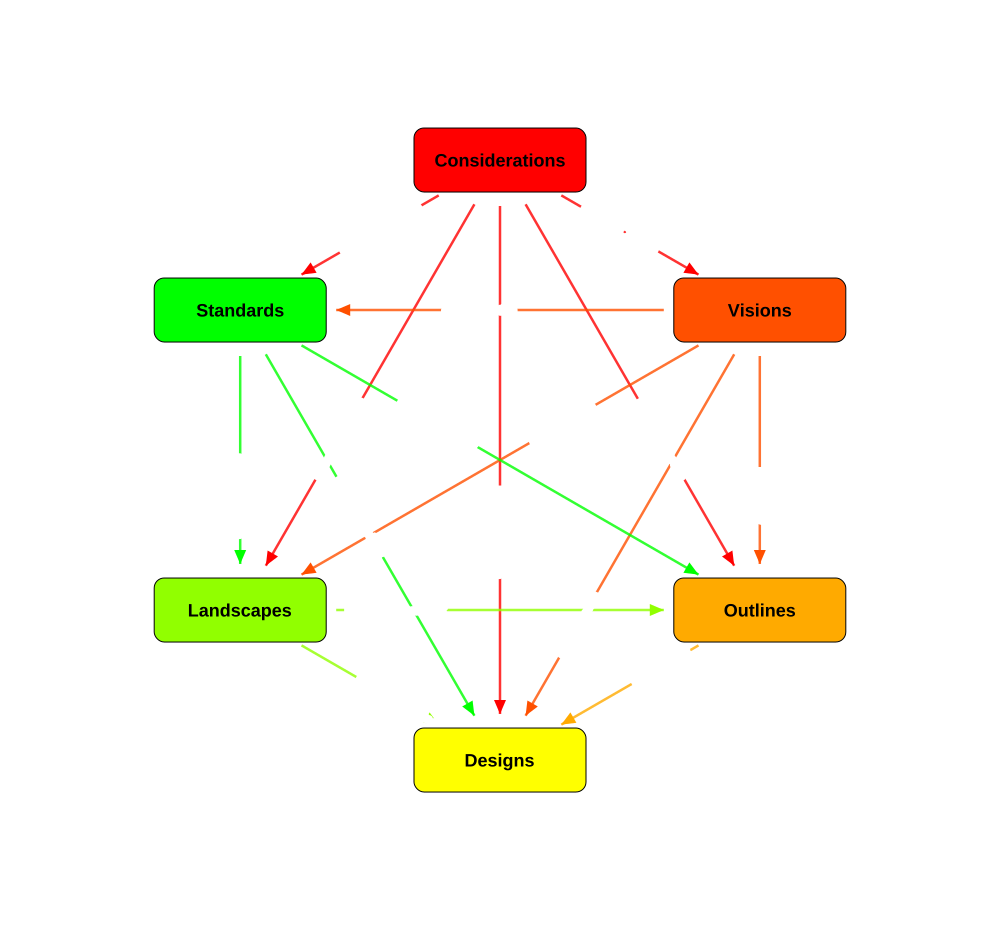 Kotusev's influence relationships form the complete graph across the six types — every type relates to every other. Each arrow is coloured by its source type and labelled with the
 eaop: property it represents.
These properties have explicit domain/range and can be used on individual artifacts.
Key Properties
| Property | Domain | Range | Purpose |
|---|---|---|---|
eaop:classifiedByType |
— | ArtifactType | Links to specific artifact type (24 SKOS concepts) |
eaop:usedInProcess |
— | EAProcess | Which process the artifact supports |
eaop:influenceCreation |
Consideration | Vision | Considerations influence creation of Visions |
eaop:initiateNew |
Vision | Outline | Visions initiate new Outlines |
eaop:provideBasis |
Outline | Design | Outlines provide basis for Designs |
eaop:provideGuidelines |
Standard | Outline, Design | Standards guide Outlines and Designs |
eaop:provideEnvironment |
Landscape | Outline, Design | Landscapes provide environment |
eaop:eventuallyShape |
Standard | Landscape | Standards shape Landscapes |
eaop:governedBy |
— | GovernanceBody | Which body governs the artifact |
eaop:processParticipant |
EAProcess | EAParticipant | Who participates in the process |
eaop:hasPhase |
EAProcess | EAProcessPhase | Sub-phases of a process |
eaop:tierLevel |
ArchitectureTier | xsd:integer |
Numeric tier level (1-3) |
Viewpoint Catalog
The EA on a Page viewpoints are organized by the process they support:
| Category | Viewpoint | Purpose | Key Artifact Types |
|---|---|---|---|
| Strategic | Business Capability VP | Deciding, Informing | Visions, Considerations |
| Strategic | Roadmap VP | Deciding, Informing | Visions, Landscapes |
| Optimization | Landscape VP | Informing, Deciding | Landscapes |
| Optimization | Standards Compliance VP | Governing, Deciding | Standards, Landscapes |
| Delivery | Solution Design VP | Designing | Designs |
| Delivery | Options Assessment VP | Deciding | Outlines, Considerations, Standards |
| Governance | Governance Overview VP | Governing, Informing | Governance Bodies, Tiers |
| Governance | Maturity Assessment VP | Governing, Deciding | Maturity Stages, Processes |
Deliverable Templates
| Template | Process | Viewpoints Required | Sections |
|---|---|---|---|
| Architecture Strategy | Strategic Planning | Business Capability, Roadmap | 4 |
| Technology Strategy | Technology Optimization | Standards Compliance, Landscape | 4 |
| Technology Reference Model | Technology Optimization | Standards Compliance | 3 |
| Solution Brief | Initiative Delivery (Initiation) | Options Assessment | 3 |
| Solution Overview | Initiative Delivery (Initiation) | Options Assessment, Standards Compliance | 5 |
| Solution Design | Initiative Delivery (Realization) | Solution Design, Standards Compliance | 6 |
| Architecture Principles Document | Governance | Business Capability | 3 |
| Roadmap | Strategic Planning | Roadmap, Landscape | 4 |
Phase 3 — Practical Modelling
Example 1: Classifying an artifact
Paste this to type an artifact with its CSVLOD class and its specific artifact type:
@prefix eaop:    <https://meta.linked.archi/eaonapage/onto#> .
@prefix eaoptax: <https://meta.linked.archi/eaonapage/tax#> .
@prefix skos:    <http://www.w3.org/2004/02/skos/core#> .
@prefix ex:      <https://model.example.com/myea#> .

# OWL type gives the CSVLOD category; classifiedByType gives the specific artifact type
ex:TechRefModel a eaop:Standard ;
    skos:prefLabel "Enterprise Technology Reference Model"@en ;
    eaop:classifiedByType eaoptax:TechnologyReferenceModel ;
    eaop:usedInProcess eaop:TechnologyOptimization .
Example 2: Modelling a complete artifact portfolio
Use this pattern to model a full artifact set across all six CSVLOD types with their inter-type links:
@prefix eaop:    <https://meta.linked.archi/eaonapage/onto#> .
@prefix eaoptax: <https://meta.linked.archi/eaonapage/tax#> .
@prefix skos:    <http://www.w3.org/2004/02/skos/core#> .
@prefix ex:      <https://model.example.com/myea#> .

# Considerations
ex:ArchPrinciples a eaop:Consideration ;
    skos:prefLabel "Architecture Principles"@en ;
    eaop:classifiedByType eaoptax:Principle ;
    eaop:usedInProcess eaop:StrategicPlanning .

# Visions
ex:CapabilityMap a eaop:Vision ;
    skos:prefLabel "Enterprise Capability Map"@en ;
    eaop:classifiedByType eaoptax:BusinessCapabilityModel ;
    eaop:usedInProcess eaop:StrategicPlanning .

# Standards
ex:TechRefModel a eaop:Standard ;
    skos:prefLabel "Technology Reference Model"@en ;
    eaop:classifiedByType eaoptax:TechnologyReferenceModel ;
    eaop:usedInProcess eaop:TechnologyOptimization .

# Landscapes
ex:AppLandscape a eaop:Landscape ;
    skos:prefLabel "Application Landscape"@en ;
    eaop:classifiedByType eaoptax:LandscapeDiagram ;
    eaop:usedInProcess eaop:TechnologyOptimization .

# Outlines
ex:PaymentSolutionOverview a eaop:Outline ;
    skos:prefLabel "Payment Platform Solution Overview"@en ;
    eaop:classifiedByType eaoptax:SolutionOverview ;
    eaop:usedInProcess eaop:InitiativeDelivery .

# Designs
ex:PaymentServiceDesign a eaop:Design ;
    skos:prefLabel "Payment Service Detailed Design"@en ;
    eaop:classifiedByType eaoptax:SolutionDesign ;
    eaop:usedInProcess eaop:InitiativeDelivery .

# Inter-type relationships between artifacts
ex:ArchPrinciples eaop:influenceCreation ex:CapabilityMap .
ex:ArchPrinciples eaop:influenceSelection ex:TechRefModel .
ex:CapabilityMap eaop:initiateNew ex:PaymentSolutionOverview .
ex:TechRefModel eaop:provideGuidelinesForDesign ex:PaymentServiceDesign .
ex:AppLandscape eaop:provideEnvironmentForOutline ex:PaymentSolutionOverview .
ex:PaymentSolutionOverview eaop:provideBasis ex:PaymentServiceDesign .
Example 3: Modelling governance arrangements
Paste this to model governance bodies, architecture tiers, and escalation paths:
@prefix eaop: <https://meta.linked.archi/eaonapage/onto#> .
@prefix arch: <https://meta.linked.archi/core#> .
@prefix skos: <http://www.w3.org/2004/02/skos/core#> .
@prefix ex:   <https://model.example.com/myea#> .

# Two-tier governance arrangement
ex:OurGovernance a eaop:GovernanceArrangement ;
    skos:prefLabel "Two-Tier Architecture Governance"@en ;
    skos:definition "Enterprise architects handle strategic artifacts; solution architects handle project artifacts."@en .

# Governance bodies
ex:ARB a eaop:GovernanceBody ;
    skos:prefLabel "Architecture Review Board"@en ;
    eaop:governsTier ex:SolutionTier ;
    skos:definition "Reviews and approves Solution Overviews and Solution Designs."@en .

ex:SteeringCommittee a eaop:GovernanceBody ;
    skos:prefLabel "IT Steering Committee"@en ;
    eaop:governsTier ex:EnterpriseTier ;
    skos:definition "Approves strategic direction, principles, and major investments."@en .

ex:ARB eaop:escalatesTo ex:SteeringCommittee .

# Architecture tiers
ex:EnterpriseTier a eaop:ArchitectureTier ;
    skos:prefLabel "Enterprise Tier"@en ;
    eaop:tierLevel 1 .

ex:SolutionTier a eaop:ArchitectureTier ;
    skos:prefLabel "Solution Tier"@en ;
    eaop:tierLevel 2 .

# Link artifacts to governance
ex:PaymentSolutionOverview eaop:governedBy ex:ARB .
ex:ArchPrinciples eaop:governedBy ex:SteeringCommittee .
Example 4: Dual classification with Zachman
Use this when an artifact needs both an EA on a Page type and a Zachman cell classification:
@prefix eaop:    <https://meta.linked.archi/eaonapage/onto#> .
@prefix eaoptax: <https://meta.linked.archi/eaonapage/tax#> .
@prefix zach:    <https://meta.linked.archi/zachman/onto#> .
@prefix zachtax: <https://meta.linked.archi/zachman/tax#> .
@prefix arch:    <https://meta.linked.archi/core#> .
@prefix skos:    <http://www.w3.org/2004/02/skos/core#> .
@prefix ex:      <https://model.example.com/myea#> .

# A technology reference model — classified by both frameworks
ex:TechRefModel a arch:Model ;
    skos:prefLabel "Enterprise Technology Reference Model"@en ;
    # EA on a Page classification
    eaop:classifiedByType eaoptax:TechnologyReferenceModel ;
    eaop:usedInProcess eaop:TechnologyOptimization ;
    # Zachman classification
    zach:classifiedByCell zachtax:R3C2_ProcessRepresentation ,
                          zachtax:R3C1_InventoryRepresentation .

# A business capability model — classified by both frameworks
ex:CapabilityMap a arch:Model ;
    skos:prefLabel "Enterprise Capability Map"@en ;
    # EA on a Page classification
    eaop:classifiedByType eaoptax:BusinessCapabilityModel ;
    eaop:usedInProcess eaop:StrategicPlanning ;
    # Zachman classification
    zach:classifiedByCell zachtax:R2C1_InventoryDefinition .
Example 5: Classifying business and application architecture
Two axes decide where an architecture artifact lands: Nature (a decomposition or landscape is a Structure — what we have — not a Rule or a Change) and Focus (business vs IT). A business capability or functional map is a business-focused structure → Vision; an application decomposition or landscape is an IT-focused structure → Landscape. Move right on the Nature axis and the same content, scoped to a specific initiative or project, becomes an Outline (Solution Overview) or Design (Solution Design). CSVLOD classifies the artifact (typed with its CSVLOD OWL class), not the individual model elements it depicts. The example uses ArchiMate content, but the classification is notation-independent.
@prefix eaop:    <https://meta.linked.archi/eaonapage/onto#> .
@prefix eaoptax: <https://meta.linked.archi/eaonapage/tax#> .
@prefix am4:     <https://meta.linked.archi/archimate4/onto#> .
@prefix skos:    <http://www.w3.org/2004/02/skos/core#> .
@prefix ex:      <https://model.example.com/myea#> .

# Business functional decomposition — business-focused structure → Vision
ex:BusinessFunctionMap a eaop:Vision ;
    skos:prefLabel "Business Functional Decomposition"@en ;
    eaop:classifiedByType eaoptax:BusinessCapabilityModel ;
    eaop:usedInProcess eaop:StrategicPlanning .

# Application functional decomposition — IT-focused structure → Landscape
ex:AppFunctionMap a eaop:Landscape ;
    skos:prefLabel "Application Functional Decomposition"@en ;
    eaop:classifiedByType eaoptax:LandscapeDiagram ;
    eaop:usedInProcess eaop:TechnologyOptimization .

# Same content scoped to one change → Outline (business) and Design (IT)
ex:CheckoutSolutionOverview a eaop:Outline ;
    eaop:classifiedByType eaoptax:SolutionOverview ;
    eaop:usedInProcess eaop:InitiativeDelivery .
ex:CheckoutSolutionDesign a eaop:Design ;
    eaop:classifiedByType eaoptax:SolutionDesign ;
    eaop:usedInProcess eaop:InitiativeDelivery .

# The model content the artifacts describe (ArchiMate here) — not CSVLOD artifacts
ex:OrderManagement a am4:Function ; skos:prefLabel "Order Management"@en .
ex:OrderService a am4:ApplicationComponent ; skos:prefLabel "Order Service"@en .
For the full layer-by-layer and viewpoint-by-viewpoint crosswalk, see Classifying Business and Application Architecture with CSVLOD.
Example 6: Querying the artifact portfolio
Run this query to list every artifact grouped by CSVLOD type:
PREFIX eaop:    <https://meta.linked.archi/eaonapage/onto#>
PREFIX eaoptax: <https://meta.linked.archi/eaonapage/tax#>
PREFIX skos:    <http://www.w3.org/2004/02/skos/core#>

# Artifact portfolio by CSVLOD type
SELECT ?type ?typeLabel ?artifact ?label WHERE {
    ?type skos:broader ?group .
    ?group skos:broader eaoptax:ArtifactTypes .
    ?type skos:prefLabel ?typeLabel .
    ?artifact eaop:classifiedByType ?type ;
              skos:prefLabel ?label .
}
ORDER BY ?typeLabel ?label
Example 7: Maturity assessment query
Run this query to count artifacts per CSVLOD group, which indicates the maturity stage reached:
PREFIX eaop:    <https://meta.linked.archi/eaonapage/onto#>
PREFIX eaoptax: <https://meta.linked.archi/eaonapage/tax#>
PREFIX skos:    <http://www.w3.org/2004/02/skos/core#>

# Which CSVLOD groups do we have artifacts for? (indicates maturity stage)
SELECT ?group ?groupLabel (COUNT(?artifact) AS ?count) WHERE {
    ?group skos:broader eaoptax:ArtifactTypes ;
           skos:prefLabel ?groupLabel .
    OPTIONAL {
        ?type skos:broader ?group .
        ?artifact eaop:classifiedByType ?type .
    }
}
GROUP BY ?group ?groupLabel
ORDER BY ?count
Example 8: Process coverage analysis
Run this query to see which of the three EA processes have supporting artifacts and which are bare:
PREFIX eaop:    <https://meta.linked.archi/eaonapage/onto#>
PREFIX rdfs:    <http://www.w3.org/2000/01/rdf-schema#>
PREFIX skos:    <http://www.w3.org/2004/02/skos/core#>

# Which processes have artifacts? Which are missing?
SELECT ?process ?processLabel (COUNT(?artifact) AS ?artifactCount) WHERE {
    ?process rdfs:subClassOf eaop:EAProcess ;
             skos:prefLabel ?processLabel .
    OPTIONAL {
        ?artifact eaop:usedInProcess ?process .
    }
}
GROUP BY ?process ?processLabel
ORDER BY ?artifactCount
Validate the Portfolio with SHACL
The eaonapage-shapes.ttl file provides validation rules:
- Completeness: Every artifact must have
artifactScope,artifactLifecycle,artifactNature, andartifactFocus - Consistency: Scope/lifecycle/nature/focus values must match the CSVLOD type
- Process linkage: Every artifact should be linked to a process via
usedInProcess
Run this to validate the artifact portfolio against the EA on a Page shapes:
Appendix A — Key Differences from Other Frameworks
| Dimension | EA on a Page | TOGAF | Zachman |
|---|---|---|---|
| Origin | Empirical (27+ orgs) | Prescriptive (industry consortium) | Theoretical (classification) |
| Nature | Descriptive — what EA practices do | Prescriptive — what EA practices should do | Classificatory — what could be described |
| Process | 3 processes (Strategic Planning, Technology Optimization, Initiative Delivery) | ADM (8 phases + requirements management) | None (not a methodology) |
| Artifacts | 24 artifacts in 6 types | 50+ artifacts across phases | 36 cells (classification slots) |
| Governance | Empirical governance model (tiers, bodies) | Architecture Board, compliance reviews | None |
| Maturity | 4 stages (descriptive) | Architecture Maturity Model (prescriptive) | None |
Appendix B — Mapping CSVLOD to Common Deliverables
| CSVLOD Type | Typical Deliverables | Lifecycle | Audience |
|---|---|---|---|
| Considerations | Architecture Principles Document, Governance Charter | Permanent | Business + IT Leaders |
| Standards | Technology Reference Model, Pattern Catalog, Security Standards | Permanent | Enterprise + Solution Architects |
| Visions | Architecture Strategy, Capability Map, IT Roadmap | Long-lived (updated annually) | Business + IT Leaders |
| Landscapes | Application Portfolio, Integration Map, Technology Inventory | Long-lived (continuously maintained) | Enterprise Architects, IT Leaders |
| Outlines | Solution Overview, Options Assessment, Architecture Brief | Short-lived (initiative duration) | Solution Architects, Business Sponsors |
| Designs | Solution Design, Interface Contract, Deployment Architecture | Short-lived (project duration) | Solution Architects, Delivery Teams |
Appendix C — Comparison Articles
For detailed comparisons of EA on a Page with other frameworks in Linked.Archi:
- Zachman Framework vs EA on a Page — Two classification lenses on the same artifacts
- Classifying Business and Application Architecture with CSVLOD — Mapping capability maps, decomposition, realization, and solution artifacts onto the six CSVLOD types
- EA Frameworks Compared — Broader comparison across TOGAF, Zachman, EA on a Page, and others
- Zachman Primer & Modelling Guide — The companion framework primer
- TOGAF Primer & Modelling Guide — TOGAF framework primer
References
- Kotusev, S. (2021). The Practice of Enterprise Architecture: A Modern Approach to Business and IT Alignment. 2nd ed. SK Publishing. ISBN 978-0-6450825-2-4.
- Kotusev, S. (2024). Enterprise Architects: The Agents of Digital Transformation. SK Publishing. ISBN 978-1-7636486-3-7.
- Kotusev, S. (2016). The CSVLOD Model of Enterprise Architecture. BCS.
- Kotusev, S. (2019). Enterprise architecture and enterprise architecture artifacts. Journal of Information Technology, 34(2), 102-128.
- Kotusev, S. (2019). Yet Another Taxonomy for Enterprise Architecture Artifacts. Journal of Enterprise Architecture.
- EA on a Page
- Kotusev.com
- BCS — Enterprise Architecture on a Single Page
- BCS — Enterprise Architecture Practice on a Single Page
- Linked.Archi EA on a Page Metamodel
- Linked.Archi Frameworks Guide
Disclaimer: This is a community semantic representation of the EA on a Page framework for interoperability purposes. It is not produced by, endorsed by, or affiliated with Svyatoslav Kotusev or IASA. The framework is based on peer-reviewed empirical research published by Kotusev across multiple academic and practitioner venues.